
WooCommerce Catalog Mode: Everything You Need to Know
Catalog mode turns a WooCommerce store into a browsable catalog rather than a store customers can buy from. In practice this means hiding the "Add to Cart" buttons, often hiding prices as well, and preventing purchases and checkout. Visitors can still browse the products, read the descriptions, and view the images, but they cannot place an order.
Stores adopt this for a range of reasons. A wholesaler may want to display its full range without showing trade prices to the public. A manufacturer may use the site as an online catalog and take orders by quote or offline. Other stores only want to hide prices from logged-out visitors, while still allowing approved B2B customers to buy as normal. The reasons differ, but the objective is generally the same. The store displays its products while controlling or removing the ability to purchase them.
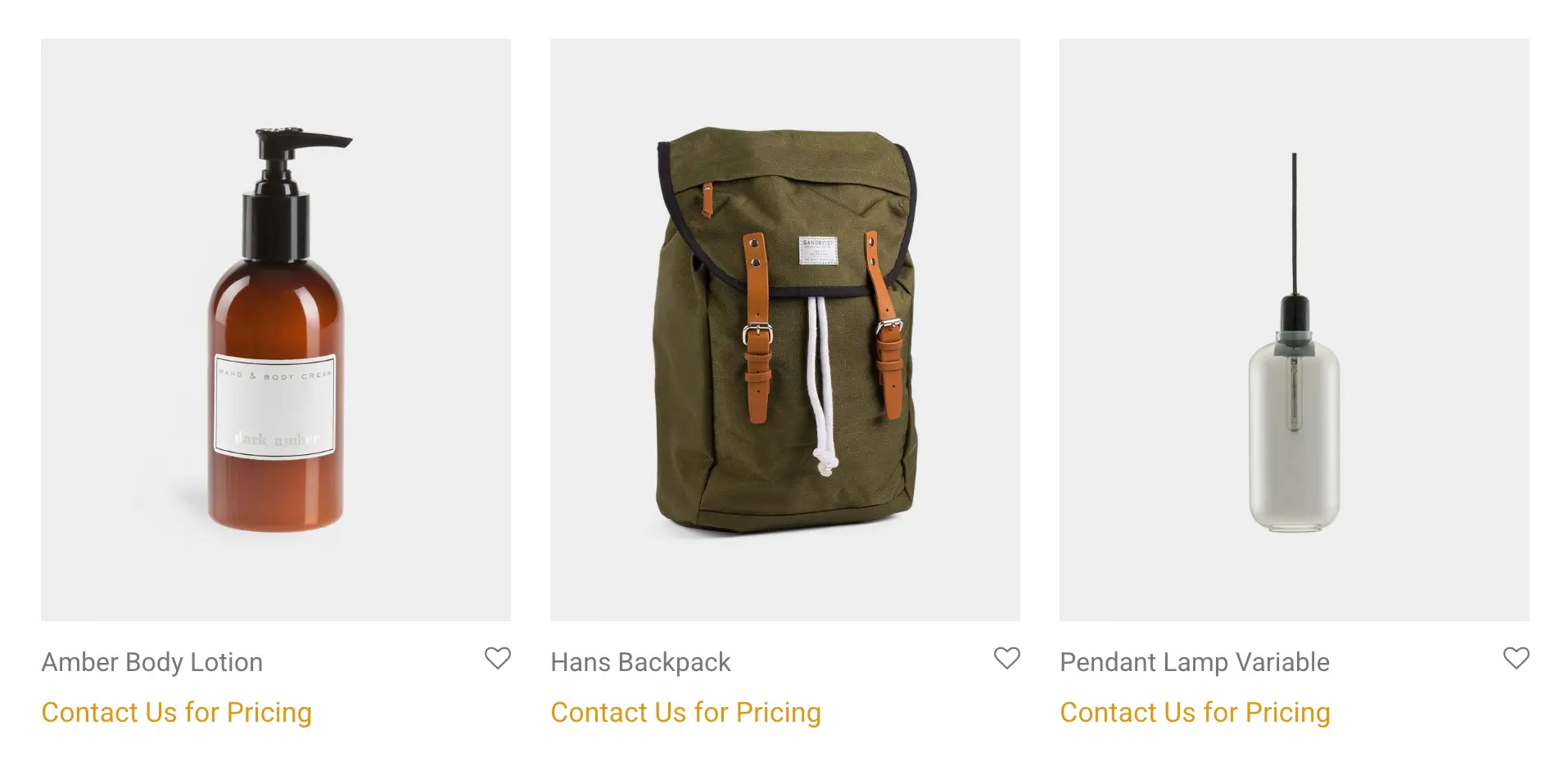
What catalog mode does
Catalog mode is often thought of as a single on/off switch, but in practice it is usually several separate settings that you can combine. You can hide the price, remove the Add to Cart button, or make a product non-purchasable so that it cannot be bought even through a direct link. You can also replace the buy button with an alternative, most commonly a "Request a Quote" option. Most stores want some combination of these rather than all of them, which is why the way catalog mode is implemented matters more than it first appears.
Common solutions and their pitfalls
Catalog mode appears straightforward, and in many cases it is. The difficulty is not hiding a button or a price in a single location. It is ensuring that the change applies consistently across the whole store, continues to work after WooCommerce updates, and does not accidentally leave the information you intended to hide exposed. Most stores try one of the two approaches below before turning to a dedicated plugin.
Doing it with code snippets
Adding a snippet to your theme's functions.php file, or to a code snippets plugin, is a common first step, and increasingly so now that AI tools will write the PHP for you. For a basic catalog mode the code is short. You make every product non-purchasable, which removes the Add to Cart button, and you blank out the price:
php
// Make every product non-purchasable (removes the Add to Cart button)
add_filter( 'woocommerce_is_purchasable', '__return_false' );

// Hide the price HTML across the store
add_filter( 'woocommerce_get_price_html', '__return_empty_string' );
If you are only concerned with how the page looks, you do not need PHP at all. A few lines of CSS will hide the elements:
css
.price,
.add_to_cart_button,
.single_add_to_cart_button {
    display: none !important;
}
Both approaches will appear to work. The pages look clean, the prices are gone, and the buttons are no longer visible. There are, however, two problems.
The first is scope. A snippet only affects the specific places it was written for. It is common to remove the price and button from the main shop and product pages, only to find the price still showing elsewhere: in a related products block, a quick-view popup, the cart widget, or a layout built with a page builder such as Elementor or Bricks, which renders products in its own way. The CSS method is weaker still, because it only hides elements visually. The price remains in the page source, is still served through the WooCommerce REST API, and is still present in the product's structured data. That last point is one many people overlook. WooCommerce includes the price in its schema.org markup, and Google can read it directly from there, so a price hidden on the page can still appear in search results. With CSS alone, the products also remain technically purchasable, because the add-to-cart URL still works if someone visits it directly.
The second problem is maintenance. Even a thorough snippet does not receive updates. WooCommerce changes regularly, and hooks are sometimes altered, deprecated, or replaced. The way variable product prices are displayed and cached, for example, has changed more than once over the years. A snippet that works today can produce a PHP warning, or quietly stop hiding something, after a core update, and it is left to you to notice and correct it.
Using a small utility plugin
The other common route is to search for "catalog mode," install one of the first plugins that appears, and move on. This is a reasonable option, particularly when there is a reputable developer behind it. A well-supported small plugin can be all you need for a simple requirement.
The risk is selecting a plugin that is not actively maintained: one written for the author's own setup that is rarely updated. Over time you begin to encounter the same issues as with the snippet approach. A function produces a warning on a newer version of PHP, a new page-builder layout is not covered, or a particular product type is missed. It is therefore worth reviewing a plugin before relying on it: check when it was last updated, how it handles the more difficult cases, and whether the developer responds to support requests.
There is also an issue that develops gradually. Catalog mode is rarely the only requirement a B2B or wholesale store has. You add one plugin for catalog mode, then another for quote requests, then another for a Net 30 payment option, and so on. Over time you may be running a dozen small plugins that were never designed to work together, which can lead to conflicts, slower load times, and a maintenance burden spread across many different developers.
When a plugin is the right choice
As noted above, hiding prices and buttons is not the difficult part. The questions that really determine which approach you need concern how much control you want and what else your store has to do.
The first is how much control you need. A global catalog mode, where everything is hidden from everyone, is straightforward. Many stores, however, need something more specific: catalog mode on certain products or categories while the rest of the shop sells as normal, or prices hidden only from logged-out visitors while approved customers continue to buy. Once you require rules of this kind, snippets become complicated quickly, and small single-purpose plugins often cannot accommodate them.
The second is what else your store needs to do. Catalog mode is frequently just one part of a larger B2B setup. You may also want a "Request a Quote" option in place of a price, the ability to let specific approved customers buy while everyone else only browses, a wholesale registration process, or B2B payment methods. When several of these requirements accumulate, it makes more sense for a single plugin to handle the whole area than to assemble a separate snippet or plugin for each one.
A plugin such as B2BKing also tends to address the parts that are not visible on the page. A good one will not only hide the price but also keep it out of the structured data and product feeds, so that it does not leak into Google or anywhere else. That is precisely the part a quick snippet usually misses.
How B2BKing handles catalog mode
B2BKing handles catalog mode in two ways: simple global modes for stores that want the standard behavior, and detailed rules for stores that need more control.
For the simple case, there are ready-made modes that you enable for the whole store. A "hide prices" mode removes prices, and with them the Add to Cart buttons, so that the site becomes a catalog. A "replace prices with quote" mode replaces the price and buy button with a quote request, so that an interested customer can ask about a product rather than reaching a page with nothing to act on.
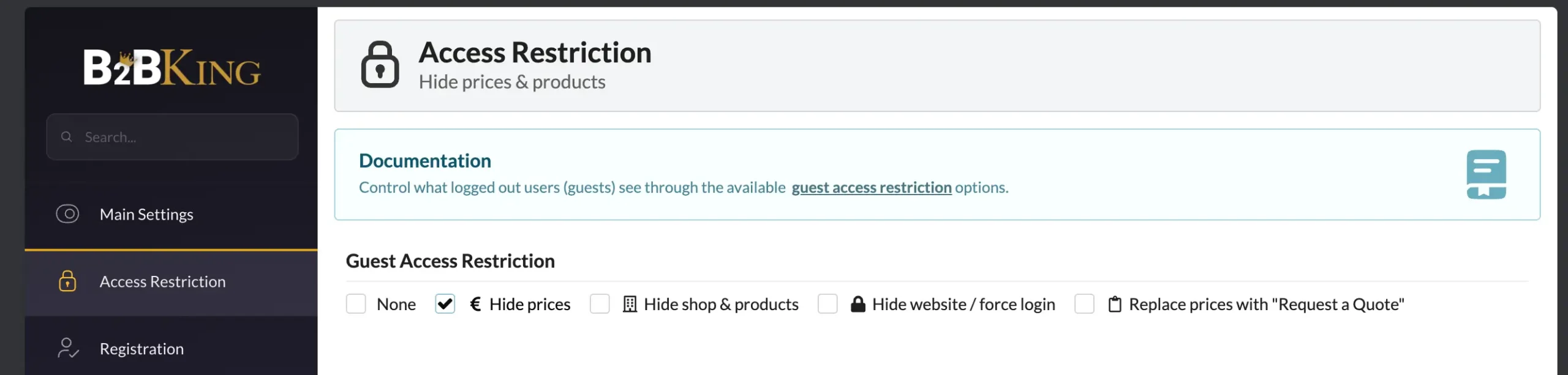
More control with dynamic rules
For stores that need more than a single switch, B2BKing provides dynamic rules that can be applied to specific products, categories, or customers. A "hidden price" rule hides both the price and the Add to Cart button for the products or categories you select. A "not purchasable" rule works differently: it keeps the price visible but removes the ability to buy, which is useful when you want customers to see pricing but handle orders by another method. A quote rule can enable "Request a Quote" for selected products rather than the whole store. Because these are rules rather than a single global setting, they can be combined freely, which makes the available configurations effectively unlimited.
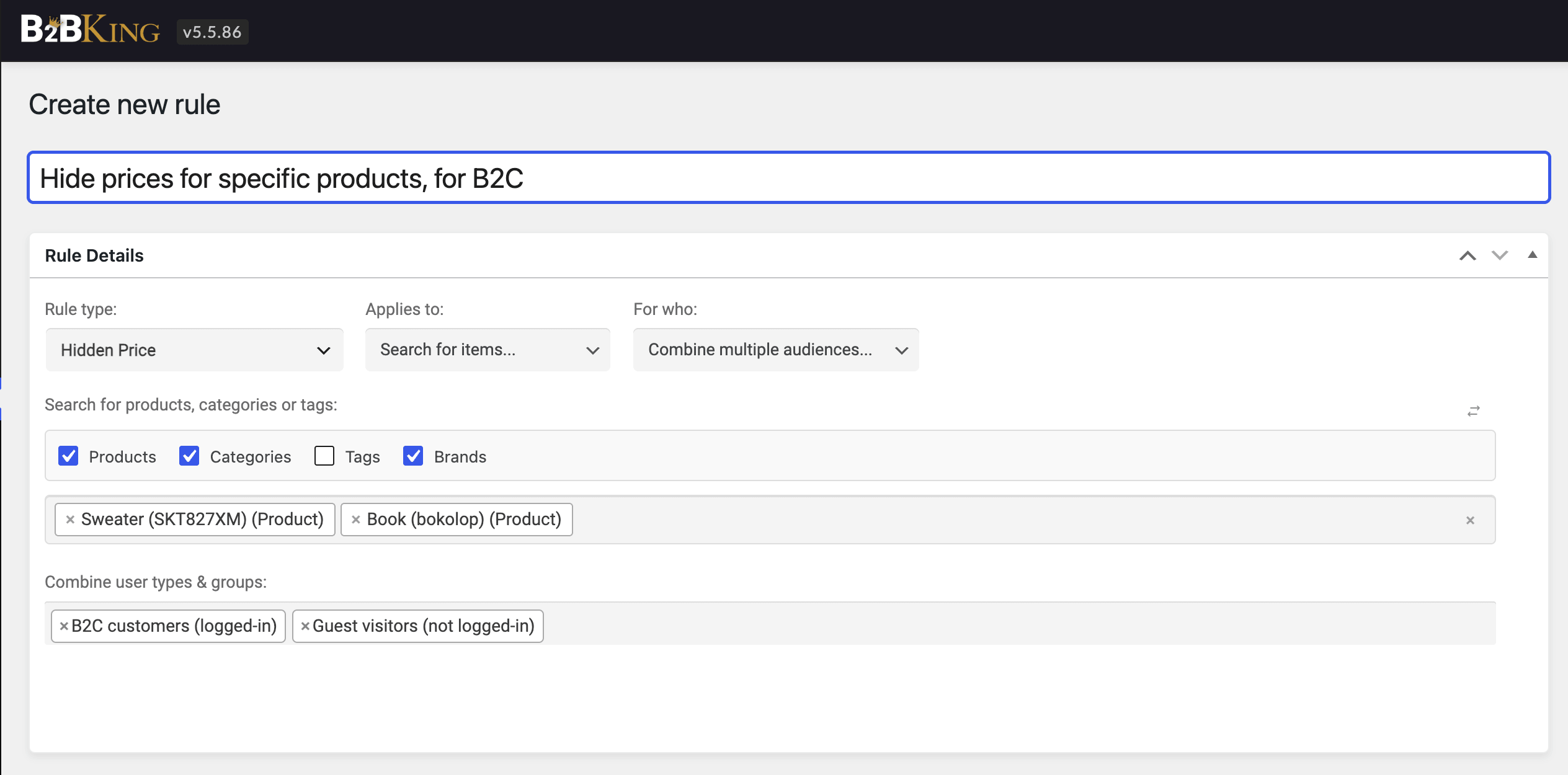
Catalog mode based on the user
One of the most common real-world requirements is catalog mode that depends on who is viewing the store. You may want the public to browse without prices, while a group of approved, logged-in B2B customers can see prices and buy. Because B2BKing ties its rules to customer groups, this is straightforward to set up. The same store can function as a restricted catalog for guests and a normal shop for approved accounts, without duplicate products or separate pages.
Beyond catalog mode
Catalog mode is usually the first of several B2B requirements, and this is where a single plugin is particularly helpful. Alongside catalog mode, B2BKing covers different content and prices for different users, a B2B registration form with manual approval, an invoice and purchase-order payment gateway, tiered pricing for volume discounts, quote requests with back-and-forth negotiation, and subaccounts for larger buying teams. It also includes a built-in mini CRM, where you can keep notes on individual customers and view each account's own rules and prices in one place.
You do not need all of this from the outset. The point is that when catalog mode turns out to be the first of several requirements, as it usually does, you are adding to a single system rather than introducing another separate plugin.
Checking that your prices are actually hidden
Whatever method you use, it is worth confirming that the prices are genuinely gone and not simply hidden from view. The quickest way is to open a product page, view the page source (or use your browser's developer tools), and search for the price. If it still appears in the HTML, or within a block of structured data near terms such as offers or price, then it is hidden visually but remains readable by Google and by anything else that reads the page. It is also worth trying to add a product to the cart through a direct URL such as /?add-to-cart=123 with a real product ID. If that still works, the store remains technically purchasable even though the buttons are gone. A proper catalog mode should pass both checks without any additional work, which is the kind of thing a full plugin handles and a quick snippet often misses.
Frequently asked questions
What is WooCommerce catalog mode? It is a configuration in which products are shown for browsing but cannot be bought. It usually hides the Add to Cart button, often hides prices as well, and disables checkout, so that the store functions as a catalog rather than a shop.
Can I hide prices only from logged-out visitors? Yes, and this is a common B2B requirement. With a group-based plugin such as B2BKing, you can hide prices and buying from guests while approved, logged-in customers continue to see prices and check out. Most WooCommerce B2B plugins include this option.
Will hidden prices still show up in Google? They can, if you only hide them visually. WooCommerce includes prices in its schema.org structured data, and search engines can read that even when the price is not shown on the page. A solution that removes the price from the structured data avoids this; CSS-only hiding does not.
Can I apply catalog mode to only some products or categories? Yes. Instead of a single global setting, dynamic rules let you apply catalog mode to specific products or categories, so that part of the store is a catalog while the rest continues to sell.
Does catalog mode disable checkout completely? That depends on how it is configured. You can remove buying entirely, keep prices visible but block buying, or replace the buy button with a quote request, depending on what you need.

