
WooCommerce B2B - Performance, Hosting & Optimization Guide
1. How B2BKing Handles Performance
B2BKing is built to work seamlessly in high-performance environments with thousands of products and orders. Here's how it stays fast even with a large feature set.
Smart Feature Detection
B2BKing doesn't load what it doesn't need. When you change settings, the plugin automatically calculates an internal configuration cache that tracks which features are actually in use. In the code, checks like this run before any feature logic executes:
if (get_option('b2bking_have_hidden_price_rules', '') === 'yes'){So if you don't have any hidden price rules, the entire hidden price rules codebase is skipped entirely - it's never even evaluated. This means that while B2BKing ships with a wide range of features, only the ones you're actively using have any performance footprint.
Extensive Internal Caching
B2BKing's dynamic rules system (used for pricing, discounts, visibility, etc.) relies on a sophisticated internal cache. For each product, the plugin pre-caches which rules apply for each specific user. This means price lookups and rule evaluations happen almost instantly, without recalculating on every page load. Most of the heavy computation happens when the rules themselves are created or modified - not when customers are browsing your store.
There's also a shared caching mechanism at work: when User A loads a page and triggers a calculation, the result is saved not just for User A, but also for other users who share the same group or rules. So User A's visit can actually speed things up for User B.
What to Expect
B2BKing should generally not have a noticeable performance impact on your site. Of course, like any plugin, it will have some effect - and the overall result depends on your hosting, theme, other plugins, and traffic.
If you do experience a performance issue related to B2BKing, it's typically caused by an unexpected scenario such as an error or conflict, rather than normal operation. In those cases:
- Check our Speed & Performance Optimization Guide
- Contact our support team - we can investigate your site directly, run code timing tests, and pinpoint exactly which functions or processes are causing the slowdown.
B2BKing doesn't require any particular hosting specs and works on any server configuration. The main factor that determines what kind of hosting you'll need is your traffic volume.
2. Hosting Recommendations
Every WooCommerce site is different, and your hosting needs will depend on your traffic and store complexity. If you're already running a large WooCommerce store, some of this may be below your level - but it's worth reviewing to make sure your setup is solid.
Hosting Tiers at a Glance
Budget / Bargain Shared Hosting - Bluehost, GoDaddy, HostGator. We'd generally advise avoiding these for production B2B stores. Servers tend to be overcrowded, and frequent slowdowns are common.
Premium Shared Hosting - SiteGround, A2 Hosting, GreenGeeks This is a solid step up and the lowest tier we'd recommend. SiteGround in particular is a good choice with a professional support team.
Managed WordPress Hosting - WP Engine, Kinsta, Flywheel, Pressable, Rapyd.cloud, Rocket.net. All of these offer high-quality hosting with excellent support and optimized infrastructure for WordPress. The tradeoff is cost - these services can get expensive, but they're worth it for high-traffic stores or teams that don't want to manage server infrastructure.
VPS (Virtual Private Server) - If you're a developer or comfortable with server management, a VPS gives you the best price-to-performance ratio by far. It does come with more responsibility though - you'll need to handle security, updates, and troubleshooting yourself. That said, with today's AI tools, managing a VPS is easier than it used to be.
Dedicated Servers - Only necessary for massive sites with massive traffic. If you need this, you likely already have a sysadmin. It's too expensive and complex for beginners.
Our Top VPS Recommendations
UpCloud (General Purpose servers) — Upcloud.com is our #1 performance pick. This is what we use ourselves for our demos and sites like kingsplugins.com and demobk3.wpbay.co. The results speak for themselves: our B2BKing demo store loads in under 100ms, completely uncached.
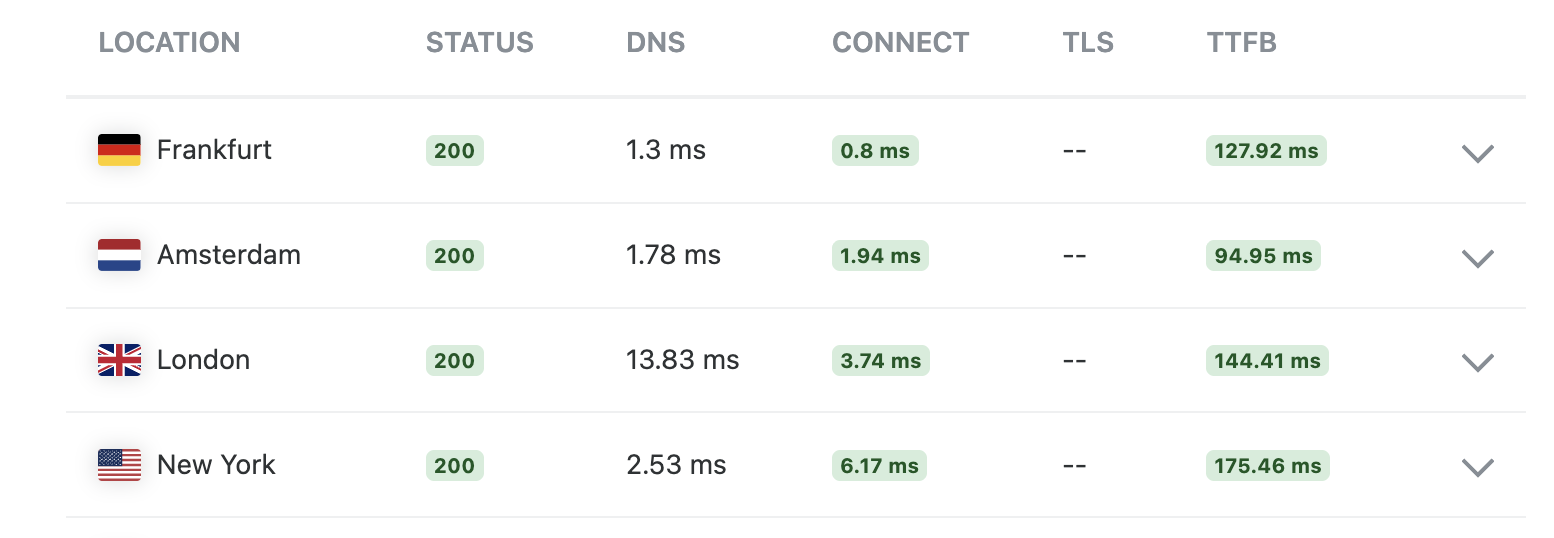
(KeyCDN test speeds for demobk3.wpbay.co, loading in less than 100ms, served from Upcloud Amsterdam datacenter)
In our testing, UpCloud servers have been as much as twice as fast as DigitalOcean or Hetzner servers. Hetzner offers great value for the price, but if raw performance is your priority, UpCloud is the clear winner.
Vultr (High Frequency VPS) — Vultr HF servers also perform quite well in our tests, they feature high CPU clock speeds, which helps a lot with WordPress since PHP is single-threaded.
Server Management with RunCloud
VPS hosting pairs very well with RunCloud, a user-friendly server management panel. It simplifies the process of setting up and managing your server without needing deep sysadmin knowledge.
Summary Recommendation: If you are technical, an UpCloud + RunCloud combo offers incredible speed. If you want a hands-off approach and have the budget, go with a managed host like WP Engine or Kinsta.
3. Caching a Dynamic B2B Site
Caching is one of the most misunderstood topics in WordPress performance. Most generic performance guides tell you to "cache everything." That works perfectly for a static blog, but it is highly problematic for dynamic B2B sites.
B2BKing stores are dynamic by nature. Different users can see different prices, different content, different payment methods, and different product visibility settings. If caching isn't configured correctly, users may see the wrong prices or content - for example, a B2C customer seeing B2B pricing. For more details on this issue, see: Users See Wrong Content
Here's how to approach caching the right way.
Start with Cloudflare
We recommend using Cloudflare for your WooCommerce store. Cloudflare sits between your site and the internet and filters traffic. You can set up firewall rules to block bots that constantly probe and attack your site. This alone reduces your server load significantly, freeing up resources to serve actual customers.
Cache Static Pages with Cloudflare Edge Caching
If you have fully static pages that look exactly the same for every visitor (e.g. your homepage, about page, contact page), you can cache them with Cloudflare using a high Edge TTL (like 1 month). These pages are then served as pre-built HTML directly from Cloudflare's worldwide servers, with no need for your server to generate them. Load times can drop to as low as 20ms.
This is incredibly effective, but only applies to pages that are truly static and identical for all users.
Handling Dynamic Pages
For pages where content varies by user (product pages with custom pricing, the cart, the account area, etc.), you have a few options:
- Leave them uncached. This is the simplest and safest approach. With a good hosting setup, uncached dynamic pages can still be very fast.
- WP Rocket's "User Cache" setting. This gives each logged-in user their own separate cache, which avoids the wrong-content problem. It's a solid option.
- Role-based caching. You can set up caching based on WordPress user roles. Note that B2BKing uses its own groups system rather than WordPress roles, so you'll need to sync the two first: How to Use WP Roles with B2BKing
- Redis Object Cache. This can help with database query performance, but it's tricky to get right and can cause issues like incorrect prices if misconfigured. Only use Redis with thorough testing and if you understand your full server configuration.
Our Caching Recommendation
Use Cloudflare to cache fully static pages at the edge. For dynamic pages, either leave them uncached or use WP Rocket's user cache feature. Avoid aggressive full-page caching on dynamic content unless you're confident you've tested it thoroughly with B2BKing's user-specific features.
4. General Site Optimization Tips
Beyond hosting and caching, there are a few common factors that affect your store's overall performance.
Keep Your Plugin Count Low
This is the single most common cause of slow WooCommerce sites. The impact of plugins isn't linear - it's exponential. Here's why: if you have 50 plugins that all hook into WooCommerce's price calculation, adding one more plugin to that hook doesn't just add its own processing time, it affects the execution of all the other plugins on that hook too.
As a rough guideline:
- Under 20 plugins: This is the sweet spot where WordPress performs best.
- 20–40 plugins: Still acceptable, but you'll notice things slowing down.
- 40-50+ plugins: This is too many. Expect a noticeably slow site, and troubleshooting performance becomes much harder.
Audit your plugins regularly. If you're not actively using something, deactivate and remove it.
Choose a Lightweight Theme
Your theme has a big impact on performance. Heavy, feature-packed themes with dozens of built-in options often add significant overhead.
We recommend choosing a simple, lightweight theme. Savoy theme is a great option and is what we use on our own demo stores at demobk3.wpbay.co and demobk2.wpbay.co. A lightweight theme paired with the right hosting can make a dramatic difference.
Strip the Fat with Asset CleanUp (For Developers)
One of the most effective ways to speed up your site is by stopping unnecessary scripts and styles from loading where they aren't needed. By default, many WordPress plugins load their JavaScript and CSS across your entire site, including your homepage, even if their features are only used on a specific page, like the checkout or a single product page.
The free Asset CleanUp plugin gives you deep, granular control to unload these unused assets on a page-by-page basis. With some careful work and testing, it can drastically reduce your page weight and load times.
⚠️ Warning: We only recommend this tool for site developers or highly advanced users. Disabling the wrong script can easily break your site's layout or functionality. Always test your changes extensively on a staging environment first!
Wrapping Up
B2BKing is designed to be smart and efficient, but it's only one piece of the puzzle. Your site's overall performance depends on the combination of hosting, caching strategy, plugin count, and theme choice all working together. For everything else that goes into a B2B store, from pricing to payment terms, see our complete WooCommerce B2B guide.

