
WooCommerce B2B: The Complete Guide to B2B Stores (2026)
By the B2BKing Team · Updated October 2026
WooCommerce was built to sell to consumers: one price per product, one checkout, the same experience for everyone. Business buyers expect something different. They want their own negotiated prices, invoice terms, quick ways to reorder 40 SKUs at once, and accounts that several people at the same company can use. The good news is that WooCommerce can do all of this very well once the right B2B layer is added on top.
We have been building that layer since 2020. B2BKing now runs on more than 15,000 active WooCommerce stores, from small wholesalers to manufacturers with thousands of trade accounts, and our support team has worked through thousands of real B2B setups along the way. This guide is what we would tell anyone planning a WooCommerce B2B store: what B2B really requires, what WooCommerce does and does not do on its own, how to set up each part of the store, and the mistakes we see most often.
You can read it top to bottom, or jump to the part you need:
- What WooCommerce B2B is, and how it differs from B2C
- What WooCommerce can and cannot do on its own
- Choosing your store model
- The 10 building blocks of a B2B store, from customer groups and pricing to quotes, payment terms and company accounts
- Keeping a B2B store fast and showing the right prices
- Common mistakes from our support queue
- A feature checklist and FAQ
What Is WooCommerce B2B?
WooCommerce B2B means using a WooCommerce store to sell to other businesses, such as retailers, distributors, contractors or resellers, instead of (or alongside) individual consumers. In practice it involves adding features that standard WooCommerce lacks: customer-specific and volume pricing, restricted catalogs, business registration with approval, quote requests, invoice and purchase order payments, tax exemptions and multi-user company accounts.
The difference is not just bigger orders. A B2B buyer relationship works differently at almost every step:
| Typical B2C store | Typical B2B store | |
|---|---|---|
| Pricing | One public price, occasional sales | Prices per customer tier or per account, volume breaks, negotiated contracts |
| Who can buy | Anyone | Approved businesses, often after checking a VAT number or trade license |
| Catalog | Same for everyone | Some products, categories or prices visible only to certain buyers |
| Ordering | Browse, add to cart, checkout | Order forms, SKU entry, repeat orders, minimums and case quantities |
| Payment | Card or PayPal at checkout | Invoice, Net 30/60 terms, purchase orders, credit limits |
| Tax | Prices including tax | Prices excluding tax, VAT exemption for validated businesses |
| Accounts | One person, one account | Several buyers per company, with permissions and order approval |
| Communication | Rarely needed | Quotes, negotiation, special offers per account |
Can WooCommerce Do B2B Out of the Box?
Partly. WooCommerce gives you a solid foundation: product management, customer accounts, offline payment methods such as bank transfer and cheque, tax settings, shipping zones, coupons and a REST API that ERP systems can connect to. It is also open source and self-hosted, so you own your store and your data, which is one of the main reasons businesses choose it over hosted B2B platforms.
What WooCommerce does not have on its own is any idea of who the customer is. Every logged-in customer sees the same prices, the same products, the same payment methods and the same checkout. There is no built-in way to:
- Show wholesale prices to some customers and retail prices to others
- Give a specific account its own contract prices
- Hide prices or products from guests or from certain customer types
- Approve business accounts before they can buy
- Offer invoice or purchase order payments only to trusted buyers
- Remove VAT for businesses with a valid VAT number
- Let several employees order under one company account
- Handle quote requests and negotiate prices
There are three ways to fill those gaps. Custom code works for one or two narrow rules, but every rule has to hold across the shop page, cart, checkout, taxes, variations, search and every WooCommerce update that follows. A stack of single-purpose plugins (one for role pricing, one for quotes, one for registration, one for order forms) can work, but you end up with several plugins modifying the same prices and checkout, configured in different places, and a support question every time they disagree. An all-in-one B2B plugin handles everything from one place with one customer model, which is the approach we took with B2BKing. If you want to compare the options, we keep an up-to-date overview of the best WooCommerce B2B plugins.
Choose Your Store Model First
Before touching any settings, decide which kind of B2B store you are building. Almost every later choice depends on it.
B2B-only store (private wholesale portal)
All your customers are businesses. Guests usually cannot see prices, or cannot see the shop at all, and every account is approved before it can order. This suits manufacturers, distributors and brands that sell only to the trade. Some of our customers run fully private dealer portals where the whole site sits behind a login and only approved retail partners can get in.
Hybrid B2B and B2C store
You sell to consumers and businesses from the same store and catalog. Consumers see a normal shop with retail prices. Business customers log in and see their own prices, payment methods, order form and quote tools. This is the most common setup we see, and it is often how established retailers open a trade channel without building a second site. We cover it in depth in our guide to running a hybrid B2B and B2C store.
Multi-tier wholesale
Either of the above, with several levels of business customer: for example Retailers, Distributors and VIP accounts, each with its own prices, minimums and payment terms. Tiers can also be dynamic, with customers moving up automatically as they spend more.
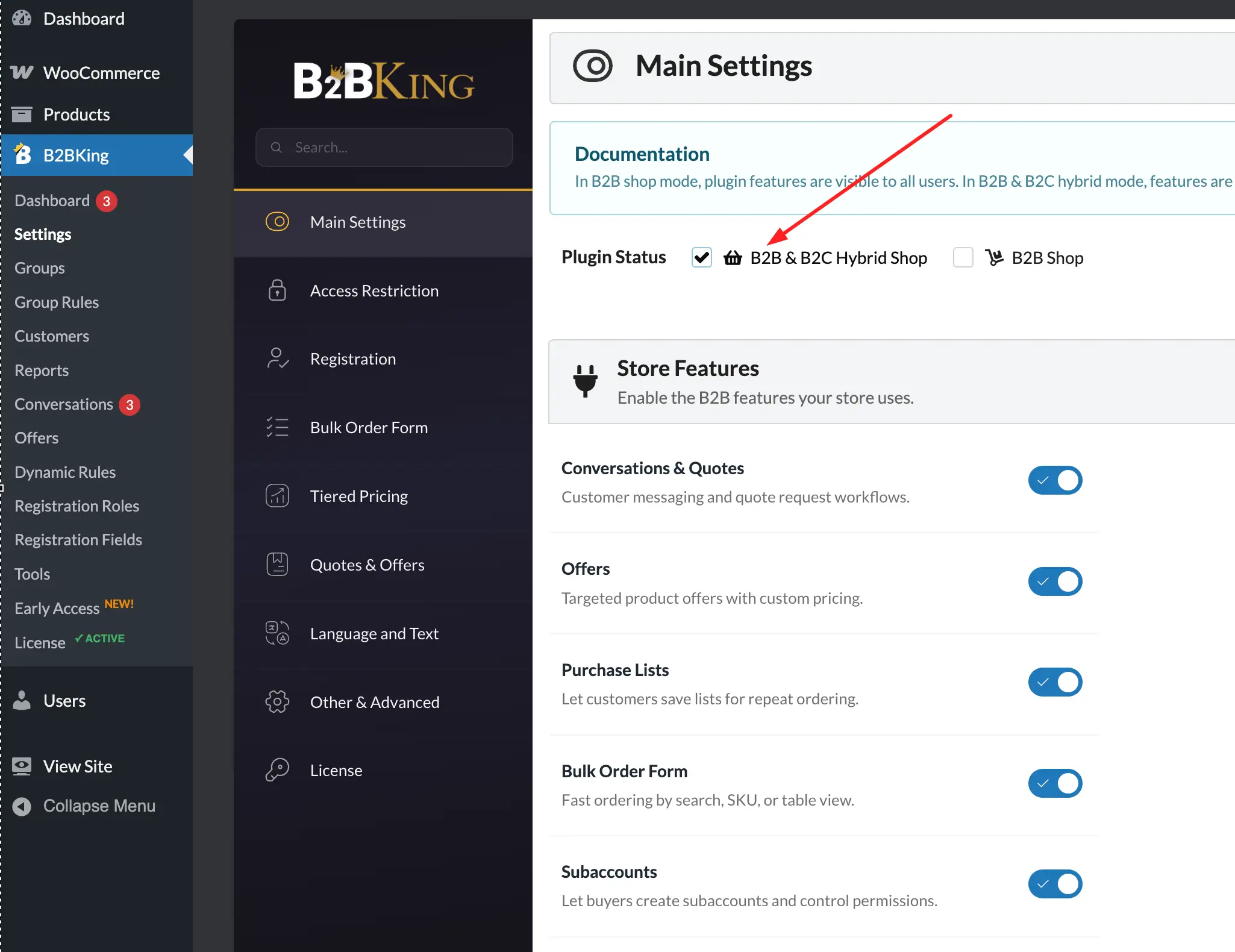
In B2BKing, the first decision is a single setting: B2B Shop or B2B & B2C Hybrid. In hybrid mode, B2B-only features such as the bulk order form and conversations are shown to business users and hidden from consumers.
The 10 Building Blocks of a WooCommerce B2B Store
Every B2B store we have helped set up is some combination of the same ten parts. You will not need all of them on day one, but it helps to know where each one fits.
- Customer groups
- B2B registration and account approval
- B2B pricing: group, customer and tiered prices
- Hiding prices and products
- Bulk ordering and reordering
- Quotes, negotiation and offers
- Minimums, maximums and order rules
- Payment terms, shipping and tax
- Company accounts and order approval
- Managing B2B customers
1. Customer Groups: The Foundation
Everything in a B2B store depends on knowing who the customer is. Most plugins do this with WordPress user roles: you create a "wholesale_customer" role and move buyers into it. It works, but it has a side effect we see in support regularly. Once a buyer is no longer on the standard WooCommerce "customer" role, other plugins (tax, loyalty, email marketing, reporting) may stop treating them as a customer at all, usually without any error message.
B2BKing uses customer groups instead. Each buyer keeps the normal customer role and is also placed in a group such as Retailers, Distributors or VIP. Prices, visibility, payment and shipping methods, minimums and discounts are attached to the group, while the rest of your WooCommerce plugins still see a normal customer. If a third-party plugin only understands roles, groups can optionally be synced to WordPress roles.
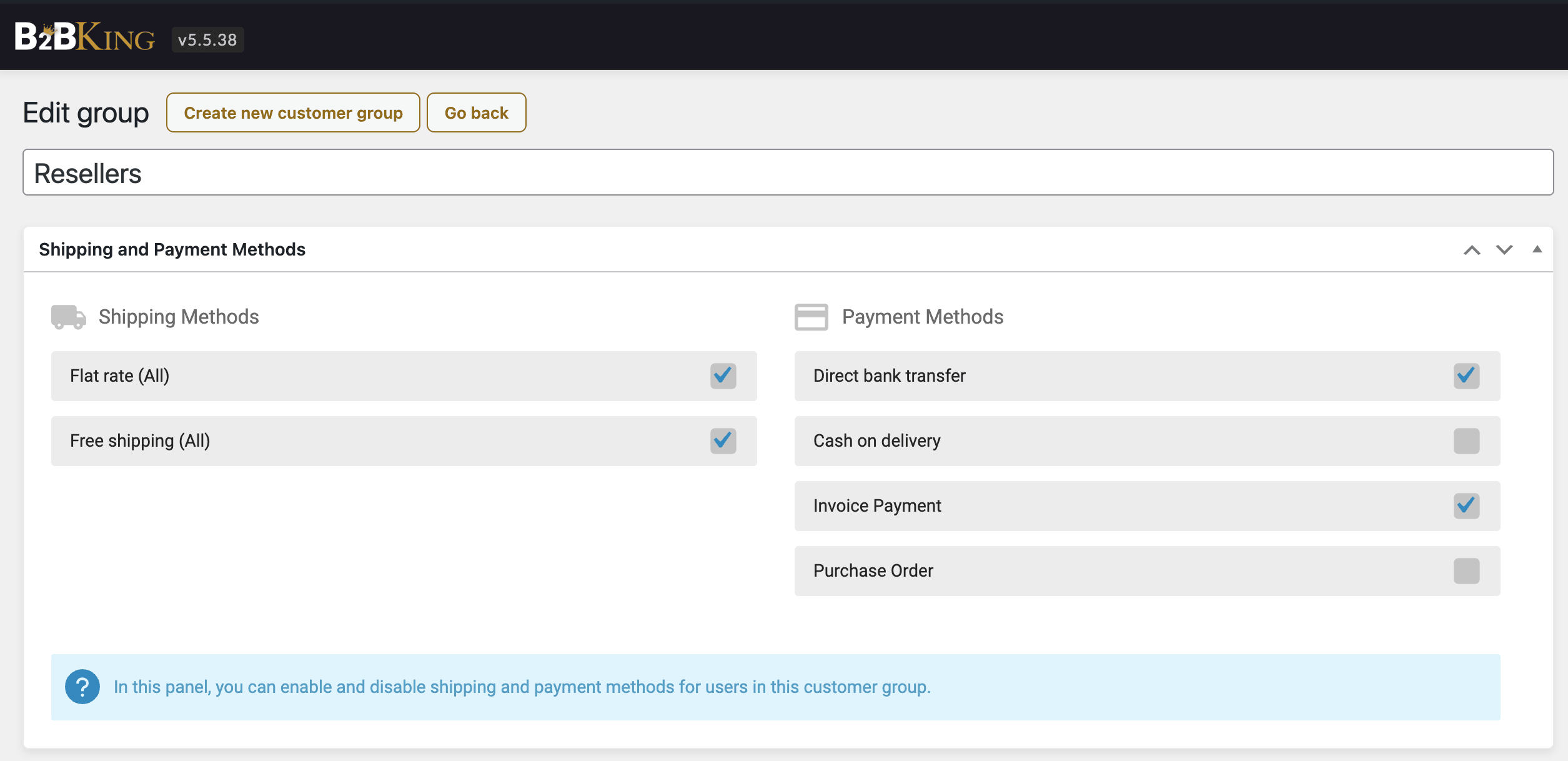
Groups do not have to be static. With group rules, customers can move between groups automatically based on what they spend, in total, in the previous month or in the previous year. For example, a buyer moves from "B2B" to "VIP" once they pass $100,000 in total purchases, and gets VIP pricing from then on without anyone touching their account.
2. B2B Registration and Account Approval
A B2B store needs to know more about a new customer than an email address, and it usually needs to check that the customer really is a business before showing trade prices. B2BKing extends WooCommerce registration with:
- Registration roles: a "user type" dropdown such as Individual Customer, Retailer or Wholesaler. Each role can show different fields and can be approved automatically or manually.
- Custom fields: company name, address, phone, text, dropdowns, checkboxes, dates and file uploads (useful for a trade license or reseller certificate). Fields can also be copied into the customer's billing details.
- VAT number with VIES validation: for EU businesses, VAT numbers can be checked live against the European Commission's VIES service, and registration can be blocked if the number is invalid.
- Separate B2B registration: keep the normal WooCommerce form for consumers and put a dedicated business form on its own page with the
[b2bking_b2b_registration]shortcode. - Spam protection: captcha and Cloudflare Turnstile support, because public registration forms attract bots quickly.
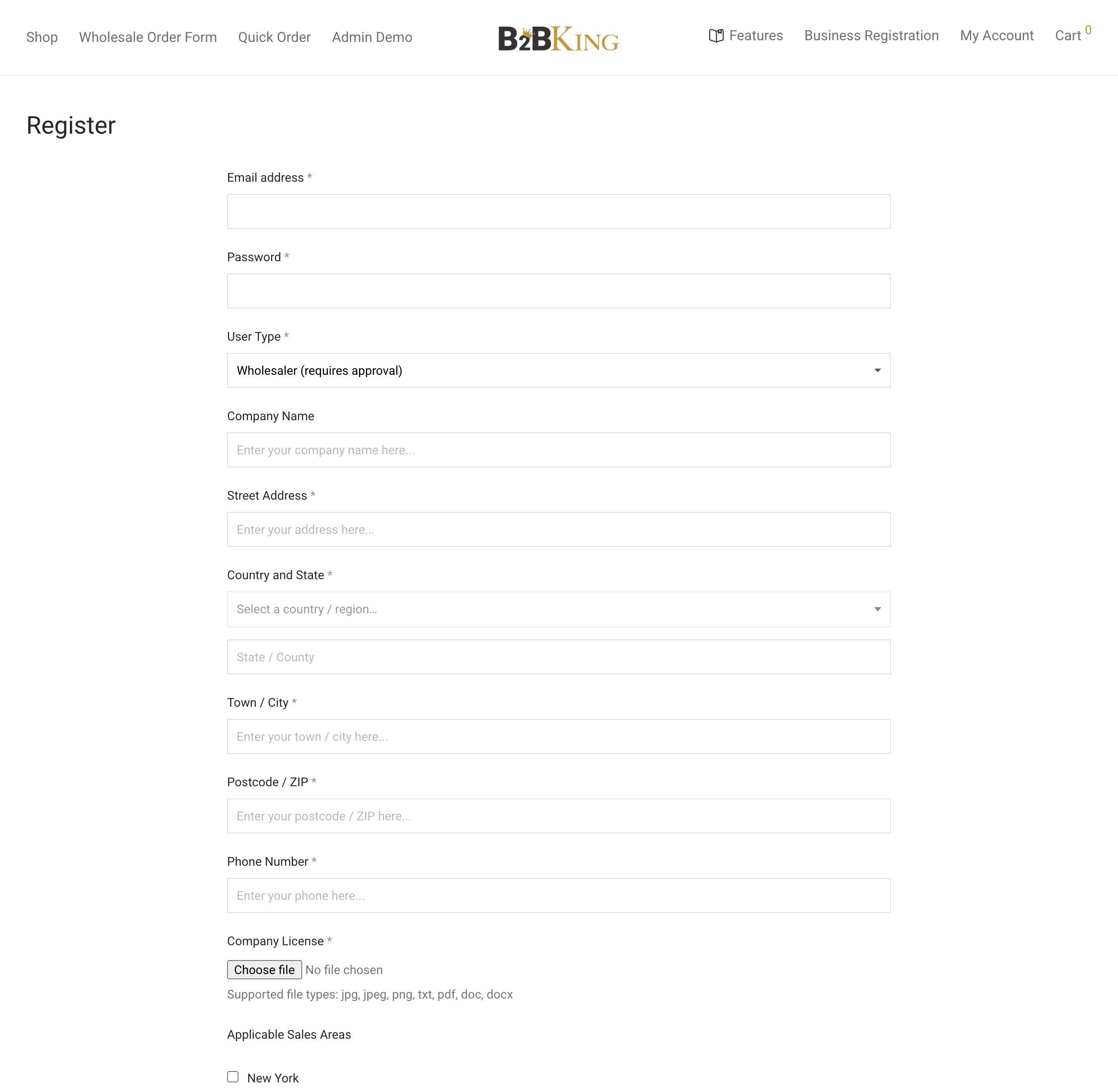
When an account needs manual approval, the store owner gets an email, reviews the submitted data and files, and approves or rejects the account. On approval you choose which customer group the buyer joins. Until then, the customer cannot log in and sees a clear "pending approval" message.
Quick setup: B2B registration with approval
- Create your customer groups (for example Retailers and Distributors) under B2BKing → Groups.
- Under B2BKing → Registration Roles, create a role such as "Wholesaler", set approval to manual, and enable the registration role dropdown.
- Under B2BKing → Registration Fields, add the fields you need, such as company name, VAT number and a file upload for a trade license, and assign them to the Wholesaler role.
- Register a test account, approve it from the user's profile or the Customers page, and log in as that user to check what they see.
For more detail, see our guide to WooCommerce wholesale registration forms.
3. B2B Pricing: Group, Customer and Tiered Prices
Pricing is the reason most stores add a B2B plugin, and it is where the right structure saves the most work later. B2BKing offers several pricing tools. They can be combined, but it is worth choosing deliberately.
Group prices (wholesale prices per tier)
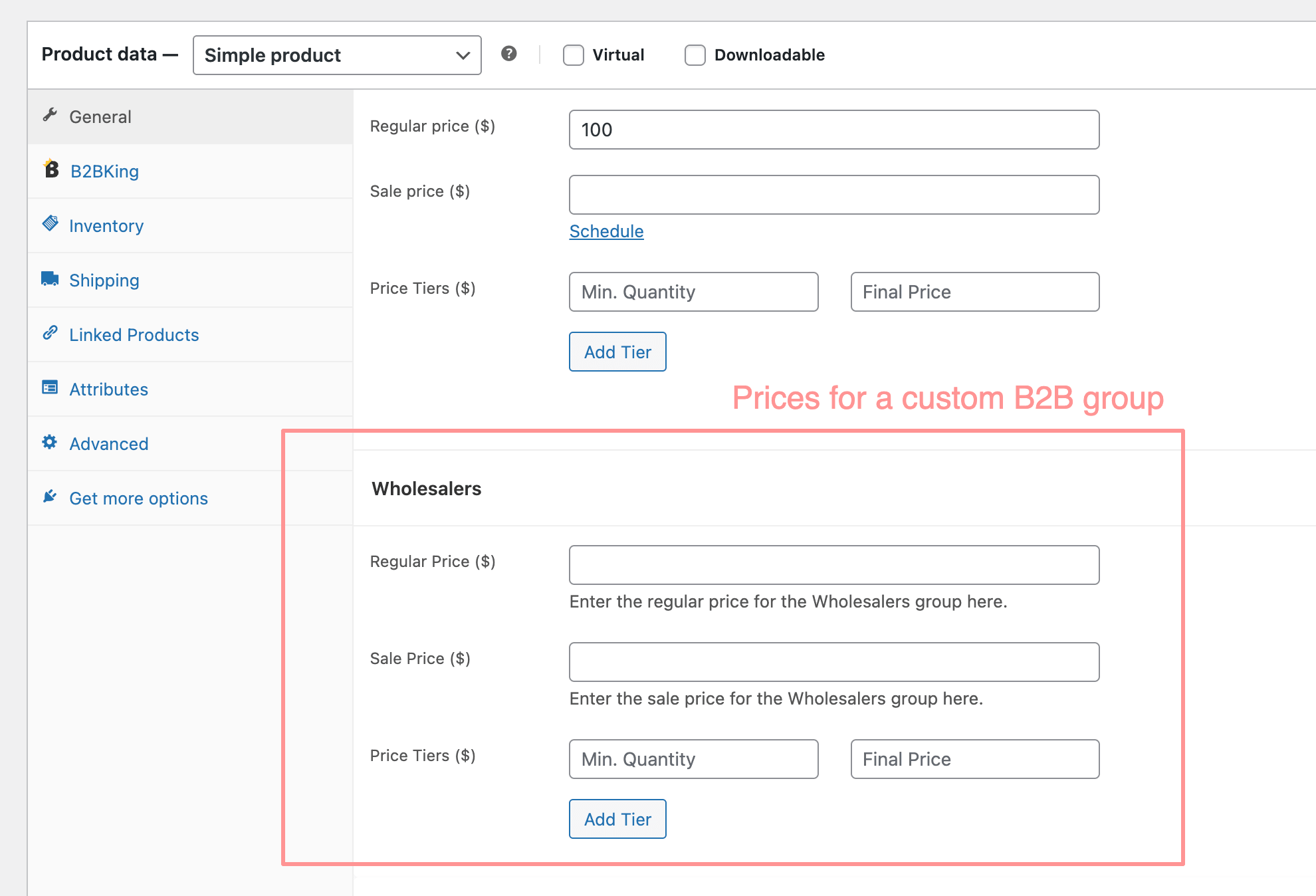
The simplest and most robust option: when editing a product or variation, you enter a regular and sale price for each customer group next to the normal WooCommerce price. A retail visitor sees $699, a logged-in B2B buyer sees $599. Group prices can be imported and exported by CSV, set through the WooCommerce product importer, or written directly to product meta by an ERP integration.
More on this in our guides to WooCommerce wholesale prices and role-based pricing.
Customer-specific price lists (contract pricing)
Many B2B businesses negotiate prices account by account. Creating a group per customer, or a rule per product per customer, quickly becomes unmanageable. Customer price lists solve this: each customer can have their own regular price, sale price and quantity tiers for any product, managed from the product page, from the customer's profile, or in bulk with CSV. Products without a customer-specific price simply fall back to the customer's group price.
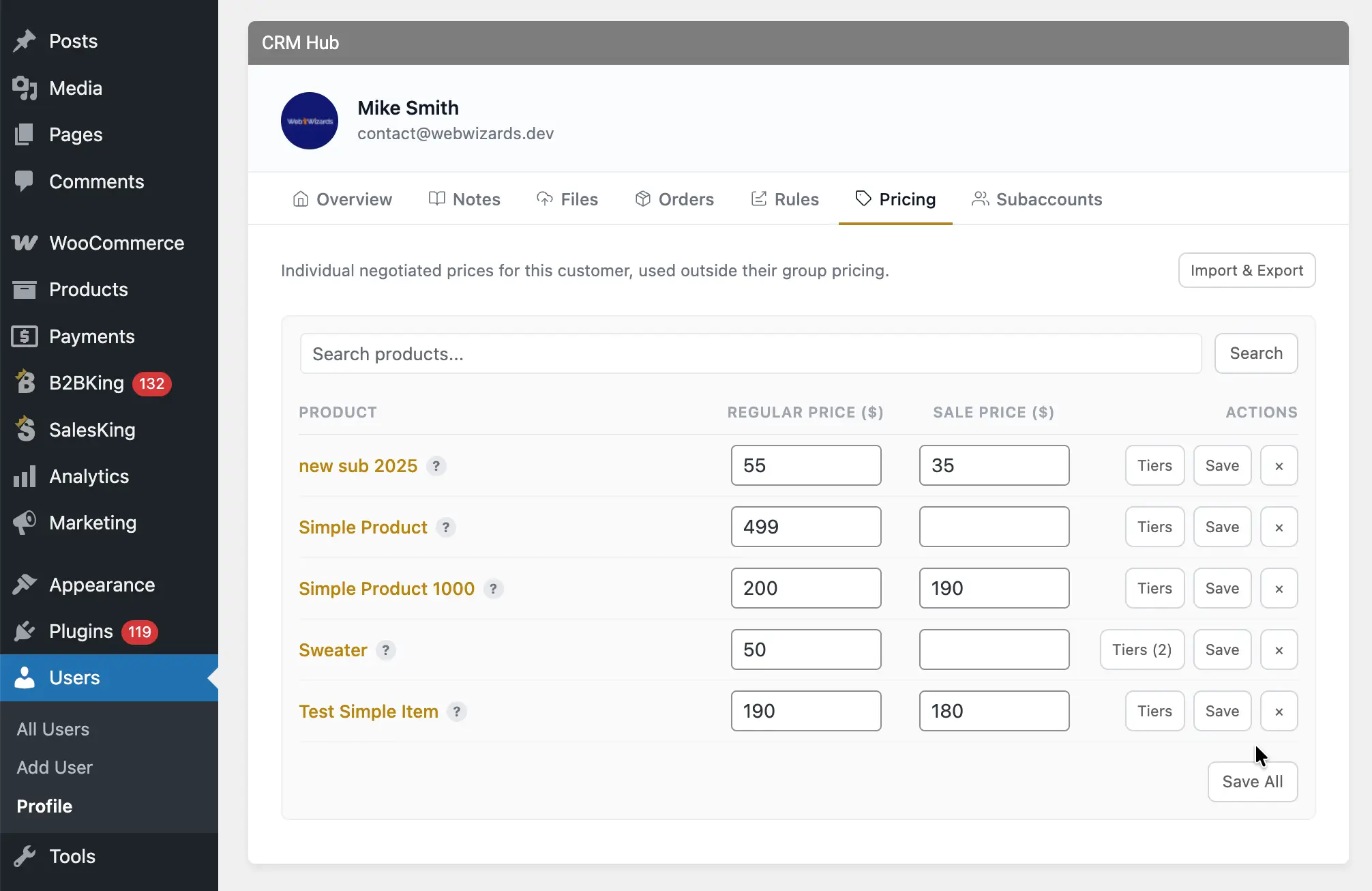
See WooCommerce customer-specific pricing for a full walkthrough.
Tiered and volume pricing
Volume breaks ("$45 each for 10+, $42 for 25+, $39 for 100+") are standard in wholesale. B2BKing lets you set price tiers per product and per group, either as final prices or as percentage discounts, and automatically shows a tiered pricing table on the product page that updates as the buyer changes the quantity. For large catalogs, tiered price rules apply the same percentage tiers to whole categories or the entire store at once.
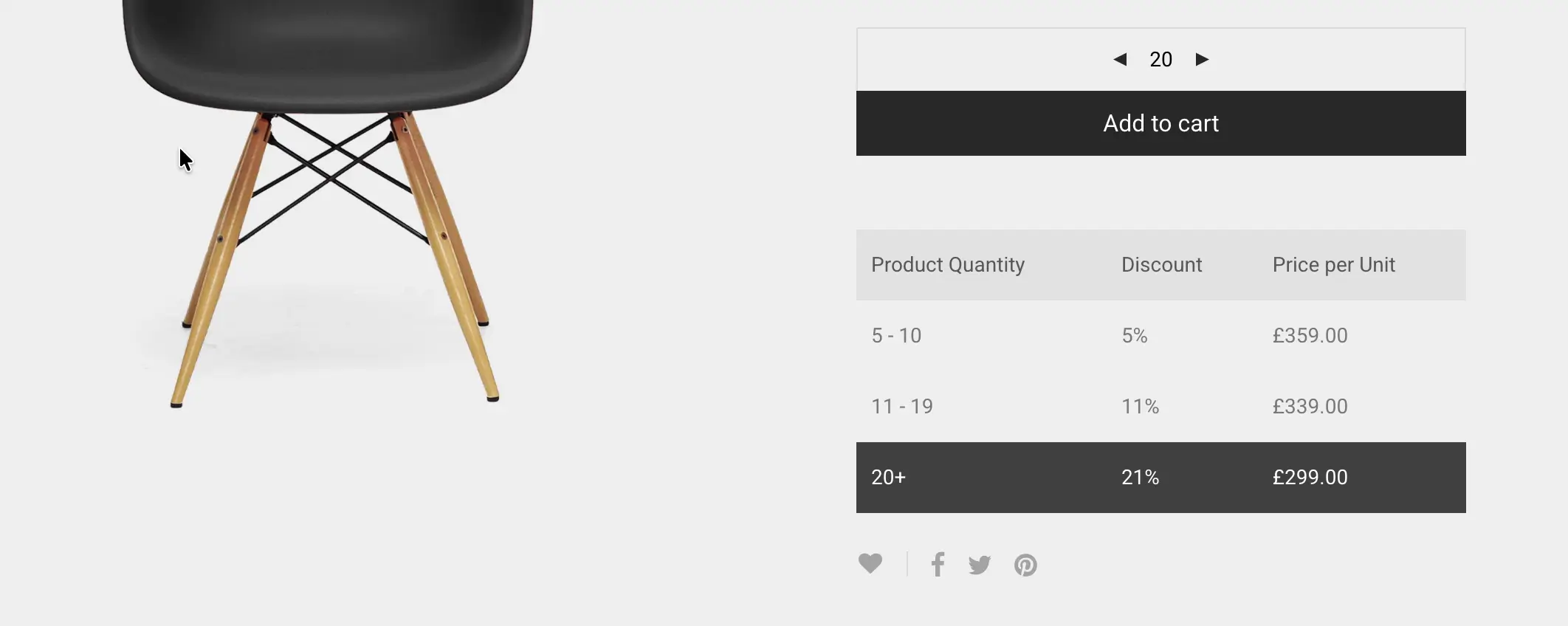
More examples in WooCommerce tiered pricing and price tables.
Discounts and dynamic rules
For everything else there are dynamic rules: percentage or fixed discounts, fixed prices, hidden prices, free shipping, minimums, fees and tax rules, targeted at all B2B users, specific groups or specific customers, for the whole store, categories or single products, with optional cart conditions. "15% off the Hardware category for Distributors when the cart is over $1,000" is one rule.
Our advice from experience: use static prices where you can and rules where you need them. Group prices, price lists and tiers are stored on the product, so they are predictable, easy to export and very fast. Rules are ideal for broad discounts and conditional logic, but a store that models every contract price as a separate rule ends up with thousands of rules that are hard to audit. If you find yourself creating one rule per customer per product, switch to customer price lists.
Price display details that matter to B2B buyers
Smaller touches make a big difference to trade customers: showing prices excluding tax for B2B and including tax for B2C, a tax toggle so buyers can switch, showing the recommended retail price (MSRP) next to the wholesale price so resellers can see their margin, and different currencies for different groups when you sell across borders.
4. Hiding Prices and Products
Most B2B stores restrict what logged-out visitors can see. B2BKing gives you four guest access options:
- Hide prices: products are visible, but prices are replaced with a "Log in to view prices" message.
- Hide the shop: product pages are hidden from guests entirely.
- Login-only website: the whole site sits behind a login, for fully private B2B portals.
- Replace prices with quote requests: guests can still ask for pricing without creating an account.
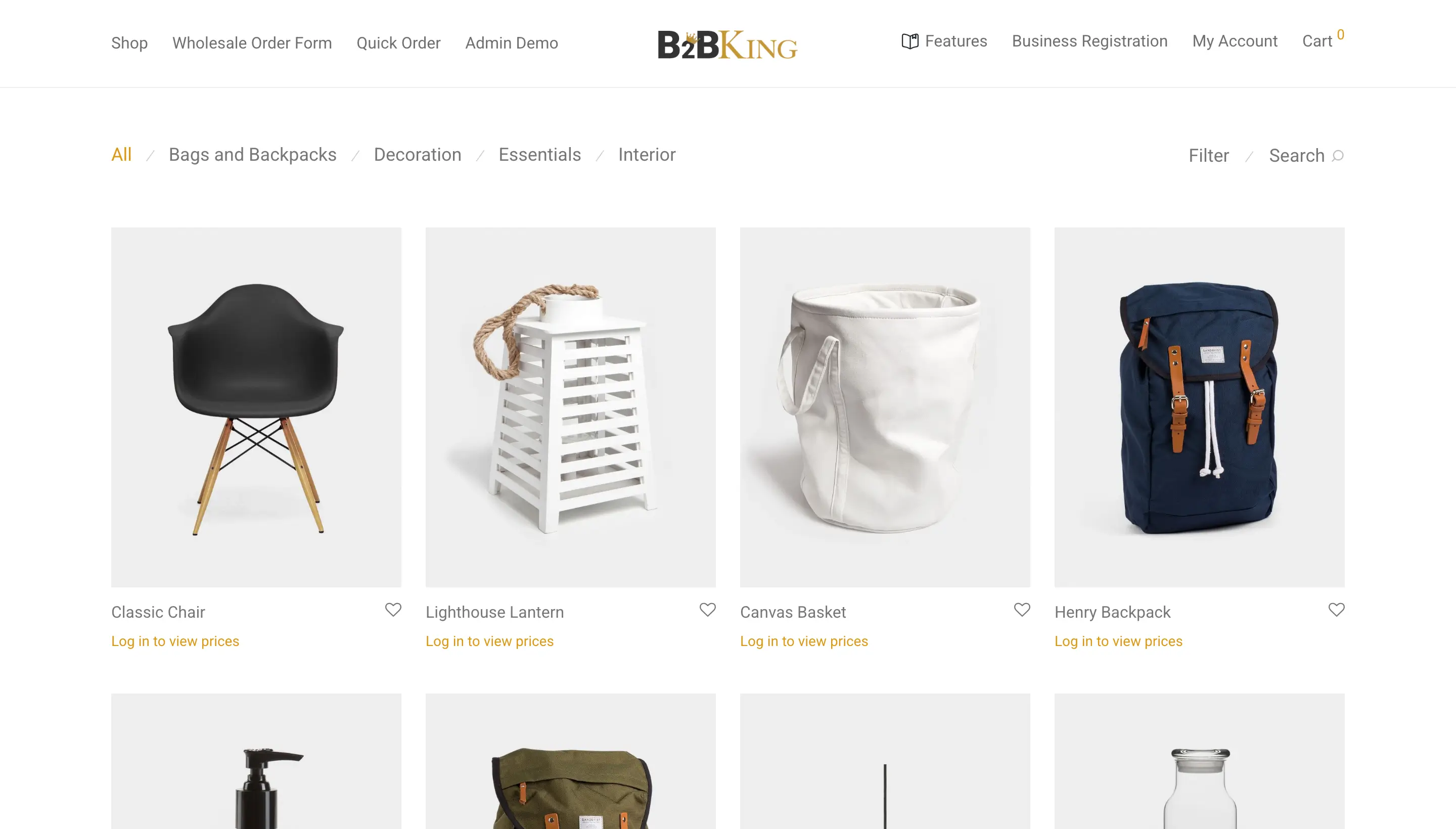
Beyond guests, you can control which products and categories each group or individual customer can see. A distributor can see a professional-only range that retailers never see, and an exclusive product can be visible to a single account. Pages and content blocks can be restricted the same way with page visibility by group and a content restriction shortcode.
Read more in how to hide prices in WooCommerce and WooCommerce catalog mode.
5. Bulk Ordering: Order Forms, Quick Orders and Reordering
Trade buyers often know exactly what they want and do not want to click through 30 product pages to get it. Fast ordering tools are one of the features B2B customers appreciate most:
- Wholesale order form: one page listing products with instant search (including by SKU), quantity fields, live subtotals and add-to-cart for many items at once. It comes in several built-in designs (Classic, Indigo and Cream), supports variations, and can be placed anywhere with a shortcode or in the customer's My Account area.
- Quick orders by CSV: buyers upload a spreadsheet of SKUs and quantities and it goes straight into the cart.
- Purchase lists: saved lists (sometimes called requisition lists) for repeat orders, which can be added to the cart in one click and downloaded as CSV.
- Bulk variations table: order many sizes and colors of one product from a single grid.
- Reorder: repeat a previous order from the order history.
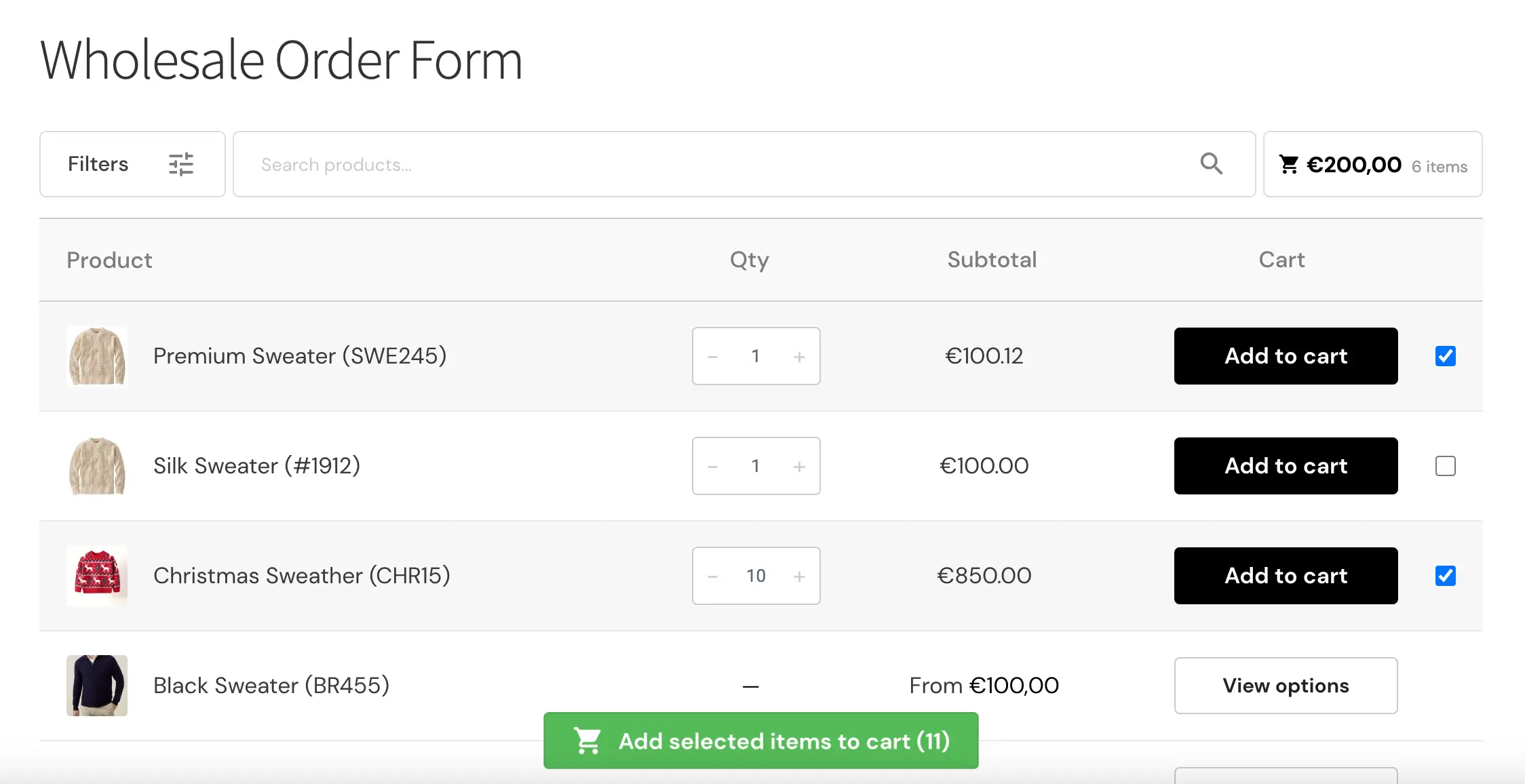
Learn more in WooCommerce wholesale order forms.
6. Quotes, Negotiation and Offers
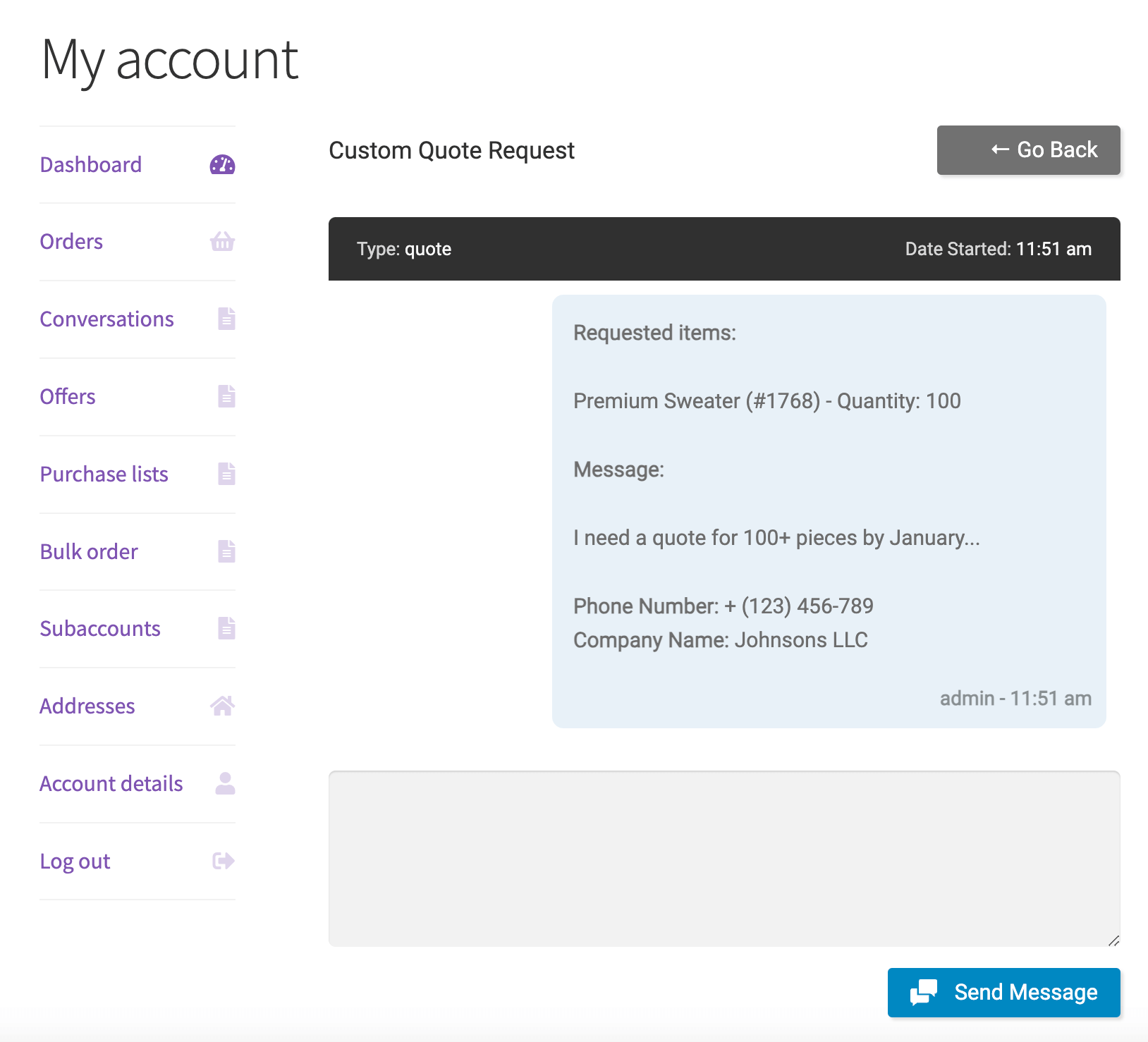
Large or unusual orders are often priced by conversation, not by price list. B2BKing handles the full quote cycle inside WooCommerce instead of in your email inbox:
- The buyer adds products to a quote request, or requests a custom quote for their current cart, and fills in a quote form with any fields you define.
- The request opens a conversation where you and the buyer can message back and forth, with email notifications on both sides.
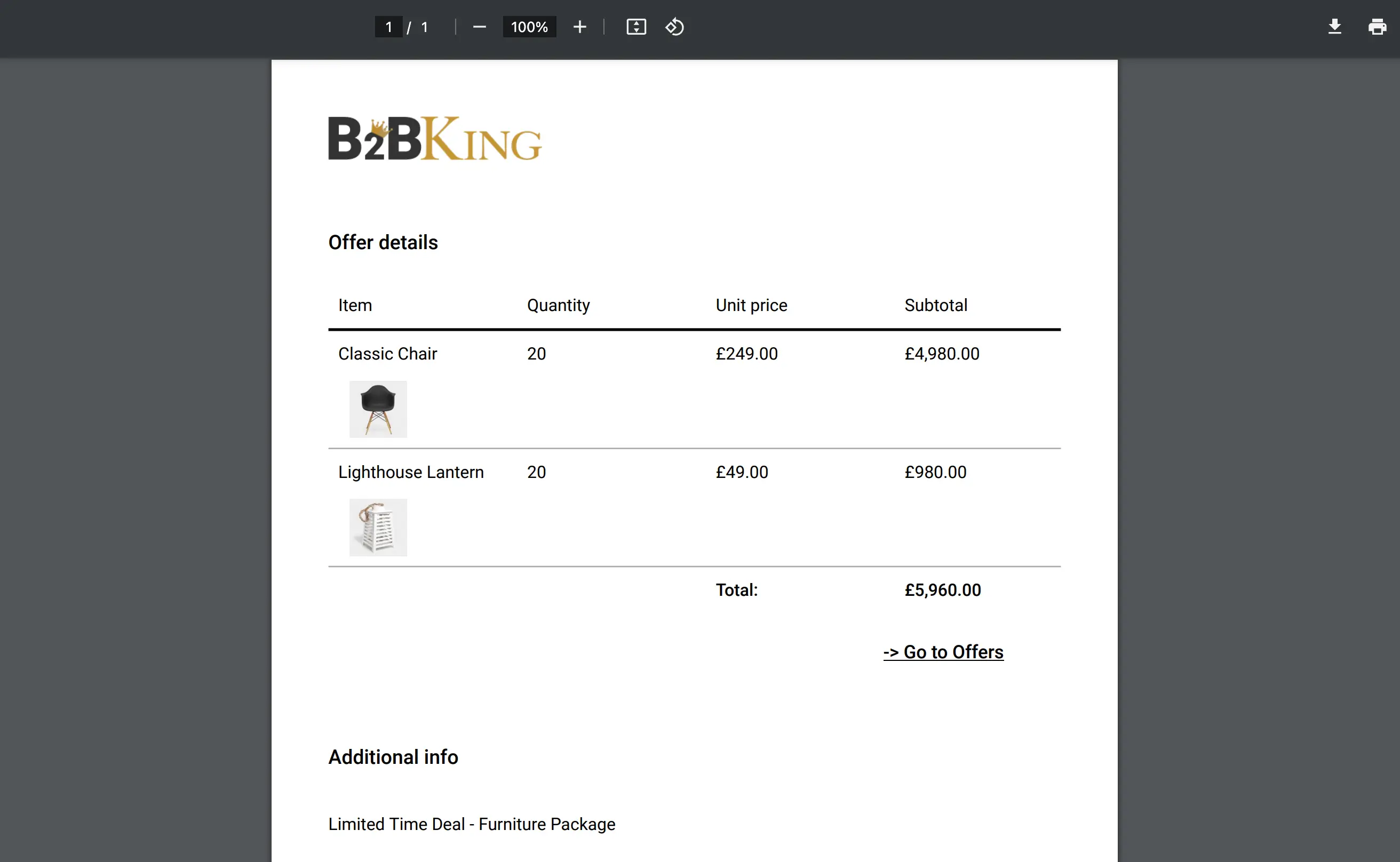
- You respond with an offer: specific products, quantities and unit prices, visible only to that customer (or to a whole group for promotional bundles).
- The buyer receives the offer by email, can download it as a branded PDF for their own approval process, and adds it to the cart to check out.
Quotes can be enabled for guests, for B2B users only, for everyone, or only for specific products. You can also run a quote-only store where the cart is replaced by a quote basket. See WooCommerce request a quote for B2B.
7. Minimums, Maximums and Order Rules
Wholesale margins depend on order size, so most B2B stores enforce some rules at the cart:
- Minimum order value or quantity: for example a $300 minimum for retailers but none for distributors, per order, per category or per product.
- Maximum orders: limit quantities for allocated or limited-stock products.
- Required multiples: sell only in case packs of 6, 12 or 24.
- Min, max and step quantities on the product page, so buyers cannot enter an invalid quantity in the first place.
- Minimum or maximum order value per payment method, for example invoice payment only on orders over $500.
If a cart does not meet a rule, the buyer sees a clear message explaining what is missing. Full details in our guide to WooCommerce minimum order amounts and quantities.
8. Payment Terms, Shipping and Tax
Payment methods for B2B customers
Card payments at checkout are not how most business customers pay. B2BKing adds B2B payment methods and lets you control which payment methods each group or customer can use:
- Invoice payment: the customer orders now and pays later. The checkout text is fully editable, so it works for Net 30 or Net 60 terms. B2BKing is not an invoicing tool itself, so pair it with an invoice plugin such as the free PDF Invoices & Packing Slips.
- Purchase order: buyers enter a PO number at checkout and can upload the PO document.
- Company credit: credit limits and outstanding balances per account, available as an add-on with the Pro and Developer packages.
- Payment method discounts and surcharges: for example a 2% discount for bank transfer or a fee for card payments.
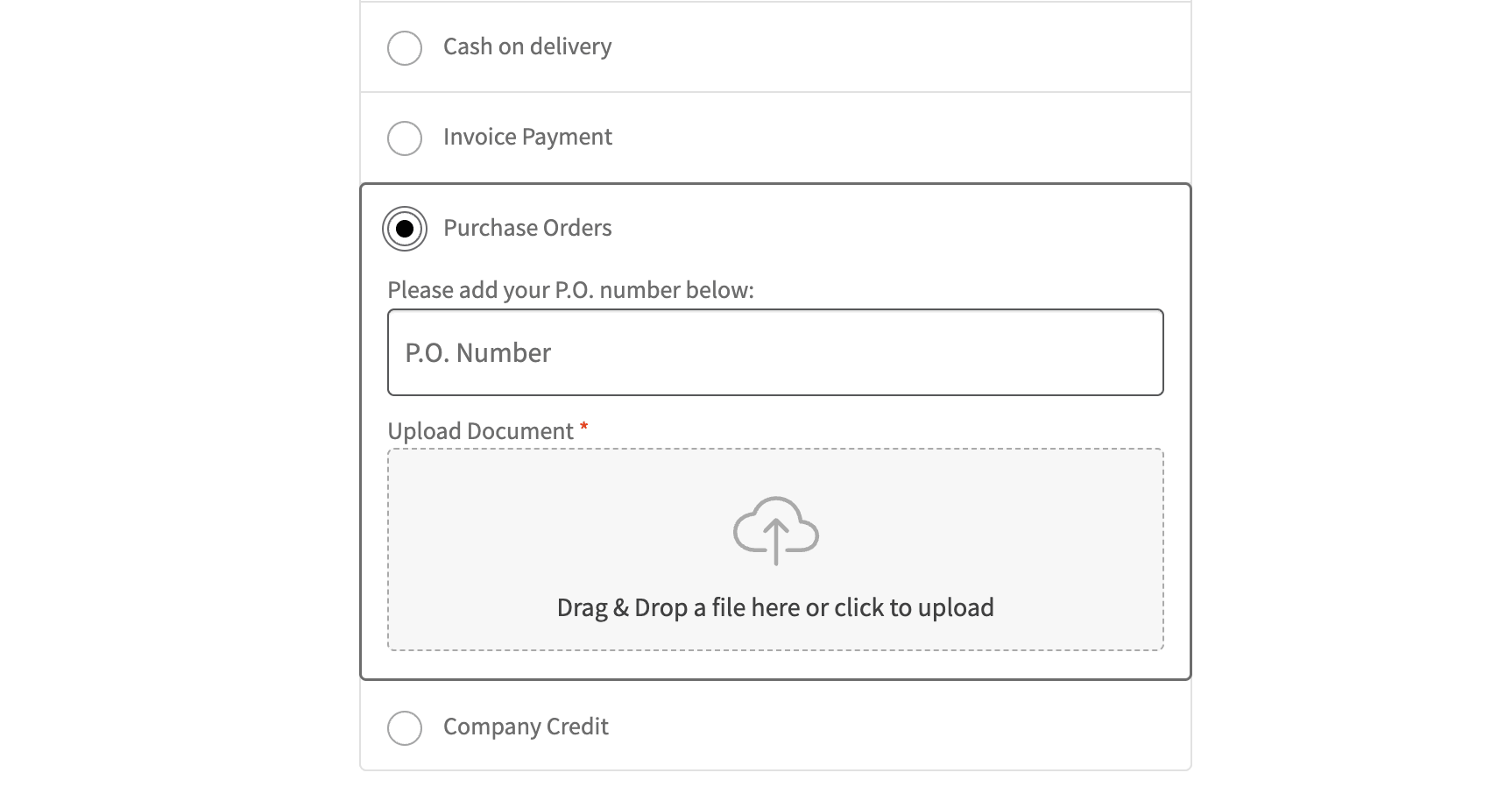
A typical hybrid store shows card and PayPal to consumers, adds invoice payment for approved trade accounts, and enables purchase orders only for its largest customers.
Shipping
Shipping methods can be enabled or disabled per group and per customer in the same way, so freight or local pickup can be offered to trade accounts only. Free shipping can be granted by rule, for example to distributors on orders over $1,000.
Tax and VAT
Tax is the single most common topic in our B2BKing support queue, so it is worth planning early. B2BKing can:
- Validate EU VAT numbers through VIES at registration or checkout.
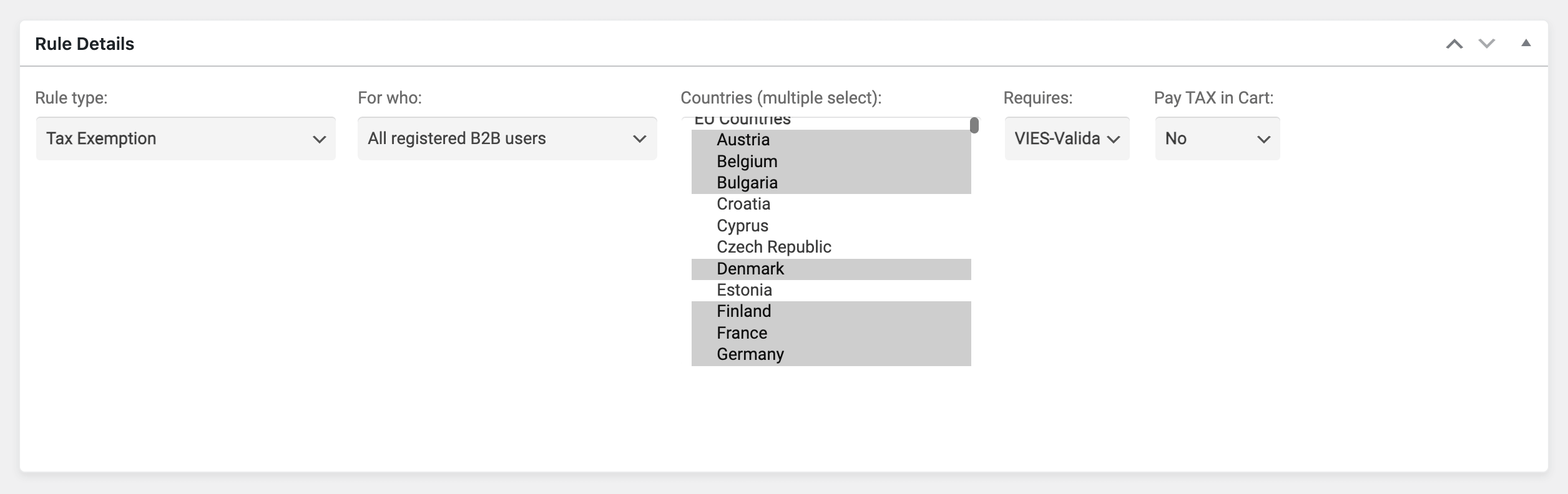
- Apply tax exemptions by group, by customer, by country and by whether the customer has a valid VAT number, for the whole store or specific products and categories. For example, exempt Austrian B2B customers with a valid VAT number, but not German ones.
- Show prices excluding tax to B2B customers while consumers see prices including tax.
- Set up different tax rates for B2B and B2C.
B2BKing is not limited to EU VAT. It works with GST, US sales tax and other tax systems. Outside the EU, stores typically collect a tax ID or exemption certificate at registration and approve accounts manually.
9. Company Accounts: Subaccounts and Order Approval
In B2B, the customer is a company, not a person. A buyer, an office manager and three branch managers may all need access to the same account, but not all of them should be able to spend money.
With subaccounts, the main account creates logins for colleagues and sets permissions for each one: place orders, view all company orders, view offers, use conversations, see purchase lists. Subaccounts get the same prices and catalog as the company. Orders show who placed them, and the main account can log in as any of its subaccounts.
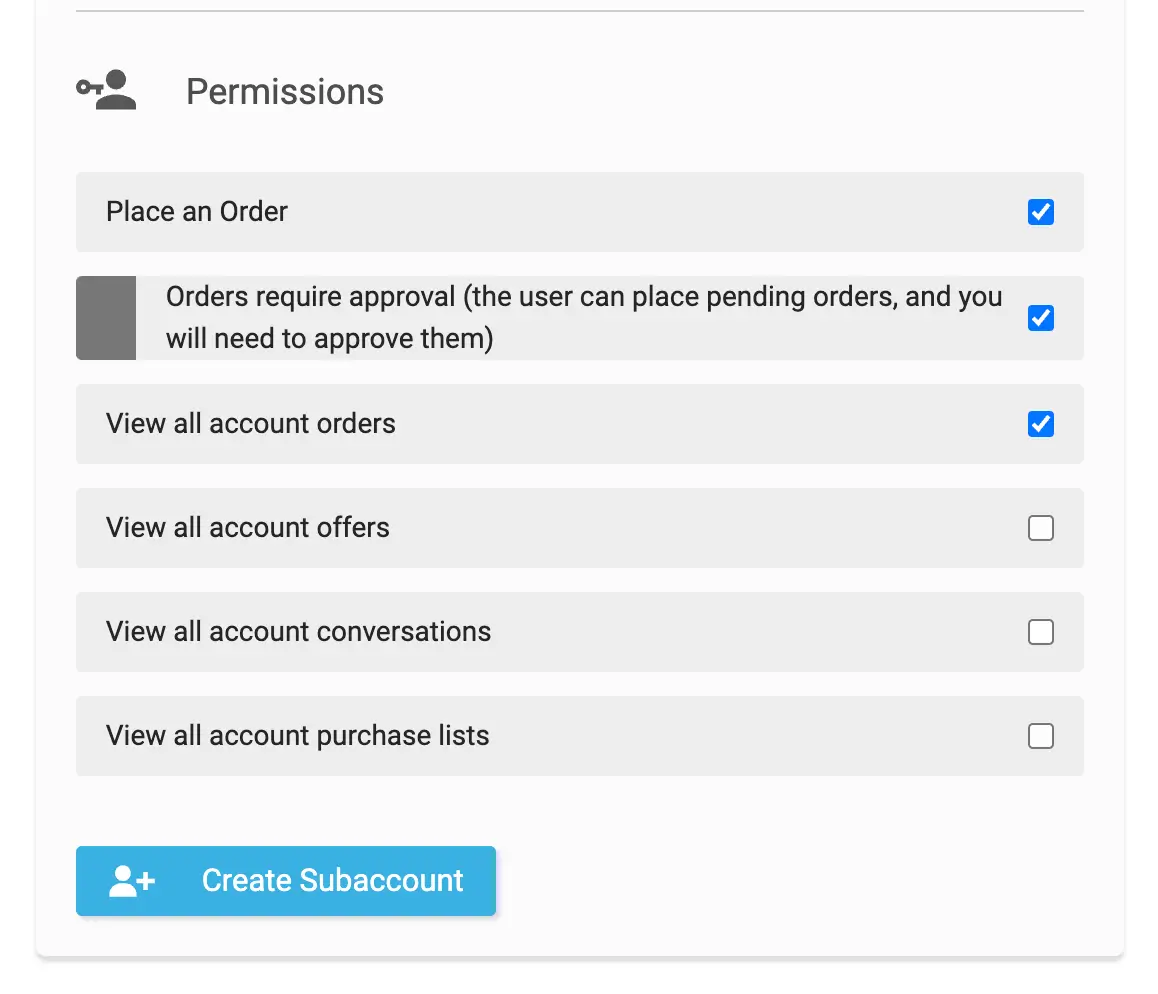
Company order approval adds one more level. A subaccount can place orders that must be approved by the main account first. For example, a company with three branches lets each branch order its own supplies, while head office reviews and approves every order before it is paid and processed.
10. Managing B2B Customers: CRM Hub, Reports and Sales Reps
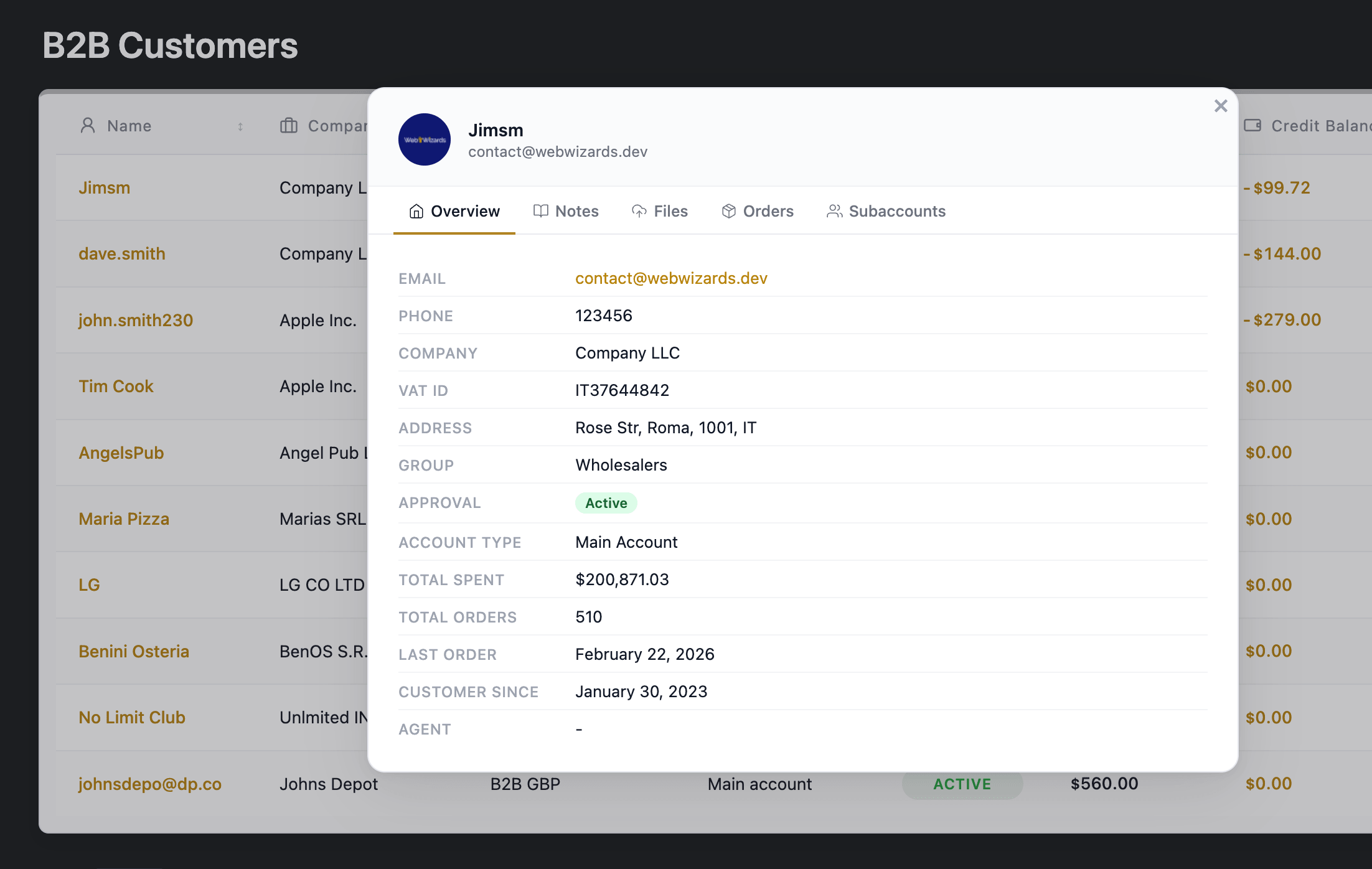
As the number of trade accounts grows, you need one place to see them. The B2BKing Customers page and CRM Hub list every buyer with company, group, account type, approval status and total spent, and let you sort, search and export the list. Each customer has a CRM panel with an overview, private notes, files (including documents they uploaded at registration), order history, their subaccounts and their customer-specific prices.
Built-in reports show sales data over time, and if you work with sales representatives, our companion plugin SalesKing adds agent dashboards, customer assignment and commissions that work alongside B2BKing.
Keeping a B2B Store Fast (and Showing the Right Prices)
B2B stores behave differently from retail stores in one important way: most visitors are logged in and see personalized content. That changes how caching must be configured.
Retail stores usually rely on full-page caching: the server saves a copy of each page and serves it to every visitor. In a B2B store, that is how a consumer ends up seeing a distributor's prices, or how a discount appears correctly in the cart but not on the product page. Two different customers simply cannot share the same cached page. Our recommendations:
- Cache truly static pages at the edge. Pages that look the same for everyone (home, about, contact) can be cached on Cloudflare for very fast load times.
- Give logged-in users their own cache or no page cache. WP Rocket's user cache option works well. With LiteSpeed Cache and most other cache plugins, disable caching for logged-in users. Check whether your host adds its own server-level cache.
- Invest in hosting. Because personalized pages are generated on every request, CPU and database performance matter more than they do for a retail store.
On the plugin side, B2BKing is built for this environment. It detects which features you actually use and skips the rest, and it caches rule results per product and per group, so a calculation done for one buyer also speeds up the next buyer in the same group. Most heavy work happens when you save settings, not when customers browse. Our WooCommerce B2B hosting and performance guide covers hosting tiers, Cloudflare and caching setups in detail.
Connecting ERPs, Imports and Other Systems
Many B2B stores are fed by an ERP or accounting system such as NetSuite, Dynamics 365, SAP, Exact or Acumatica. Because B2BKing stores its data according to WooCommerce standards, any existing WooCommerce integration for your ERP will also work with B2BKing. Group prices, price tiers and customer groups can be imported by CSV or written directly as product and user meta by your integration, using documented meta keys. For example, one wholesale beauty supplier we work with syncs gross retail prices and net trade prices from its ERP into WooCommerce, and B2BKing shows each customer the right one.
B2BKing also works with WPML for multilingual stores, multi-currency plugins (we recommend FOX for the deepest integration), multisite, the WordPress and WooCommerce REST APIs, and virtually any WooCommerce theme.
Setting Up a B2B Store With AI
A growing number of agencies and store owners now configure their stores through AI assistants. B2BKing supports this through the WordPress Abilities API and the official WordPress MCP Adapter, so assistants such as Claude, Codex, Cursor or VS Code can read and change your B2B setup directly. A single request such as "Set my store up as a hybrid B2B/B2C shop, replace prices with quote requests for guests, and create a Wholesale group with 15% off everything and a $300 minimum order" becomes a handful of validated B2BKing changes that you can review in the dashboard afterwards.
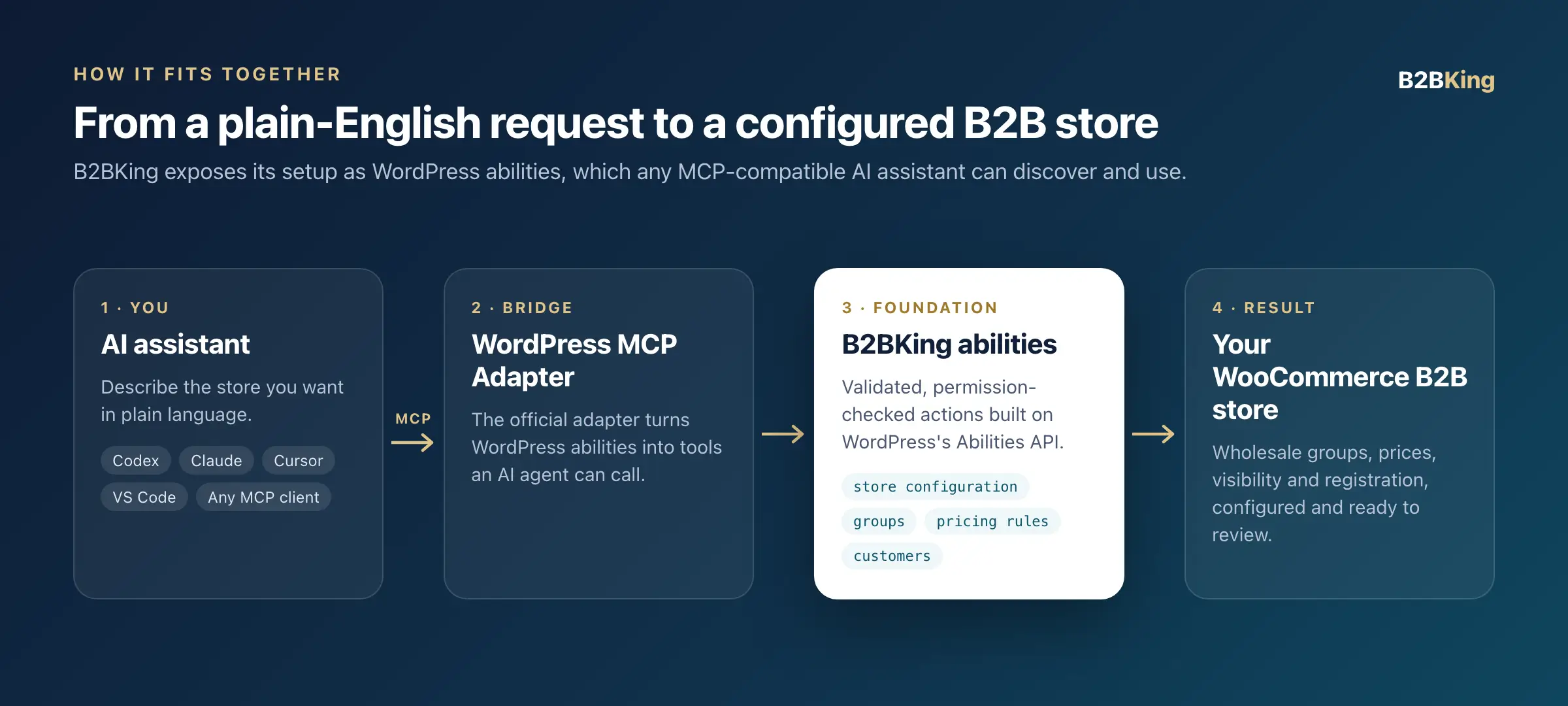
The AI handles the configuration, while the pricing, visibility and checkout logic stays in a plugin that has been tested on thousands of live stores. See how to build a WooCommerce B2B store with AI.
Common WooCommerce B2B Mistakes (From Our Support Queue)
After years of B2B support tickets, the same issues come up again and again. Avoiding these will save you most of the trouble we see:
- Caching logged-in pages like retail pages. The top cause of "a retail customer saw wholesale prices" reports. In one case, a store's cache folder grew to several gigabytes because pages for every logged-in buyer were being cached and never cleaned. Use a per-user cache or disable caching for logged-in users.
- Running a second pricing plugin alongside your B2B plugin. Two plugins changing the same price is the classic reason prices are correct on the product page but wrong in the cart or checkout. Ideally, let one plugin own pricing. If you must keep another, test every product type, especially variations.
- Confusing tax display with tax exemption. Showing prices excluding tax is not the same as removing tax. Set up your WooCommerce tax rates first, decide who should actually be exempt, and test with customers from different countries, not only your own.
- Moving buyers to custom WordPress roles. Other plugins may stop recognizing them as customers. Keep the customer role and use groups.
- Testing only as an administrator. Admins see everything. Create a test account for each group, and check the store logged out in a private window.
- Using page builder cart widgets instead of the standard cart. Some theme and builder cart widgets calculate totals their own way. If cart totals look wrong, test with a page containing the
[woocommerce_cart]shortcode. - Forgetting search, feeds and APIs when hiding products. A theme's live search or a product feed for Google or Facebook can expose products or B2B prices you hid in the shop. Check them after setting up visibility.
- Not configuring email delivery. Registration and approval emails that never arrive look like a broken store to new trade customers. Use an SMTP plugin or transactional email service.
- Modeling contract prices as hundreds of rules. If every customer has their own prices, use customer price lists with CSV import instead of one rule per product per customer.
Our troubleshooting docs on users seeing the wrong prices or content and incorrect price or subtotal display cover these in more depth.
WooCommerce B2B Feature Checklist
Use this as a planning checklist for your store. Every item below is covered by B2BKing in a single plugin.
| B2B need | How B2BKing handles it |
|---|---|
| Separate retail and trade customers | B2B-only or hybrid mode, customer groups, automatic group changes by spend |
| Vet new business customers | Registration roles, custom fields, file uploads, VIES validation, manual or automatic approval |
| Wholesale prices per tier | Group prices on each product and variation, CSV import and export |
| Contract prices per account | Customer price lists with tiers, managed per product, per customer or by CSV |
| Volume discounts | Tiered pricing with automatic price table, tiered price rules for whole categories |
| Discounts and promotions | 25+ dynamic rule types with group, customer, product and cart conditions |
| Private catalog | Hidden prices, hidden shop or login-only site for guests, product, category and page visibility by group or customer |
| Fast reordering | Wholesale order forms, CSV quick order, purchase lists, bulk variations table, reorder |
| Quotes and negotiation | Quote requests, conversations, offers with PDF and email, quote-only mode |
| Order rules | Minimum and maximum order value or quantity, required multiples, min/max/step quantities |
| Payment terms | Invoice and purchase order gateways, payment methods by group or customer, company credit add-on |
| Tax | Tax exemptions by group, country and VAT status, B2B prices excluding tax, tax toggle |
| Company accounts | Subaccounts with permissions, company order approval, "placed by" on orders |
| Customer management | Customers page, CRM Hub, reports, SalesKing integration for sales reps |
| Inventory and currency | Separate B2B and B2C stock, currencies by group |
| Integrations and AI | WooCommerce-standard data for ERPs, CSV tools, WPML, multisite, MCP for AI assistants |
Why Store Owners Choose B2BKing
A B2B plugin sits in the most sensitive part of your store: prices, checkout and who can buy what. A list of features is only part of the decision. What matters just as much is whether those features have been proven on real stores.
- Proven at scale: more than 15,000 active stores since 2020, across fashion, food and drink, industrial supplies, beauty, furniture, medical supplies and many other industries.
- Years of edge cases already solved: variable products, product bundles and add-ons, multilingual and multi-currency setups, ERP-fed catalogs, dozens of popular themes and builders. Problems a newly built system would still have to discover have been reported by real merchants and fixed over 135+ updates.
- One plugin, one customer model: registration, pricing, visibility, quotes, payments and company accounts are designed to work together, configured from one dashboard.
- Rated 4.95/5 from more than 215 reviews on WordPress.org, CodeCanyon, Capterra and G2.
- Free to start: the core plugin is free on WordPress.org, and B2BKing Pro adds the full feature set.
Frequently Asked Questions
Can WooCommerce be used for B2B?
Yes. WooCommerce is a strong foundation for B2B e-commerce, but it does not include B2B features such as customer-specific pricing, hidden prices, business registration with approval, quotes or invoice payments. These are added with a B2B plugin such as B2BKing.
What is the best WooCommerce B2B plugin?
It depends on your requirements. We are obviously biased toward B2BKing, which covers the widest range of B2B features in a single plugin. For a balanced comparison of the main options, see our guide to the best WooCommerce B2B plugins, or our detailed comparisons with Wholesale Suite and WholesaleX.
Can I sell B2B and B2C from the same WooCommerce store?
Yes. In hybrid mode, consumers see a normal retail store while logged-in business customers see their own prices, payment methods and B2B tools. You can use one registration form with a user type dropdown, or keep B2B registration on a separate page.
How do I show different prices to different customers in WooCommerce?
Put customers into groups and set a price per group on each product, use customer price lists for account-specific contract prices, and add tiered pricing for volume breaks. Discount rules cover store-wide or category-wide percentages.
How do I hide prices from guests in WooCommerce?
In B2BKing, choose a guest access option: hide prices until login, hide the shop, make the entire site login-only, or replace prices with quote requests. You can also hide specific products or categories from specific groups.
Does WooCommerce support Net 30 or invoice payments?
Not for specific customers on its own. B2BKing adds an invoice payment gateway that you can label "Net 30" or "Net 60", plus a purchase order gateway, and lets you offer them only to approved groups or accounts.
Can several employees use the same company account?
Yes, with subaccounts. Each employee gets their own login with permissions set by the main account, and orders from selected subaccounts can require approval by the main account before they are processed.
Is there a free WooCommerce B2B plugin?
Yes. B2BKing's core plugin is free on WordPress.org and covers customer groups, wholesale prices per group, payment and shipping methods per group, percentage discount rules, the CRM Hub and B2B/B2C reports. B2BKing Pro adds business registration with approval, hidden prices and private store options, tiered pricing, quotes and offers, order forms, subaccounts, and invoice and purchase order payments.
Will B2BKing work with my theme and ERP?
In almost all cases. B2BKing works with virtually any WooCommerce theme and stores its data according to WooCommerce standards, so existing WooCommerce integrations for ERPs and accounting systems continue to work.
How long does it take to set up a WooCommerce B2B store?
A basic B2B setup with groups, wholesale prices, hidden guest prices and B2B registration can be configured in an afternoon by following our step-by-step setup guide, or in minutes with an AI assistant. Complex stores with contract pricing, ERP integration and company accounts take longer, mostly because of decisions and data preparation rather than configuration.
Start Building Your WooCommerce B2B Store
The best B2B stores start simple: choose your store model, set up customer groups and pricing, decide what guests can see, and open registration. Quotes, order forms, payment terms and company accounts can follow as your trade customers ask for them.
- See it working: explore the B2BKing demo as a guest or a B2B customer.
- Start free: install B2BKing Core from WordPress.org.
- Get the full B2B toolkit: compare B2BKing Pro plans.
- Set it up step by step: follow the initial setup guide, or ask our team about your specific requirements.

