
WooCommerce Role Based Pricing: Everything You Need to Know
WooCommerce stores commonly need to set different prices for different users depending on their role. A company may want to charge an official distributor a different price than a reseller, for example, or offer yet another rate to a new partner just getting started. This kind of distinction is common in B2B commerce, and it happens for many reasons: negotiating leverage, bulk volumes, established relationships, or simply rewarding a long-standing, hassle-free customer with a small discount. If you are setting up a complete trade channel, our WooCommerce B2B guide covers the rest of the setup.
How Role-Based Pricing Traditionally Works
Traditionally, WooCommerce sites and plugins handle this based on WordPress roles. These roles were originally established in WordPress as a way to set permissions. An admin, a contributor, and an editor, for instance, are each standard WordPress roles. WooCommerce has built on top of this system and introduced its own roles, namely 'shop manager' and 'customer'. Most role-based pricing solutions then take a similar approach: assign each of your customers a separate role, then set prices for each role.
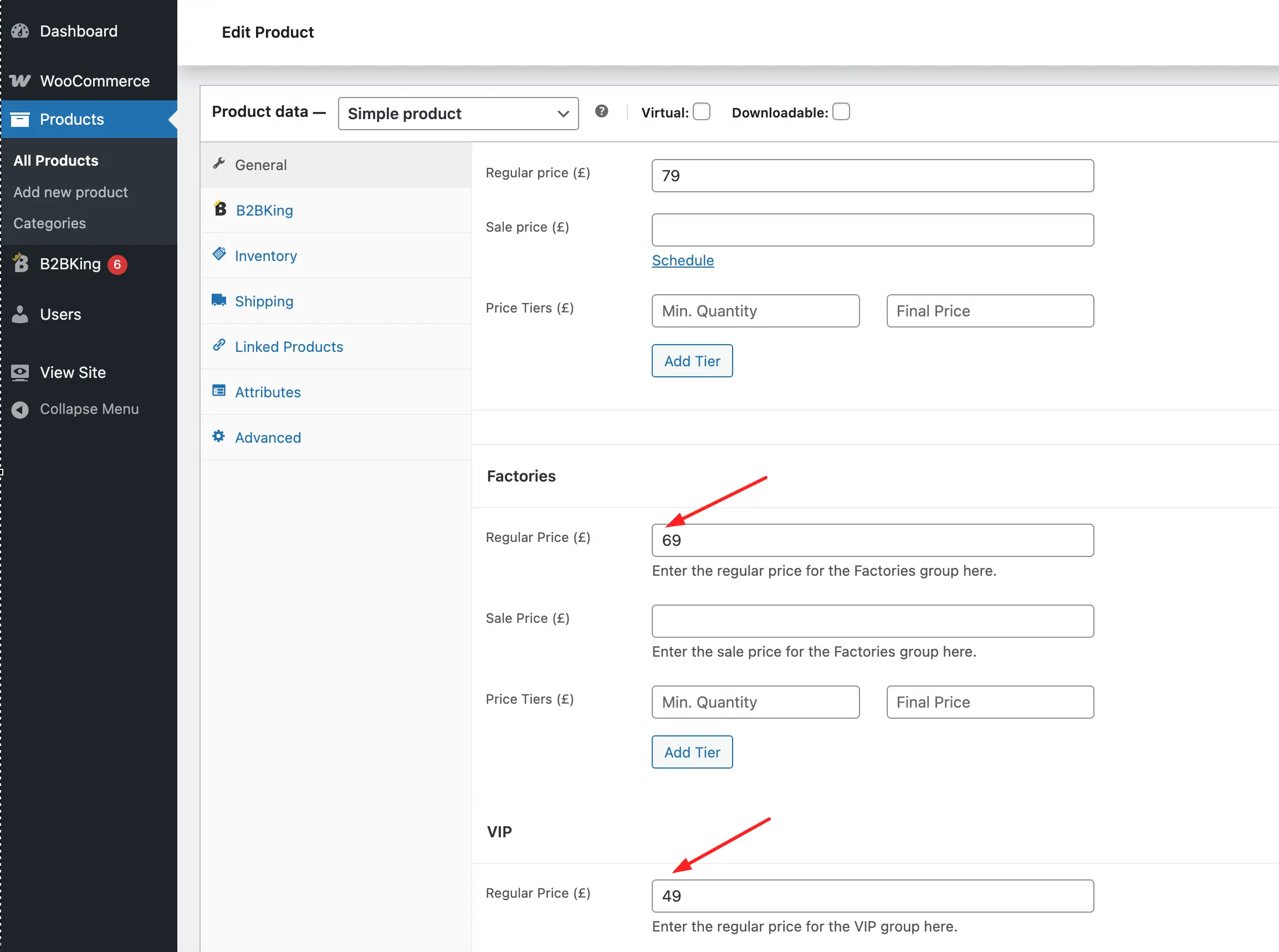
While this works in general, it can sometimes create issues or conflicts. Many plugins attach permissions or functionality to users based on the standard WooCommerce 'customer' role. The moment you start moving your customers onto custom roles, they are no longer recognized as standard 'customer' users, and that can lead to unexpected behavior elsewhere on the site. A tax exemption plugin, for example, might only apply its logic to users with the 'customer' role, which becomes a problem if your B2B users have been moved onto something else.
B2BKing's Customer Groups
To solve this, B2BKing introduces a mechanism called 'customer groups'. The pricing engine itself works in essentially the same way as other solutions. The difference is that roles and groups work together and stack on top of each other. A user can keep the standard WooCommerce 'customer' role while also belonging to a 'Resellers' group. This gives you the same pricing distinctions you would get from custom roles, but without breaking compatibility with the rest of the WooCommerce ecosystem.
For the cases where you do need actual WordPress roles, typically because a third-party plugin only recognizes role-based logic — B2BKing can optionally sync each group to a corresponding WP role and keep the two aligned as users are created, moved, or removed. This is opt-in and described in the WP Roles with B2BKing documentation.
General Solutions
Before diving into specific plugins, it's worth looking at what WooCommerce offers out of the box, along with the kind of custom code you might write yourself.
WooCommerce itself is fairly limited here, as it only allows a single generic price per product. A common workaround is to use coupons to give certain customers different prices, but that approach does not scale well for a real B2B operation.
Custom Code With Hooks
What WooCommerce does provide is an extensive system of hooks that developers can use to modify behavior. The two most important hooks for pricing are woocommerce_product_get_price and woocommerce_product_variation_get_price. A very basic custom snippet might look something like this:
add_filter('woocommerce_product_get_price', 'custom_role_based_price', 10, 2);
add_filter('woocommerce_product_variation_get_price', 'custom_role_based_price', 10, 2);

function custom_role_based_price($price, $product) {
    if (!is_user_logged_in()) {
        return $price;
    }

    $user = wp_get_current_user();

    if (in_array('reseller', (array) $user->roles)) {
        $price = $price * 0.8; // 20% off for resellers
    } elseif (in_array('distributor', (array) $user->roles)) {
        $price = $price * 0.6; // 40% off for distributors
    }

    return $price;
}
The Case for Using a Plugin
This kind of solution can absolutely work, but it's hard to maintain if you are not a developer, and you take on real risk every time WooCommerce releases a major update. The recent transition to HPOS (High-Performance Order Storage) is a good example of a core change that broke many custom solutions which depended on the legacy order structure.
So while WooCommerce itself is flexible and powerful, the main reason to work with a plugin is support. When something breaks, plugin updates tend to be pushed out quickly, underpinned by the commercial incentive to keep paying customers happy.
Hiding Prices and Quotes
Pricing is not the only thing you may want to vary by role. You may also want to hide prices entirely for some visitors, or replace the "Add to Cart" button with a "Request a Quote" option.
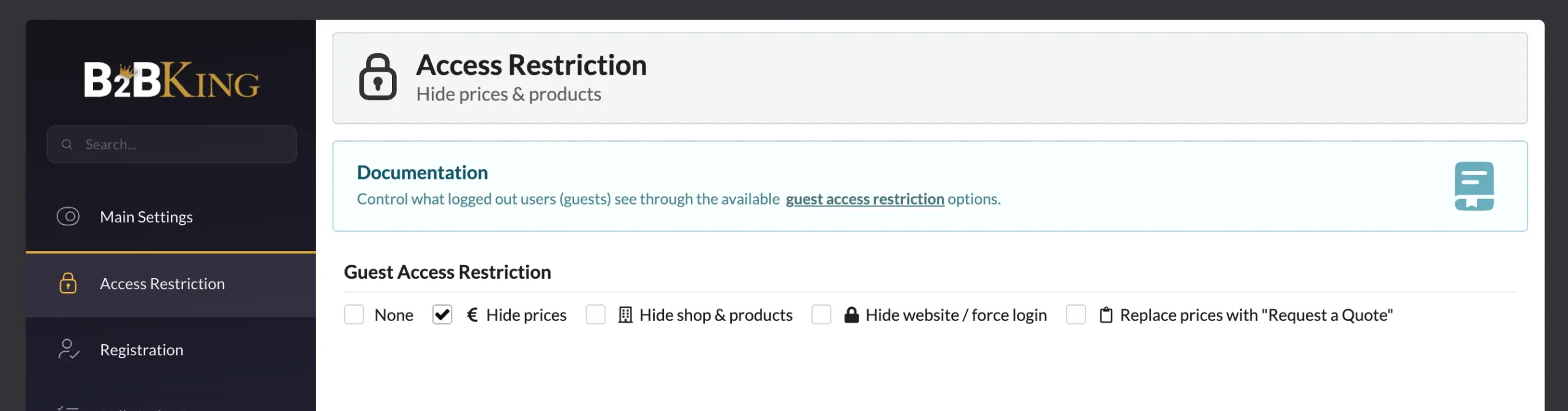
A very common need for B2B stores is hiding prices from logged-out users. B2BKing treats logged-out visitors as a separate case, and you can choose whether to hide prices for them, enable quote requests instead, or even hide the shop and products altogether.
Quote Requests
The quotes system gives the admin more flexibility than pure role-based pricing does. Prices can be set individually for each quote, tailored to that specific customer and that specific request. The customer can then add the quoted items to their cart and check out with the offer they received, rather than the standard listed price.
Assigning Roles Through Registration and Approval
Once you've decided to base pricing on roles, the next question is how a user actually gets a role in the first place. Setting it manually is one option, but it doesn't scale well, especially for larger stores with frequent signups.
A common workaround is to use a forms plugin like Forminator or WP Forms to build a custom registration form. Most of these plugins include a role-assignment option. Some B2B and wholesale plugins also offer their own built-in registration systems.
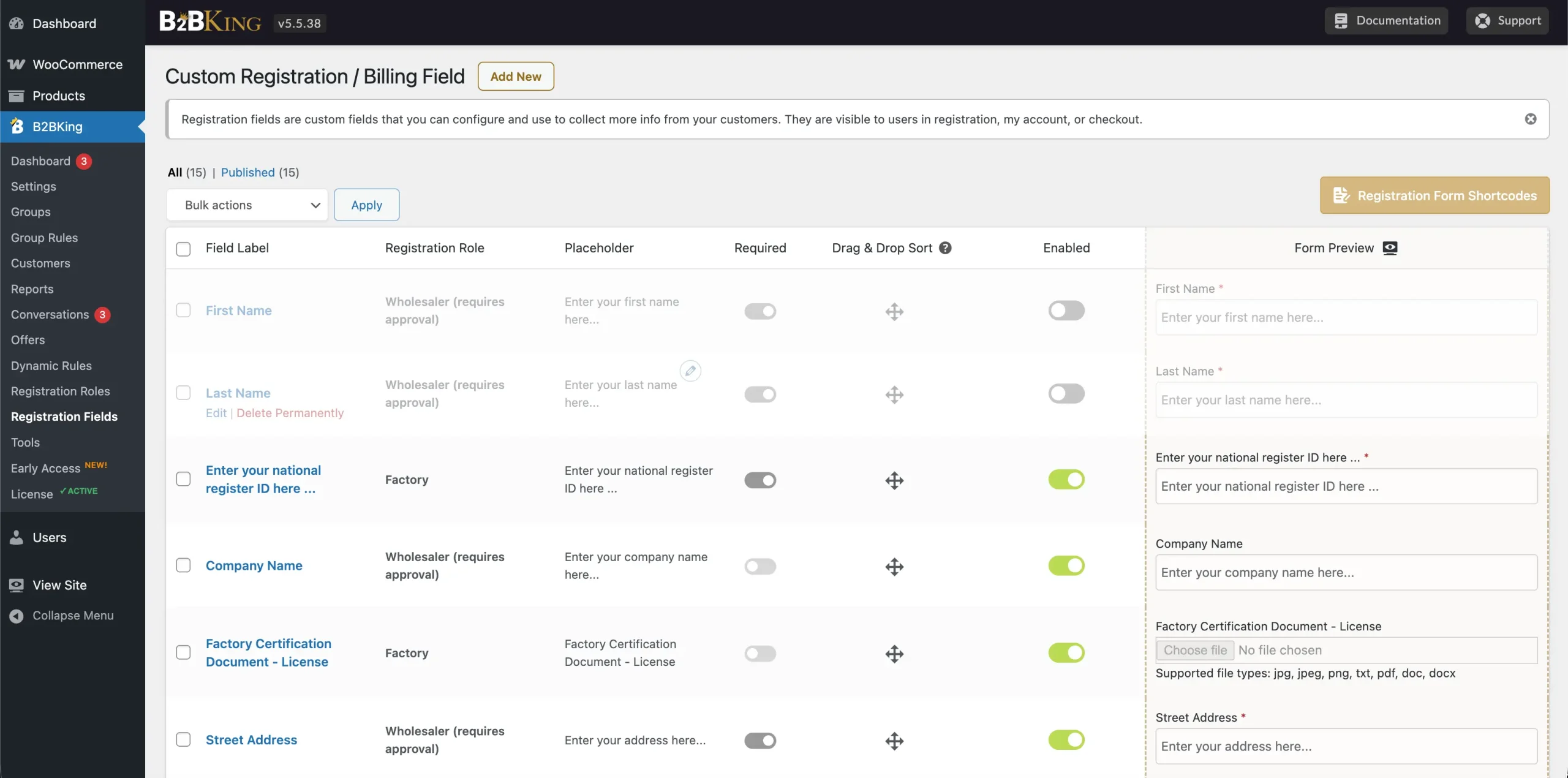
B2BKing provides its own registration form builder with different custom field types. It includes a built-in Role Dropdown that lets the customer choose which role they are applying for, such as Reseller or Distributor. These are just illustrative examples, of course; each store defines its own role names based on its business model. Once submitted, the customer is assigned to the corresponding group.
The Approval Step
Registration approval can be either automatic or manual, with the admin reviewing each application. The important thing to understand is that the role a customer applies for is really just a request. The final decision sits with the admin, who picks the actual group at the moment of approval. Because group membership is what determines pricing, this approval step is effectively where pricing access is granted.
How Prices Work
In B2BKing, each user only sees their own role or group price. When logged out, depending on your settings, a visitor may see a standard retail price. As soon as they log in, the price updates to whatever is correct for their group. Role-based prices are private. Each customer only sees their own, which means the admin can quietly assign different customers to different tiers without anyone knowing what anyone else is paying.
Tiered Pricing
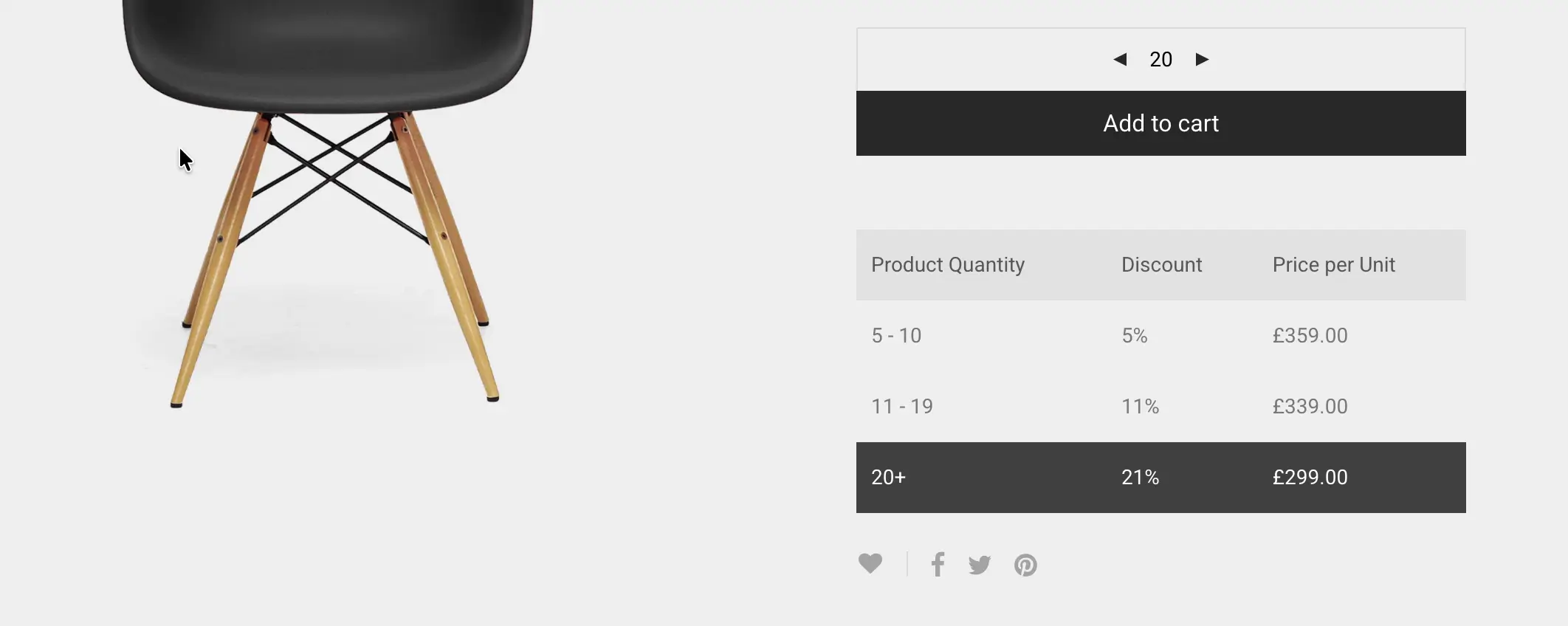
Beyond simple regular and sale prices, B2BKing also introduces tiered pricing, which is essentially volume-based discounting. The unit price drops as the purchased quantity goes up, and this can vary per role. A reseller might get a unit price of $9 when buying 10 or more, while a distributor gets $7 per unit at the same quantity.
Dynamic Discount Rules
There are also options that go beyond editing each product individually. Dynamic rules can apply a discount across all products, or only to a specific category or tag, and again these can be configured separately per role.
A few examples of what this looks like in practice:
- 25% off all items for users in the Wholesale group
- 50% off items in the Computers category for users in the Resellers group, when the order total exceeds $1000
- 15% off the Electronics category for the VIP Users role, with no minimum
Rules can be combined with conditions such as a minimum order amount or quantity, which is useful when you want to incentivize larger orders without committing a customer to a separate tier.
Per-Customer Pricing
Sometimes a single account has negotiated terms that don't apply to anyone else. Creating a group for one customer works but adds admin noise and doesn't scale.
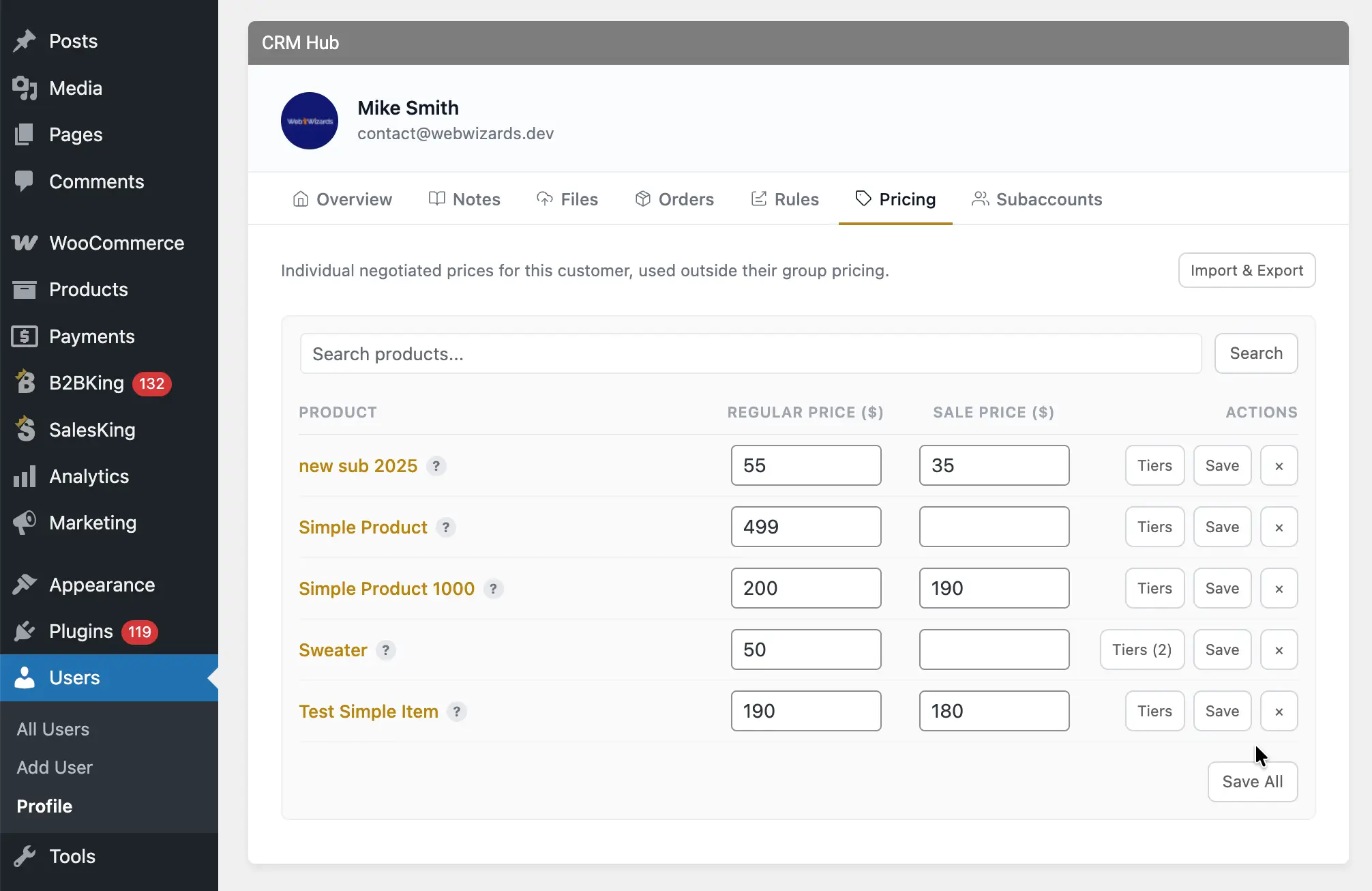
B2BKing offers Customer Price Lists for this. You can assign regular prices, sale prices, and quantity tiers to individual customers, independent of their group. Price lists can be imported and exported as CSV, which is the practical way to handle longer lists from supplier records or an ERP.
B2BKing vs. Other Plugins
There are many solid role-based pricing plugins on the WooCommerce market. If you are wondering what B2BKing does differently regarding pricing alone, the honest answer is that core pricing functionality is quite similar across top-tier plugins.
What makes B2BKing truly stand out is the profound level of ecosystem integration. Simply changing prices is rarely enough to run a successful wholesale business. You also need registration integration, manual customer approval, complex tax exemptions, minimum order requirements, and strict control over payment and shipping methods.
The main difference lies in choosing between ten distinct modules built by different developers, which frequently conflict, and a single all-in-one solution. B2BKing's features are natively fully integrated. Sales agents can create new customers and directly assign their group during the account creation process. Once a customer has an assigned role, you can also attach specific discounts or surcharges to their checkout experience. Rather than just offering different product pricing, you can enforce a 3% surcharge for PayPal payments or grant a 10% discount for bank transfers based entirely on the user's role. This elevates the software from a simple pricing tool into a comprehensive suite for managing an entire wholesale operation.
Conflicts
Whichever plugin or custom solution you end up choosing, conflicts are a real risk in this area. Whenever two different pieces of code try to modify pricing for the same user, it is very easy for them to step on each other. WooCommerce doesn't expose just one or two pricing hooks. There can be as many as twenty different points where a price is filtered: in the cart, in the mini cart, on the product page HTML, in the order totals, and so on. When two plugins each hook into a different subset of these points, the results quickly become unpredictable.
The practical takeaway is to avoid running more than one plugin that actively manages pricing. If you already have a role-based pricing plugin, you should not bolt on a separate dynamic discounts plugin alongside it. Pick one and let it own that responsibility from end to end.
Caching
Caching is another area worth thinking about carefully. The common advice for WordPress sites is that more caching is always better. That can be true for static sites where every visitor sees the same product at the same price, but it falls apart on a site where different roles see different prices. A cache is essentially a snapshot of the page at a given moment. If two users with different pricing end up sharing the same cached version of a product page, one of them is going to see a price that wasn't meant for them.
The way around this is to use a caching setup that can produce a separate cache per role, or ideally per user. We commonly recommend WP Rocket together with its "User Cache" add-on, which gives each logged-in user their own cached version of the site. This is the safer choice for highly dynamic stores where even two users in the same group might end up with slightly different totals, because of a tax exemption applied to one but not the other, for instance.

