
Sell Both B2B and B2C with WooCommerce: How to Set Up a Hybrid Store
Running a store that serves both businesses and consumers is one of the most common requests we hear from WooCommerce shop owners. It sounds simple on the surface, but anyone who has tried to set it up quickly runs into the same problem: B2B and B2C are fundamentally different sales models, and most e-commerce platforms are built around one or the other.
This article looks at why a hybrid approach is worth the effort, where the difficulties usually come from, and how B2BKing handles them inside WooCommerce.
Why run both channels from one store
B2B and B2C rarely cannibalize each other. They tend to reach different buyers, follow different purchase cycles, and respond to different kinds of marketing. A consumer buying a single item through a product page and a distributor placing a recurring order for several hundred units are doing two different things, even if the underlying catalog is the same. Serving both from one storefront means you get more out of the catalog, the inventory, and the operational work you are already doing, without having to maintain a second website.
The complications of mixing the two models
The reason this is harder than it sounds is that B2B carries a lot of requirements that simply do not exist in consumer retail. Business customers often expect negotiated pricing, account-specific terms, tax exemptions, payment on invoice, approval workflows, and the ability to request quotes before committing to an order. Standard WooCommerce, like most consumer-focused platforms, does not address these needs out of the box. Our WooCommerce B2B guide covers each of these requirements in detail.
WooCommerce as the foundation
WooCommerce remains the most widely used e-commerce platform on the web, powering a substantial share of online stores worldwide. Its strength is flexibility: it is open source, extensible, and has a mature ecosystem of plugins and themes. That flexibility is what makes a hybrid setup possible in the first place, provided the right extensions are in place to handle the B2B side. We compare the main options in our roundup of the best WooCommerce B2B plugins.
Where B2BKing fits in
B2BKing is built specifically to fill that gap. It currently includes more than 137 features covering the full range of wholesale and B2B needs, from registration and approval workflows through pricing rules, quote management, payment control, and reporting.
A complete overview of the plugin and its capabilities is available on the B2BKing product page.
Setting up the hybrid mode
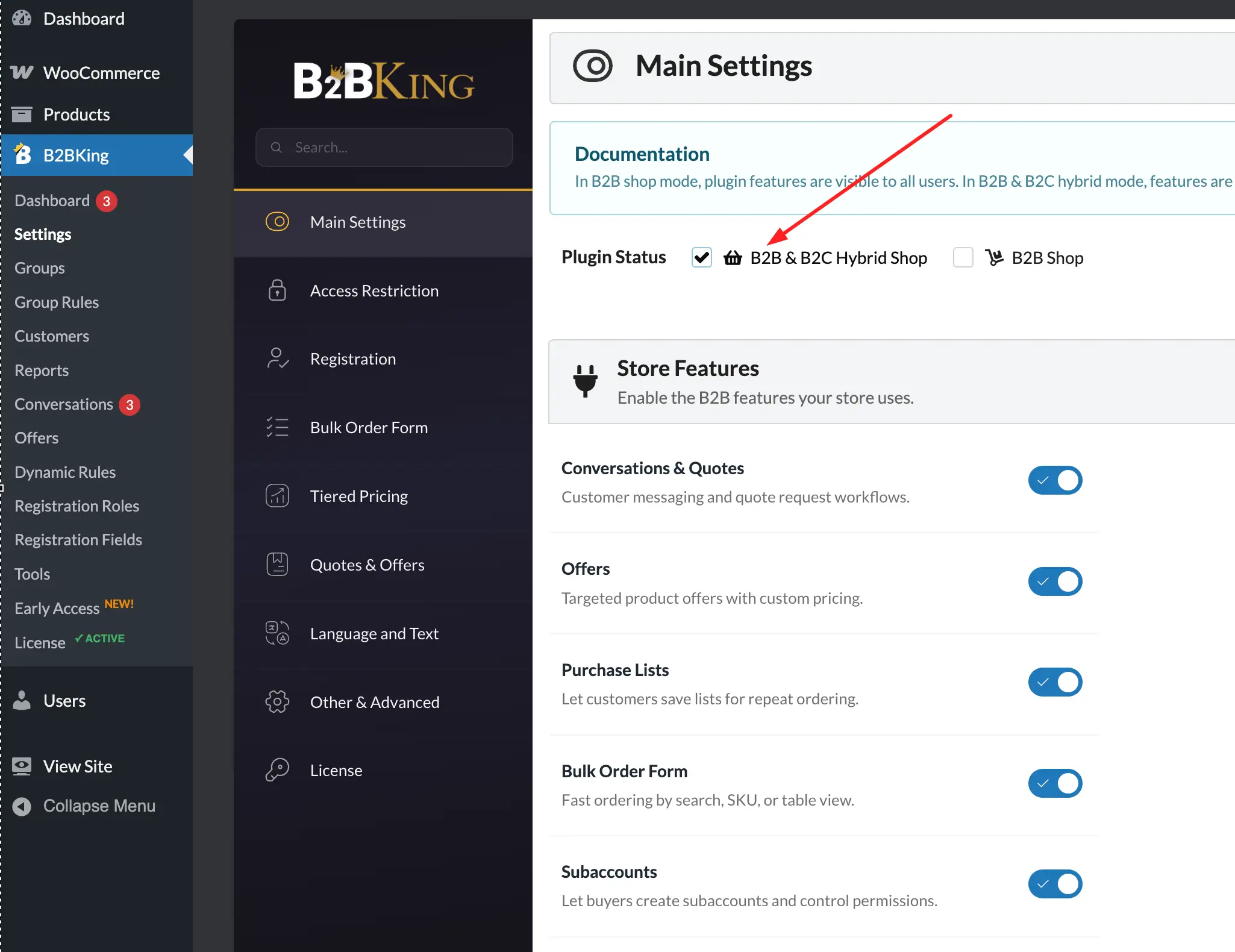
B2BKing has Plugin Status setting that determines whether the store runs as a pure B2B operation or as a B2B and B2C hybrid. In hybrid mode, the plugin recognizes which type of customer is browsing and adjusts the storefront accordingly.
B2B-specific features such as quote requests, conversations, and the wholesale order form are shown to business users and hidden from consumers, who continue to see a normal WooCommerce shopping experience.
This separation is the foundation that everything else in this article builds on. Once the store knows who is who, almost every part of the buying experience can be configured differently for the two audiences. For a deeper walkthrough of the initial configuration, see the B2BKing setup guide.
Registration with a shared form and roles
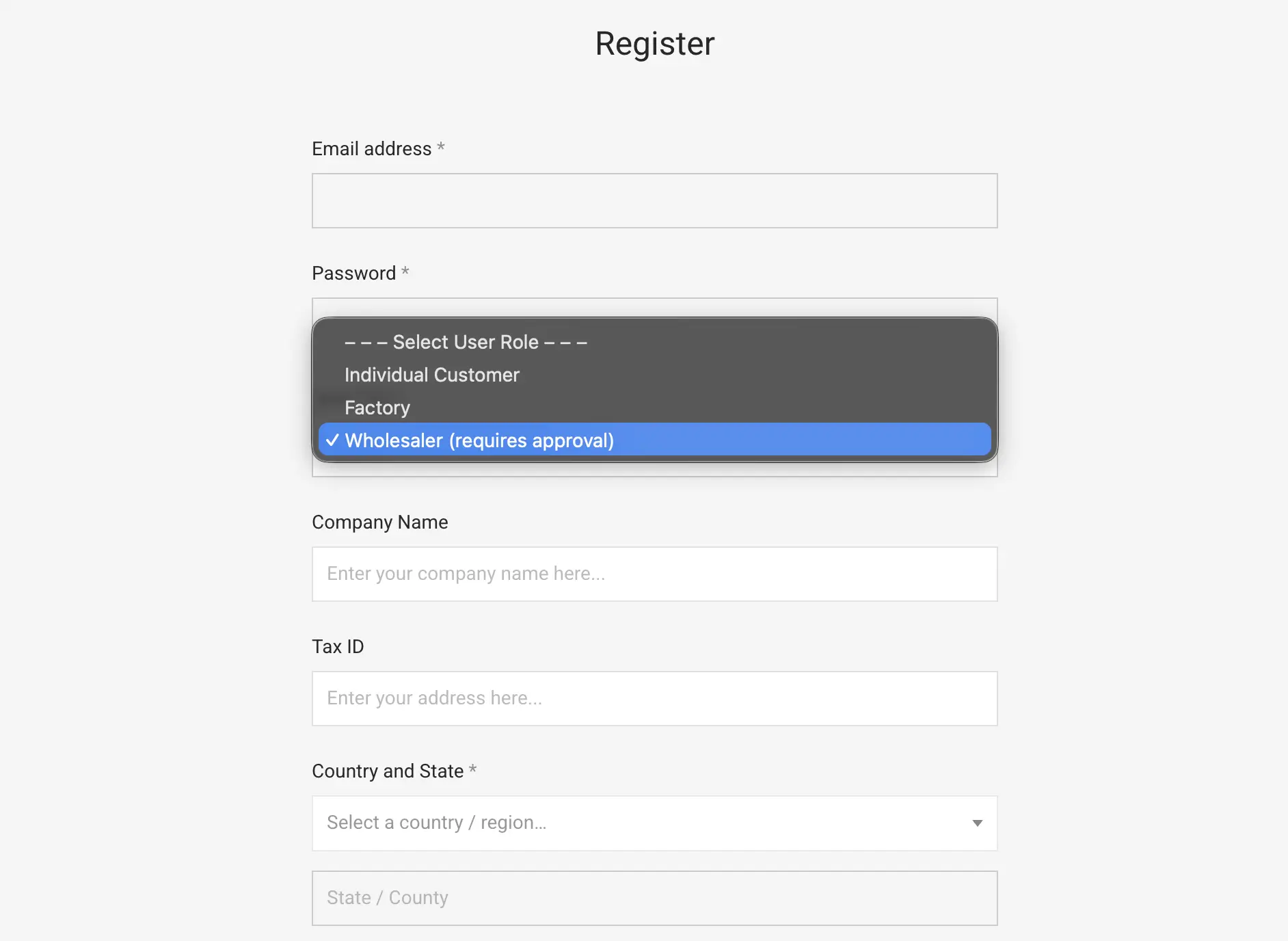
The first registration approach uses a single registration page with multiple roles, where users select whether they are signing up as a business or as a consumer. Choosing a B2B role can reveal additional fields such as company name, VAT number, or any custom fields you define.
You can require manual approval for business accounts while letting consumer accounts activate immediately.
Registration with separate B2B and B2C flows
The second approach is to keep the two registration flows entirely separate. B2BKing provides a shortcode, [b2bking_b2b_registration], that renders a dedicated B2B registration form on any page you choose.
Consumers go through the standard WooCommerce registration with no awareness that a B2B side exists, while business customers reach their own form through a link you control, perhaps from a "Wholesale" or "For Resellers" page in your menu. The right choice between the two approaches depends on how visible you want the B2B side of your business to be.
Reviewing and approving business accounts
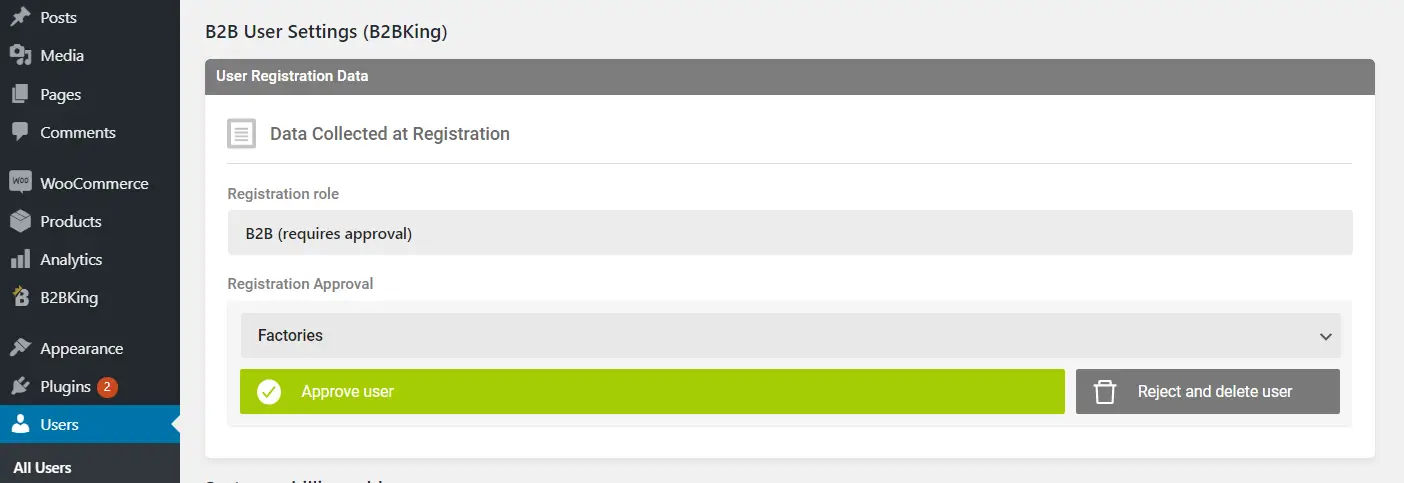
When a B2B account requires approval, the store administrator receives an email notification and can review the submitted information before either approving the user and assigning them to a customer group such as Resellers, Distributors, or VIP, or rejecting the application. Each user's status can also be changed manually later from the user settings screen.
Configuring the two experiences
The point of a hybrid store is not just that both audiences can buy from you. It is that each audience gets an experience suited to how they actually purchase. B2BKing is built around the idea that nearly every part of the shopping experience should be configurable per user group. The sections below illustrate how far this goes.
Pricing and discounts
You can offer one price to consumers, a lower price to small business accounts, and a lower price still to large distributors, all on the same product. Tiered pricing and volume discounts can be enabled for B2B groups while consumers continue to see the standard retail price. Dynamic rules can apply only when certain quantities or order values are reached, or target specific products, categories, or user groups. An automatic tiered pricing table can be displayed on product pages so business customers immediately see the volume breaks available to them.
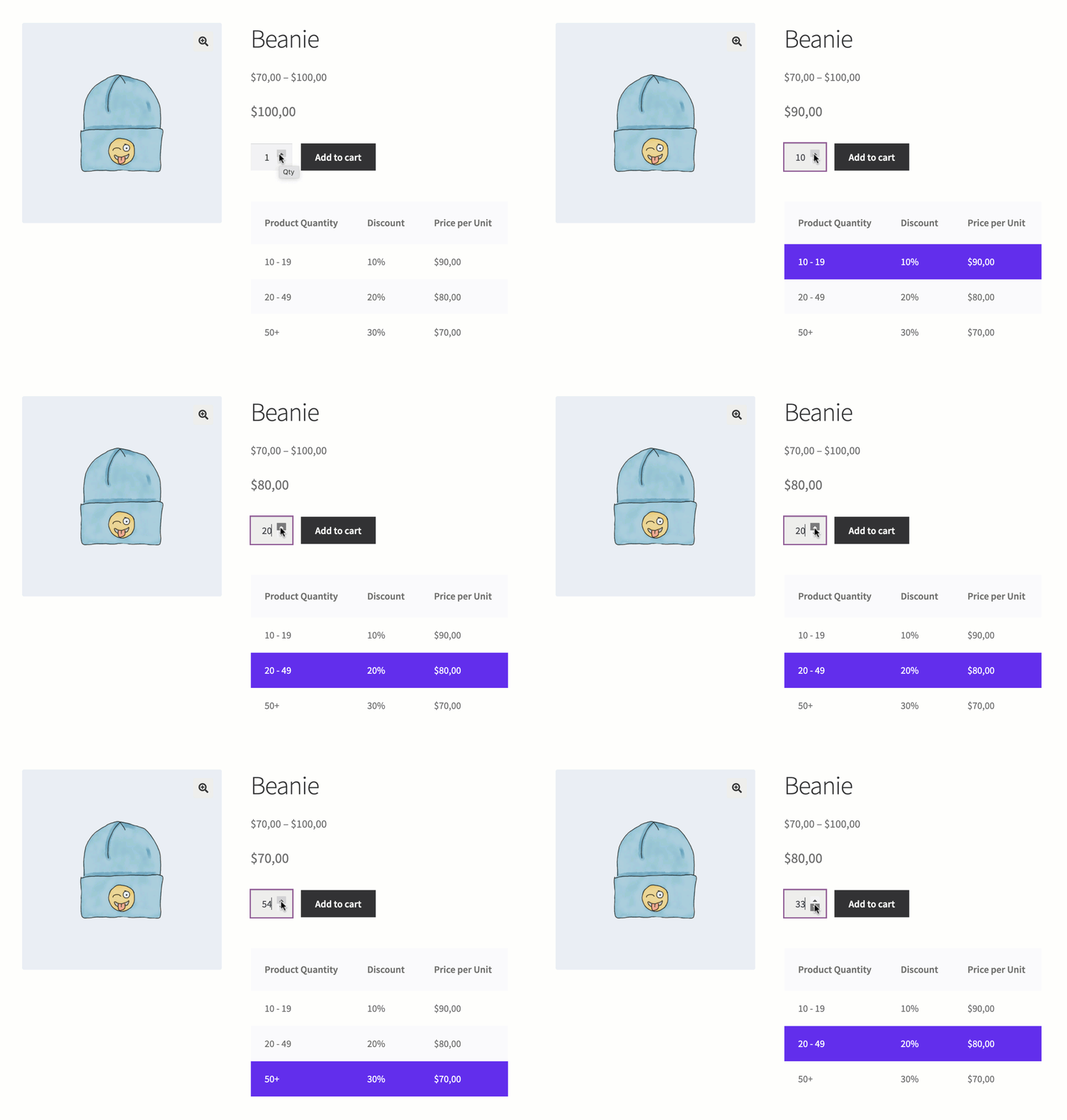
Coupons follow the same logic. They can be restricted to B2B or B2C users, given different values per user group, or disabled entirely for B2B if you prefer to handle business pricing through dynamic rules instead. You can also configure discounts that apply only to consumer orders, or set minimum order quantities and values that apply only to wholesale customers.
Payment and shipping methods
Consumers and businesses rarely pay the same way. A consumer typically pays by card or through a wallet such as PayPal at checkout, while a business customer often expects to receive an invoice and pay later by bank transfer or purchase order. B2BKing lets you assign payment methods per user group or even per individual user.
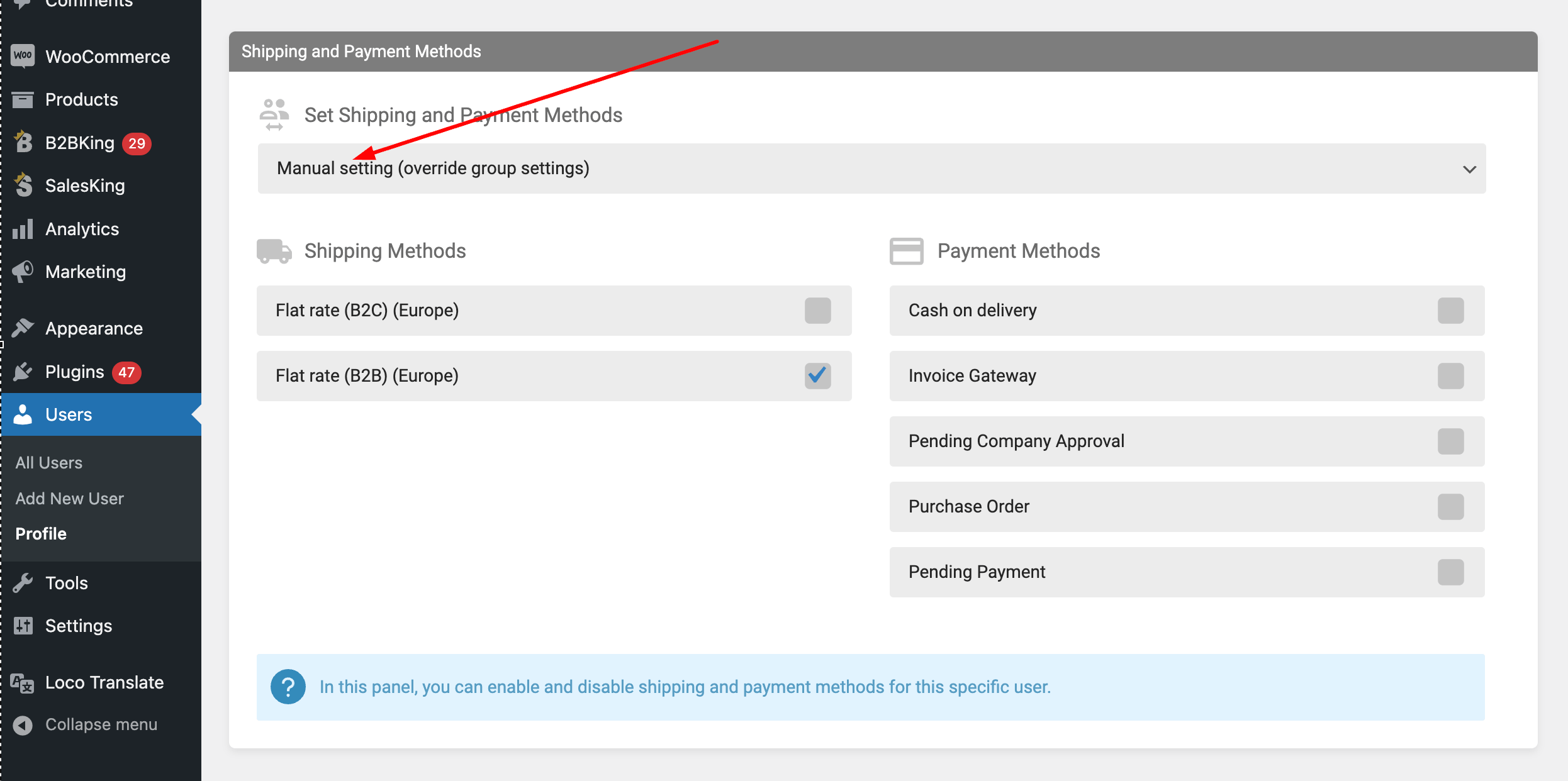
You might offer card and PayPal to your B2C customers, wire transfer and the built-in invoice payment gateway to your B2B customers, and a purchase order option to a select group of approved accounts. Surcharges and discounts can be attached to specific payment methods, and minimum or maximum order values can determine when each method becomes available.
Shipping behaves the same way. Different groups can see different shipping options, different rates, or different free shipping thresholds. A wholesale customer ordering pallets needs nothing in common with a consumer ordering a single item, and the store should reflect that.
Tax display and exemptions
B2B and B2C customers often need to see prices differently. Logged-in business customers might see prices excluding VAT, while consumers see prices including VAT, all on the same product page. EU stores can validate VAT numbers against VIES and apply tax exemptions automatically for qualifying business customers. Withholding tax and other less common tax structures are also supported.
Quotes and negotiation
Many business orders begin as a conversation rather than a checkout. B2BKing adds a quote request system where B2B users can submit a cart as a quote request, send a message, and receive a custom offer in return.
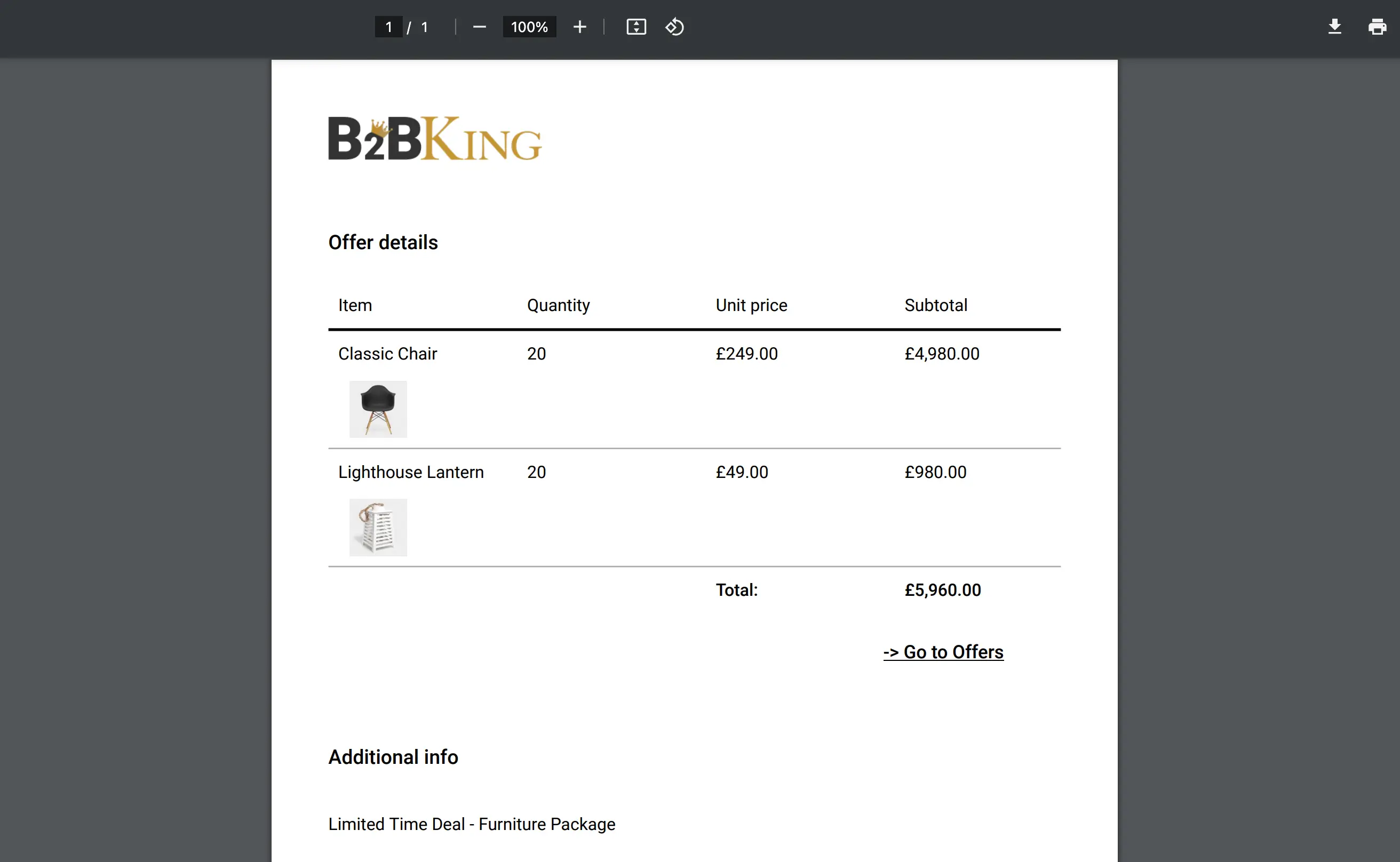
You can convert quotes into offers, attach branded PDFs with your company logo, and send quotes by email, including to guests who are not yet registered. Custom quote fields with nine field types let you collect exactly the information you need from the buyer up front. Consumers, meanwhile, continue to use the standard add-to-cart and checkout flow without ever seeing any of this.
Product visibility
Not every product needs to be visible to every customer. You can mark certain products as wholesale only, and consumers will not see them in the catalog, in search results, or anywhere else on the storefront. You can also do the reverse and reserve some products for retail customers only. This is useful when your wholesale catalog includes bulk packs, case quantities, or trade-only items that would only confuse a consumer browsing the site.
The buying interface itself
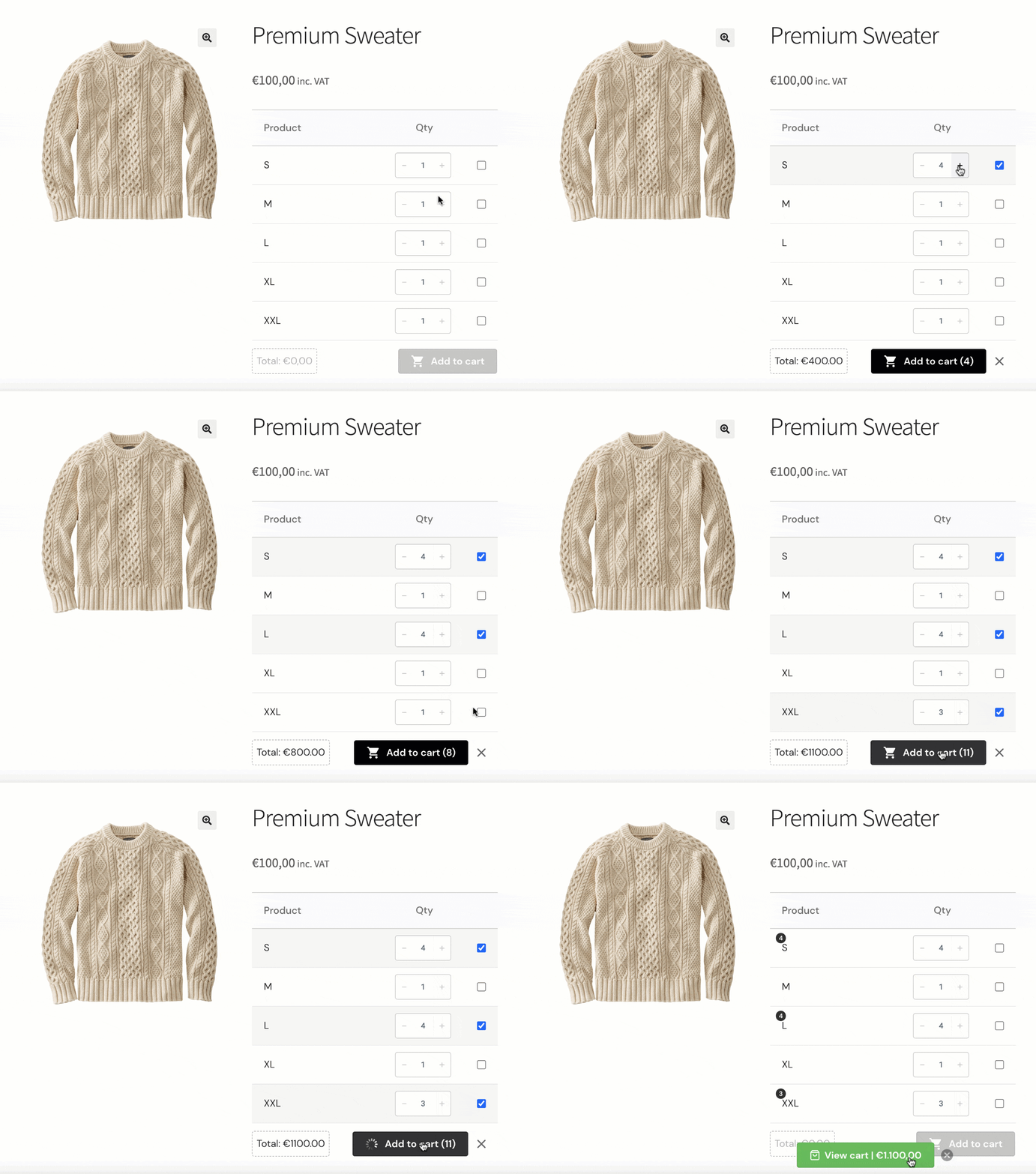
Business customers usually know what they want and want to order it as quickly as possible. The wholesale order form gives them a fast way to search the catalog, enter quantities, and add many products to the cart in one screen. Purchase lists let them save frequent orders and reorder them with a single click, and lists can be downloaded as CSV for record keeping. A bulk variations table gives quick access to all variations of a product on a single screen. Quick orders can also be placed by uploading a CSV.
The underlying principle is that flexibility should run end to end. Almost any setting that matters, including pricing, payments, shipping, tax display, visibility, discounts, and order rules, can be configured differently for different audiences.
Inventory and operational features
Beyond the storefront experience, a hybrid store needs to handle inventory and account management in ways that respect how businesses actually operate.
Separate stock for B2B and B2C
In a hybrid store, it is common to want to reserve a portion of inventory for wholesale buyers, or to keep retail availability protected from large business orders that could clear out the warehouse in a single transaction. B2BKing lets you assign separate stock quantities for B2B customers, or alternatively enable backorders for B2B users while keeping standard stock rules in place for consumers. This makes it possible to honor both audiences fairly without resorting to a second store or a duplicated catalog.
Multiple buyers and order approval
Multiple buyers can be attached to a single company account, so several employees can place orders under the same business while the account owner retains overall control. Company order approval lets a designated account holder review and approve or reject orders submitted by employees before they are processed.
Customer ranks and reporting
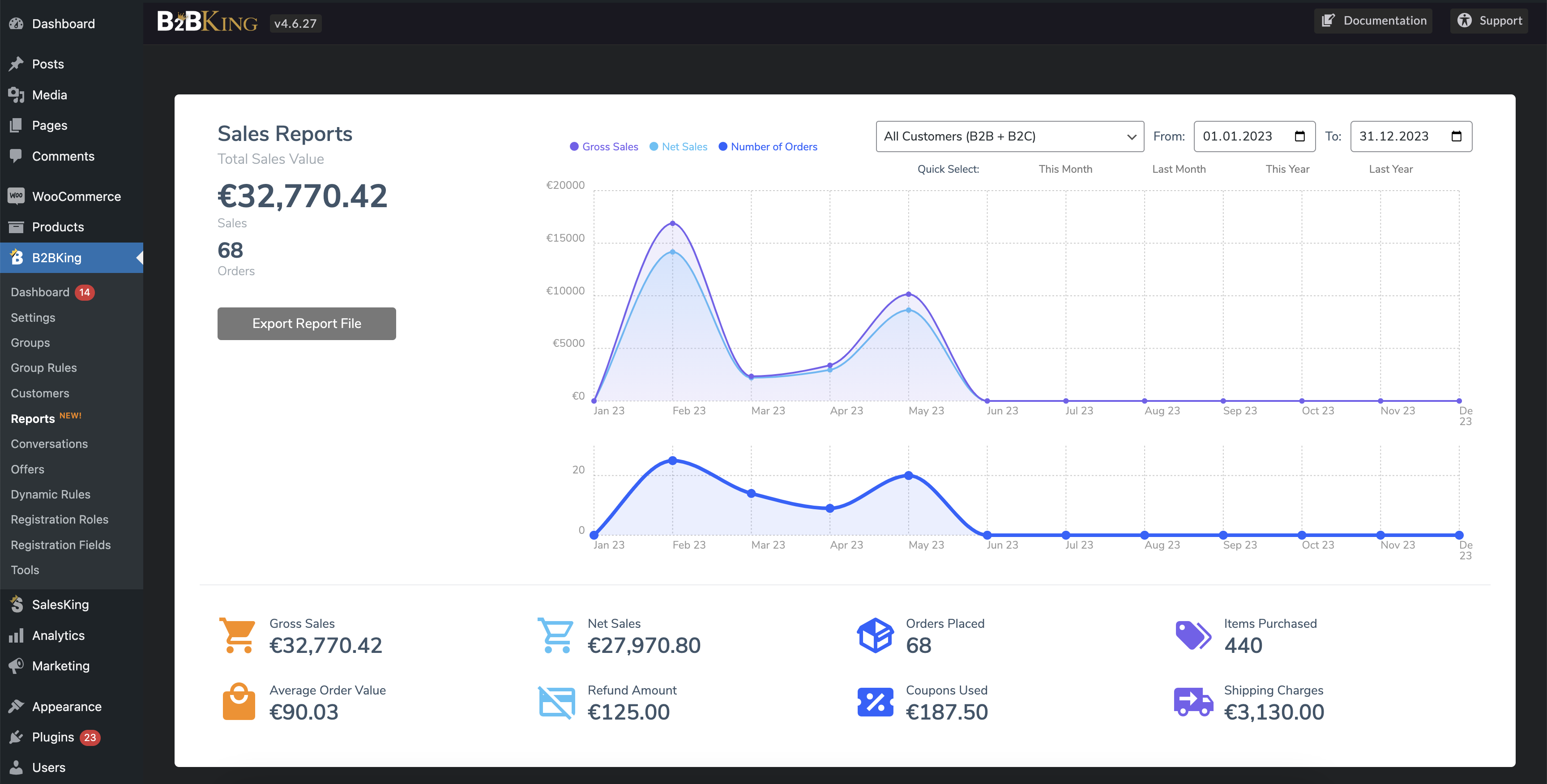
A rank system can automatically move customers between groups based on their total purchase value over time, rewarding loyal accounts without manual intervention. Reports and analytics give you visibility into sales data broken down by B2B customers and groups, so you can see how each segment of your business is performing.
Trying it out
A live demo of B2BKing is available for anyone who wants to explore the plugin before deciding: https://demobk1.wpbay.co/b2bking-demos/
Full information about the plugin, including the complete feature list and documentation, is available at KingsPlugins.com.
If you have questions about running a hybrid B2B and B2C store, or about how a specific scenario would map onto B2BKing's features, get in touch and we will be glad to help.

