
WooCommerce Customer Specific Pricing: Per-User Prices
WooCommerce stores that sell to businesses rarely charge every customer the same price. A distributor who has been ordering for five years has negotiated better terms than a reseller who signed up last month. A large account may have a contract that fixes the prices of forty specific products for a full year. An importer might buy your entire catalog at rates agreed in an annual meeting, rates that apply to nobody else.
In these situations, role-based or group-based discounts only get you part of the way. What you actually need is customer specific pricing: the ability to set per-user prices for individual accounts, on individual products. This article looks at how per-user pricing can be handled in WooCommerce, from built-in workarounds and custom code to dedicated plugin features, including B2BKing's Customer Price Lists.
Customer-Specific vs. Role-Based and Group Pricing
Most pricing plugins on the WooCommerce market are built around roles or groups. You assign each customer a role such as Reseller or Distributor, then define prices or discounts for each role. We covered this model in detail in our WooCommerce role-based pricing guide, including how B2BKing implements it through customer groups.
Group pricing is the right tool when your customers fall into a handful of tiers. It starts to break down when each customer has individually negotiated terms. The common workaround is to create one group per customer. This technically works, and for three or four special accounts it is perfectly fine. It scales badly, though. With 50 customers you are managing 50 groups, and with 200 customers the groups page becomes unusable. Every price change means hunting down the right group, and every new contract means creating yet another one.
A dedicated per-customer pricing feature is surprisingly rare in the WooCommerce ecosystem. Most plugins stop at roles and groups. B2BKing offers both models side by side: groups for tier-based pricing, and Customer Price Lists for individual accounts. You can use whichever fits each situation, and as we will see later, you can freely combine them.
Setting Per-User Prices Without a Plugin
Before looking at plugin features, it is worth covering what WooCommerce can do on its own.
The honest answer is: not much. WooCommerce supports a single regular price and a single sale price per product, shown identically to every visitor. The closest built-in workaround is coupons. You can create a coupon restricted to a specific customer's email address, which effectively gives that person a personal discount. For an occasional gesture this is fine, but it is not real customer specific pricing. The customer still sees generic catalog prices, has to remember to apply a code, and you cannot express something like "this account pays 42.50 for this SKU per our contract" through a percentage coupon.
A Basic Code Snippet
WooCommerce does expose pricing filters that developers can hook into. The same hooks we used for role-based pricing can be keyed on the user ID instead of the role:
add_filter('woocommerce_product_get_price', 'custom_user_specific_price', 10, 2);
add_filter('woocommerce_product_variation_get_price', 'custom_user_specific_price', 10, 2);

function custom_user_specific_price($price, $product) {
    $user_id = get_current_user_id();

    // User 123 pays 42.50 for product 800
    if ($user_id === 123 && $product->get_id() === 800) {
        return 42.50;
    }

    return $price;
}
This works, and for a single exception it may be all you need. The problem is what happens next. Every negotiated price becomes another hardcoded line of PHP. Only a developer can update prices, staff have no interface to work with, and the price displayed in the shop loop, the cart, the mini cart and the order totals may each require additional filters, since WooCommerce filters prices in many different places. Custom pricing code also carries real maintenance risk: the transition to HPOS (High-Performance Order Storage) is a recent example of a core change that quietly broke many custom solutions. A supported plugin gets patched quickly when WooCommerce changes; a forgotten snippet in functions.php does not.
B2BKing Customer Specific Pricing
B2BKing's Customer Price Lists feature exists precisely for the scenario above: negotiated per-user prices, managed through an actual interface, without creating a separate group or rule for every customer.
You can manage customer prices from three places, depending on how you prefer to work:
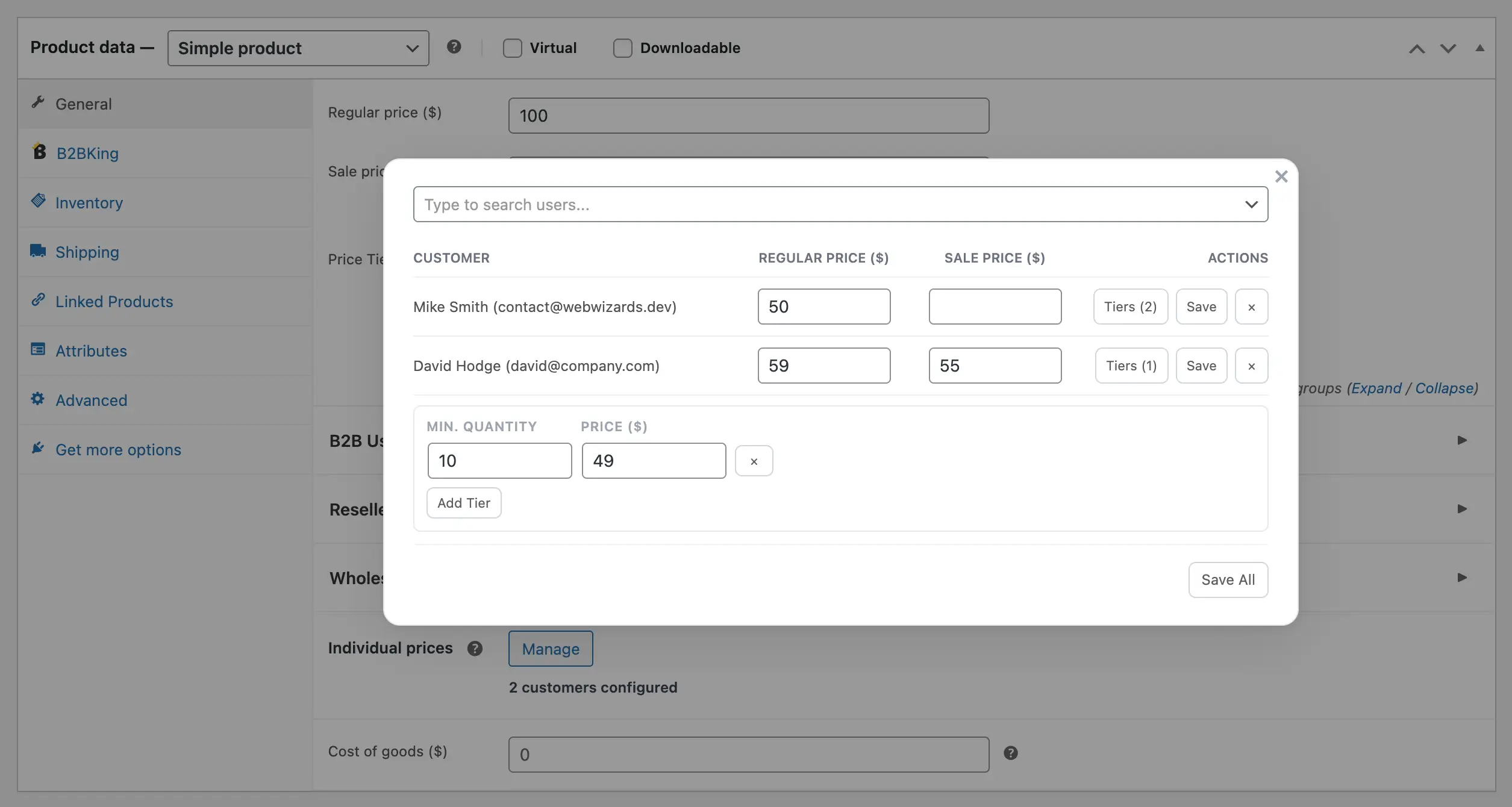
- The product edit page. In the B2BKing pricing area of any product, an Individual Prices section lets you view and edit every customer who has a special price on that item. This is the natural view when working product by product.
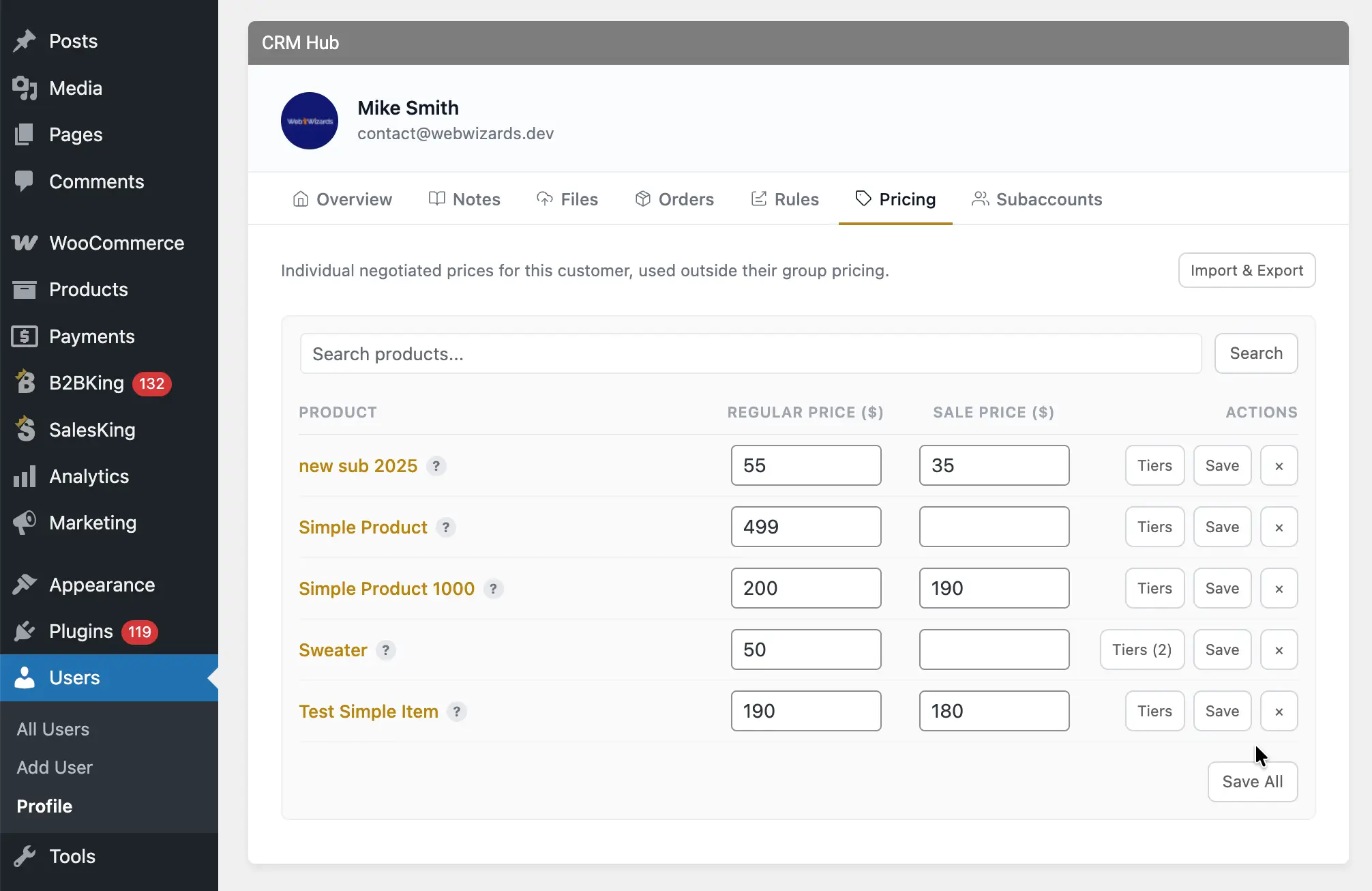
- The B2BKing Customers page. Each customer profile has a Pricing tab where you can search products, add prices, edit them and manage quantity tiers. This is the best view for maintaining one customer's full negotiated list.
- The WordPress user profile. The same Pricing panel appears on the user's profile page, which is convenient if you are already editing the account.
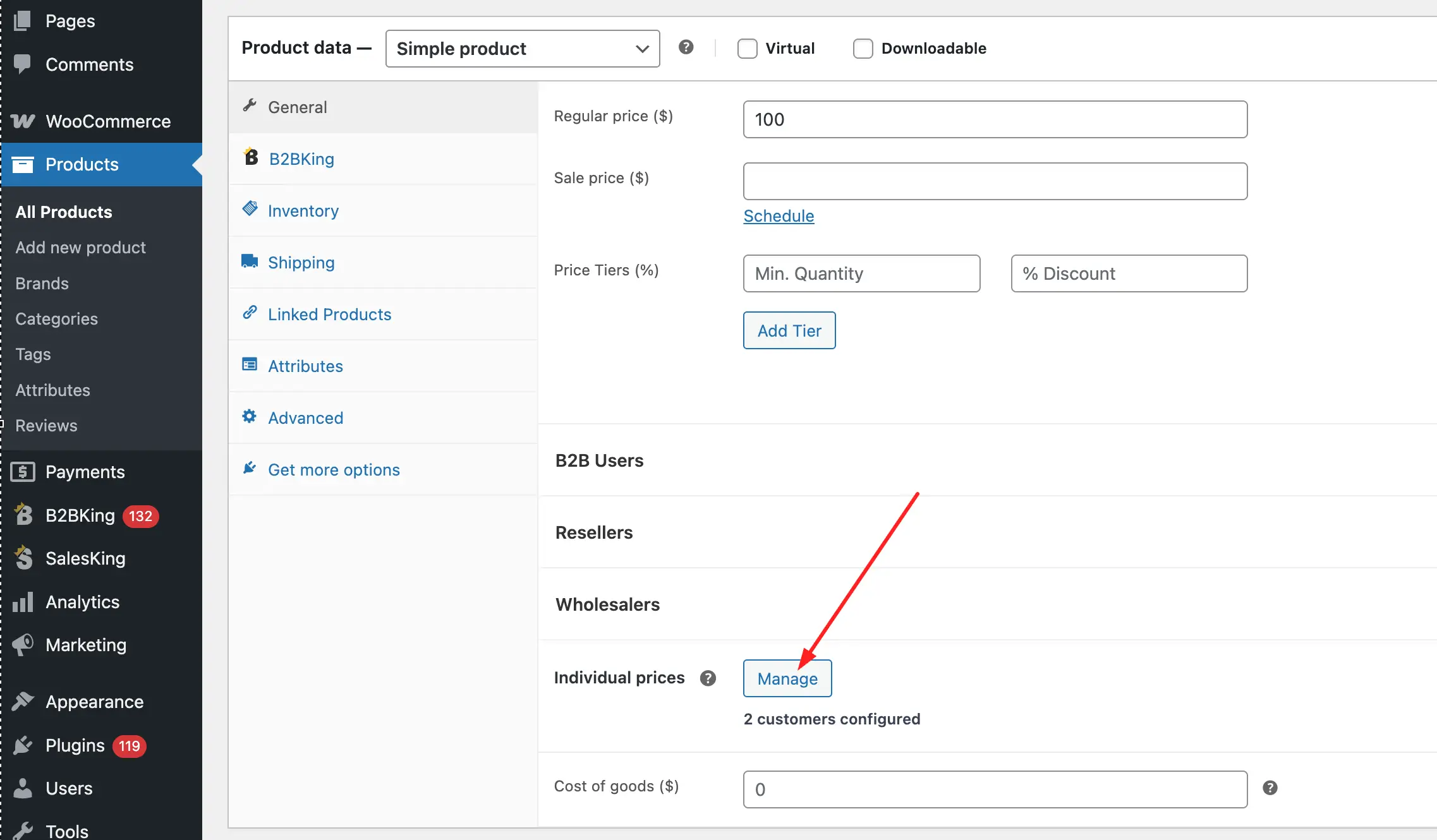
For each customer and product combination you can set a regular price, a sale price, and quantity price tiers. Tiers work the same way as B2BKing's standard tiered pricing, so a specific customer can pay 45 per unit at 10+ units and 39 per unit at 100+, with those breakpoints applying to them alone.
Per-user prices are private. Each customer sees only their own price once logged in, so you can quietly maintain different terms for different accounts without anyone knowing what anyone else pays.
Bulk Management: CSV Import and Export
Typing prices into an interface is fine for a dozen products. Real contract price lists often cover hundreds or thousands of SKUs, frequently coming out of an ERP or a supplier spreadsheet. For this, Customer Price Lists support CSV import and export through the standard WooCommerce product importer.
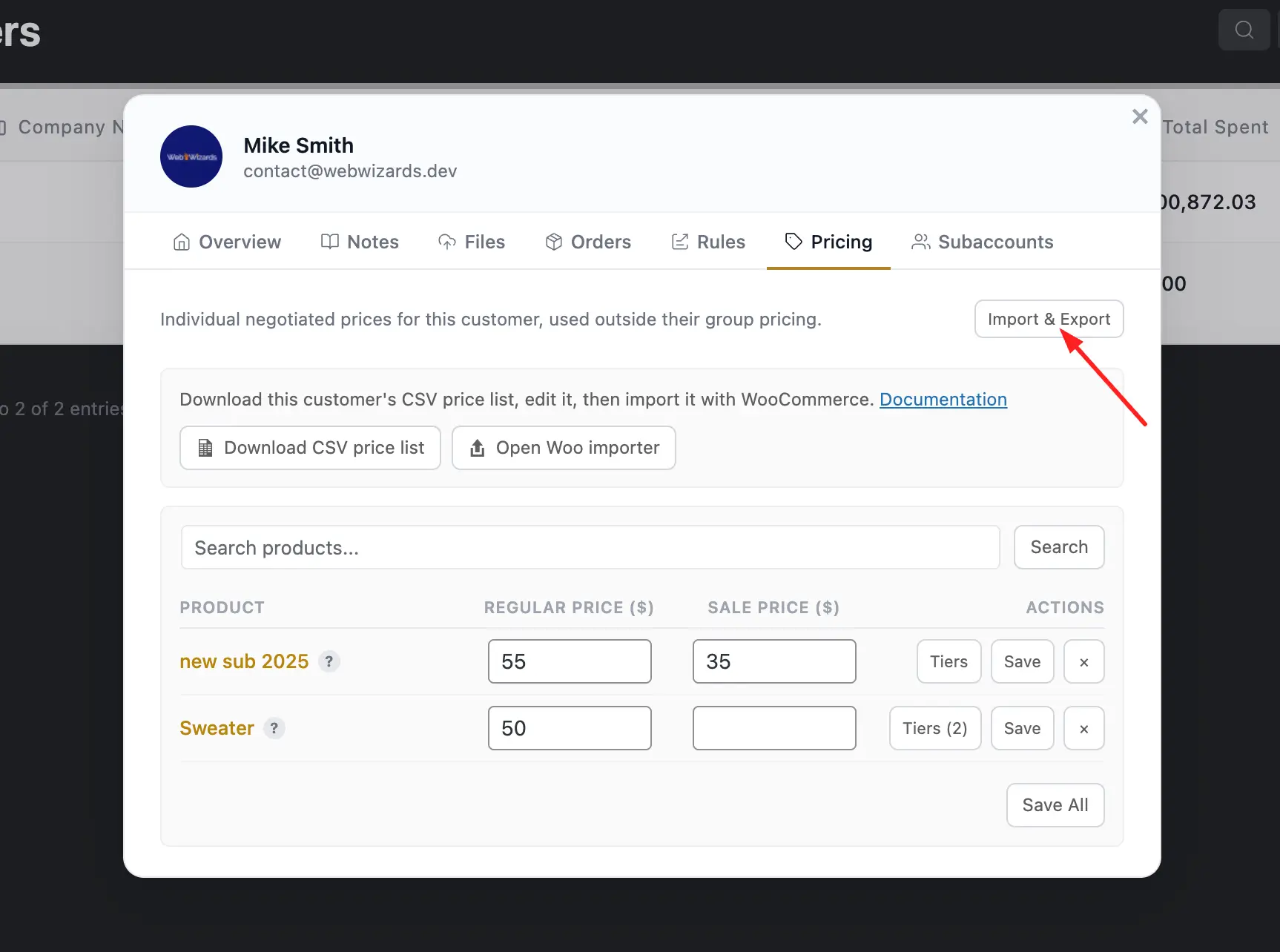
From any customer's Pricing tab, you can download a CSV price list for that customer. The file includes all products and variations, with any existing negotiated prices and tiers already filled in and empty columns where no custom price exists yet. You edit the file in a spreadsheet, then upload it through the WooCommerce importer. The file is already prepared for the importer: columns are named correctly, fields are pre-mapped, and updating existing products is enabled automatically, so in most cases the import is just a few clicks.
It is also possible to import prices for multiple customers in a single CSV by adding a set of price columns per user. This makes it practical to sync per-user prices from an external system on a schedule, which is how many stores connect their WooCommerce catalog to ERP-managed contract pricing.
Combining Pricing Mechanisms: Inherit and Override
This is where per-user pricing becomes genuinely practical rather than just another data-entry chore. A common misconception is that customer specific pricing means filling in a price for every product, for every customer. In B2BKing, it does not, because pricing mechanisms layer on top of each other.
Consider a typical setup. A dynamic rule gives all B2B customers a global 10% discount. The Wholesale group additionally has its own group price list on core products. Then one particular customer, say a long-standing distributor, has negotiated a special fixed price on exactly one product. You enter one single customer price for that customer, and the logic resolves itself: on that one product they get their negotiated price, which overrides everything else, and on every other product in the store they simply inherit their group prices and the global discount like everyone else.
In other words, customer prices sit at the top of the hierarchy and act as targeted exceptions. Group prices, tiered pricing and dynamic rules handle the broad strokes; per-user prices handle the contracts. You maintain the smallest possible amount of pricing data, and every customer still sees exactly the number they agreed to.
Dynamic rules themselves can also target individual users, not just groups. Beyond discounts, rules cover things like fixed prices, free shipping, hidden prices, minimum order values and tax exemptions, and any of these can be scoped to a single account when needed.
When Prices Are Negotiated Case by Case: Quotes and Offers
Not every custom price belongs in a permanent price list. Sometimes a customer asks for pricing on a one-off large order, and the number you give them applies to that deal only. For these cases B2BKing includes a quote request system, which can be enabled globally or on specific products only, along with custom offers the admin can send to individual buyers. The customer receives their quoted prices, adds the items to the cart and checks out at the agreed amount. Quotes handle the negotiation itself; Customer Price Lists store the outcome when the pricing becomes standing.
An All-in-One Solution
It is fair to ask how B2BKing compares to other plugins here, and the honest starting point is that a store rarely needs custom pricing in isolation. The same wholesale operation that needs per-user prices usually also needs B2B registration with approval, VAT handling and tax exemptions, invoice or purchase order payments with net 30 terms, minimum order requirements, and control over which payment and shipping methods each customer can use.
B2BKing's core design goal is to be a complete all-in-one B2B solution covering all of this natively: customer specific pricing, group pricing, tiered pricing, dynamic rules, quotes on specific products, offers, invoice and purchase order gateways, tax exemption and VAT/VIES validation, registration approval, subaccounts and more. The practical advantage is that you will most likely not need to add other B2B plugins down the road. That matters more than it sounds, because pricing is exactly the area where plugin conflicts are most common. One integrated system that owns pricing end to end is far safer than three separate plugins each filtering prices in their own way. Our complete guide to WooCommerce B2B shows how these pieces fit together.
Practical Considerations
Conflicts. Whichever solution you choose, avoid running more than one plugin that actively modifies prices. WooCommerce filters prices at many different points (product page, cart, mini cart, totals), and two plugins hooking into different subsets of them will produce unpredictable results. Pick one pricing system and let it own the job.
Caching. Per-user prices make caching strategy critical. A page cache is a snapshot, and if two users share the same cached product page, one of them sees the wrong price. With customer specific pricing, even users in the same group can see different numbers, so you need caching that works per user, not just per role. We commonly recommend WP Rocket with its User Cache add-on, which gives each logged-in user their own cached version of the site.
Frequently Asked Questions
Can WooCommerce show different prices to different customers? Not by default. WooCommerce supports one price per product for all visitors. Per-customer prices require either custom code using pricing filters or a plugin with a dedicated customer pricing feature, such as B2BKing's Customer Price Lists.
What is the difference between role-based pricing and customer specific pricing? Role-based (or group-based) pricing assigns prices to a category of users, such as all Resellers. Customer specific pricing assigns prices to one individual account. Role pricing suits tiers; customer pricing suits negotiated contracts. B2BKing supports both and lets them work together.
Do customer specific prices override group prices? Yes. In B2BKing, a per-user price on a product takes priority over group prices. On all other products, the customer continues to inherit their normal group pricing.
Can I import per-user prices via CSV? Yes. Each customer's price list can be exported as a pre-mapped CSV, edited in a spreadsheet and re-imported through the standard WooCommerce importer. Multiple customers' prices can also be imported in a single file, which works well for ERP integrations.
Do customers see each other's prices? No. Per-user prices are private. Each logged-in customer sees only the prices that apply to their own account.

