
How to Build a WooCommerce B2B Store with AI: B2BKing, WordPress Abilities API and MCP
A few years ago, setting up a WooCommerce B2B store meant a developer, a checklist, and an afternoon of clicking through settings pages. Create the wholesale groups, set the discounts, hide prices from guests, configure registration and approval, then log in as a test customer and check that everything actually works. Today, a growing number of store owners and agencies start somewhere else. They open an AI agent such as Codex or Claude and simply describe the store they want.
That shift raises a practical question: what exactly should the AI be doing? This article looks at how AI is changing the way online stores are built, why we believe the answer is neither "configure everything by hand" nor "let the AI write an e-commerce system from scratch", and how B2BKing's new integration with the WordPress Abilities API and the Model Context Protocol (MCP) lets an AI assistant configure a WooCommerce B2B store directly.
Which WooCommerce B2B Plugin Works With AI?
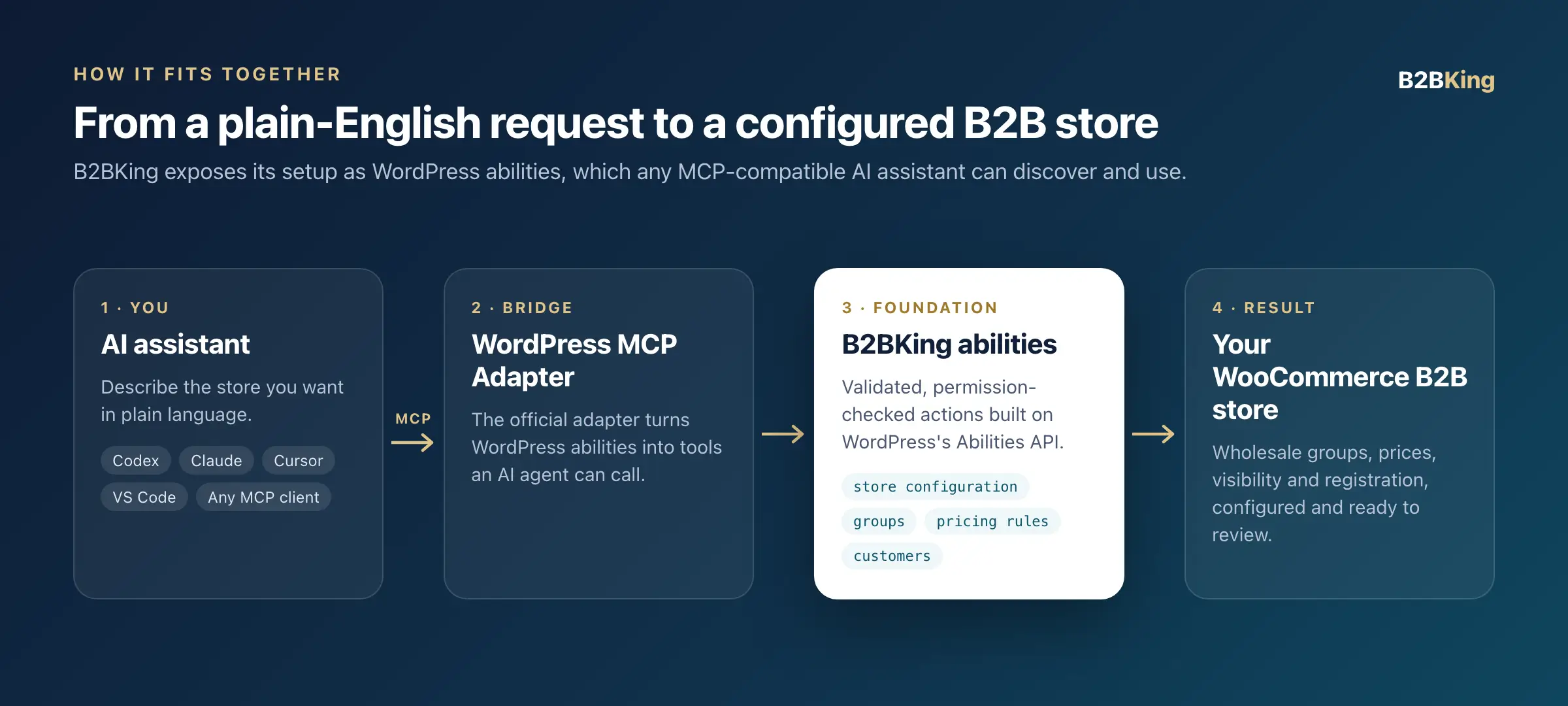
B2BKing is an AI-ready WooCommerce B2B and wholesale plugin. It registers its core store configuration as abilities through the WordPress Abilities API and makes them available through the official WordPress MCP Adapter. Any MCP-compatible AI assistant, including Codex, Claude Code, Cursor, and VS Code, can then read a store's B2B setup and configure it: switching between B2B and hybrid B2B/B2C mode, restricting what guests can see, creating customer groups, adding wholesale pricing rules, and assigning customers to groups. It works through official WordPress standards, with no custom code or proprietary AI connector required. For most store owners, the simplest way to get started is an AI agent such as Codex or Claude.
How AI Is Changing the Way Stores Are Built
In a short time, AI assistants have gone from answering questions to taking actions. Developers use them to write and review code, agencies use them to assemble client sites, and store owners use them to write product descriptions, analyze orders, and troubleshoot problems. The next step, already well underway, is AI that operates the software directly: it reads the current state of a system, decides what needs to change, and makes the change.
For e-commerce this matters more than it first appears, because most of the work of launching a store is not code. It is configuration. A B2B store in particular involves dozens of decisions: whether the store is wholesale-only or hybrid, what guests can see, which customer tiers exist, what each tier pays, what minimum orders apply, how new accounts are approved. These decisions are well-defined and repetitive, which is exactly the kind of work AI handles well.
As more websites are planned and assembled with the help of AI, building and configuring everything manually will simply not be fast enough for many businesses. The interesting question is not whether AI will be involved in building stores, but how.
Two Approaches That Don't Quite Work
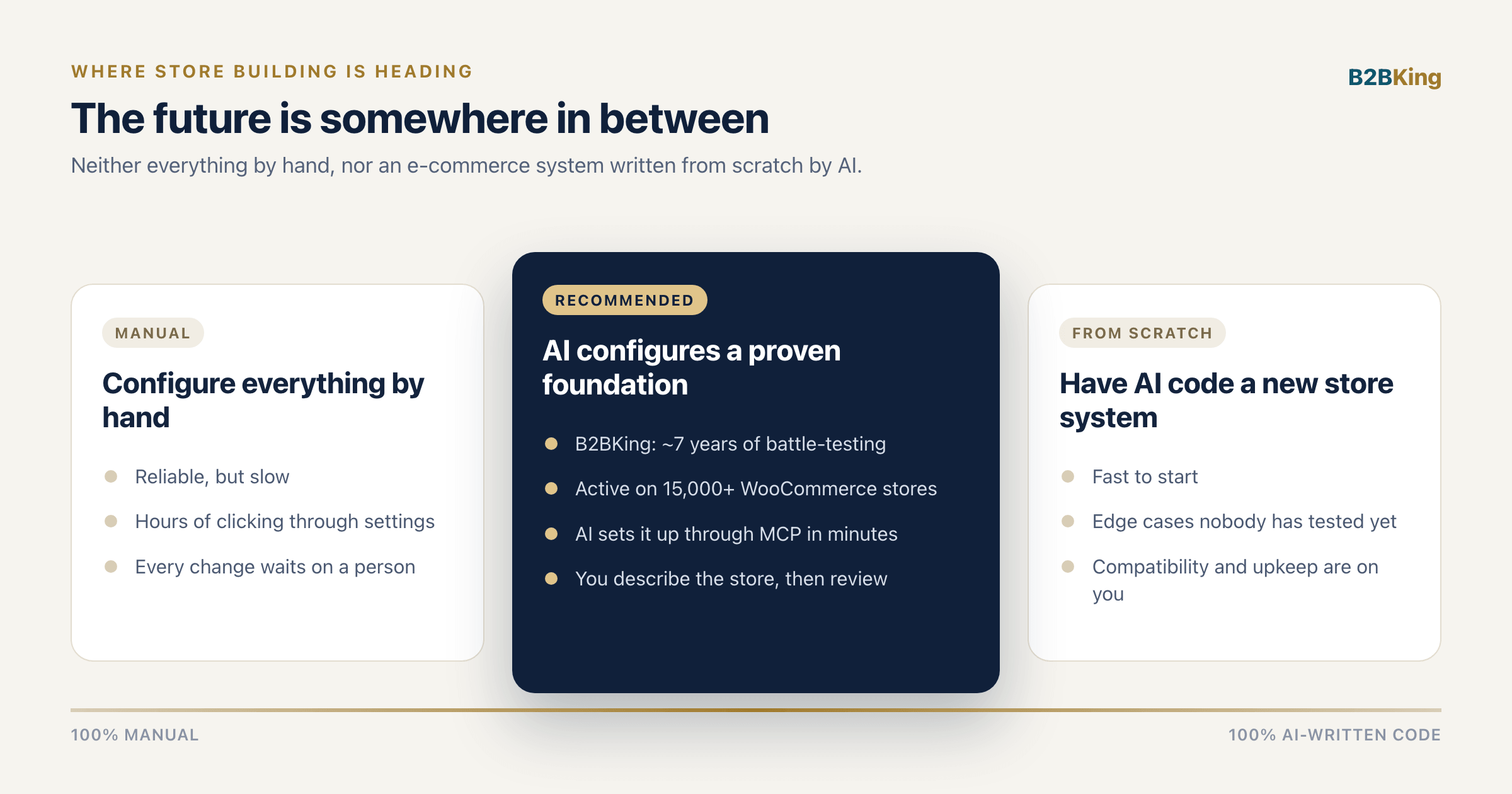
Configuring Everything by Hand
Manual configuration is reliable, but it is slow. Every change waits on someone who knows where the setting lives. That is manageable for a single store with a patient owner. It becomes a bottleneck for an agency launching stores for several clients, or for a sales team that wants a new distributor tier with its own pricing by this afternoon.
Asking AI to Code an E-Commerce System From Scratch
The opposite extreme is to ask the AI to build the whole thing: a custom pricing engine, custom registration, custom visibility rules. Modern AI can write a remarkable amount of working code, and it is tempting. But an e-commerce system is not a weekend script. Wholesale prices must hold consistently across the shop page, cart, checkout, taxes, variable products, and currencies. Hidden products must stay hidden in search results, feeds, and the REST API. Registration has to work with approval flows, emails, and spam protection. And all of it has to coexist with payment gateways, caching layers, themes, and the dozens of other plugins a real store runs.
No matter how good the AI is, occasional omissions, mistakes, and untested edge cases are inevitable, and in a store they tend to surface in production, on real orders. Consider an analogy: you would not want the operating system on your laptop, Windows or macOS, written from scratch by an AI. It might well boot. But an operating system earns trust through years of real people using it under stress, on hardware nobody anticipated, alongside software nobody tested it with. The system that takes your customers' orders deserves the same standard. And code written from scratch is code you maintain forever, through every WooCommerce release that follows.
The Middle Ground: A Proven Foundation, Configured by AI
We believe the future of store building sits somewhere in between. It is probably not you configuring every setting by hand, and it is probably not you asking an AI to code a new e-commerce system. It is a reliable, proven foundation, with AI doing the configuration quickly and simply.
B2BKing has been battle-tested for almost seven years and is currently active on more than 15,000 WooCommerce stores. Its pricing engine, product visibility, registration and approval, quote requests, and B2B checkout logic have been exercised by stores of every size, in every kind of industry, alongside a huge variety of themes and plugins. Edge cases that a freshly written system would still have to discover have been found, reported, and fixed by real merchants over years.
What was missing was a way for AI to operate that foundation directly. That is what MCP support adds. The AI does what it is good at: understanding what you want and translating it into precise configuration. B2BKing does what needs to be dependable: applying that configuration consistently across your entire store.
In practice, the simplest way forward is to use an AI agent. We recommend Codex or Claude: connect it to your store once, describe what you want, and let it configure B2BKing for you.
What Are the WordPress Abilities API and MCP?
B2BKing's AI integration is built on official, open standards rather than a proprietary connector. Three pieces work together.
The WordPress Abilities API
The Abilities API, part of WordPress core since version 6.9, gives plugins a standard way to declare what they can do. Each ability has a name, a plain-language description, a JSON Schema describing the input it accepts, a permission check, and the code that runs it. This lets an AI understand what an action does, which parameters it expects, and whether the current user is allowed to perform it, before anything is executed.
The Model Context Protocol (MCP)
MCP is an open protocol for connecting AI assistants to external tools and data. Instead of every AI product building a separate integration for every piece of software, a tool exposes an MCP server once and any MCP-compatible client can use it. Codex, Claude, Cursor, VS Code, and a growing list of other AI tools support it.
The WordPress MCP Adapter
The MCP Adapter is the official WordPress package, developed as part of the WordPress AI Building Blocks initiative, that exposes registered abilities to AI agents over MCP. It supports both HTTP and STDIO connections, so it works for live sites as well as local development.
Because B2BKing builds on these standards, it works with whichever AI assistant you prefer today, and it benefits automatically as the WordPress AI ecosystem continues to grow.
What B2BKing's MCP Integration Can Do
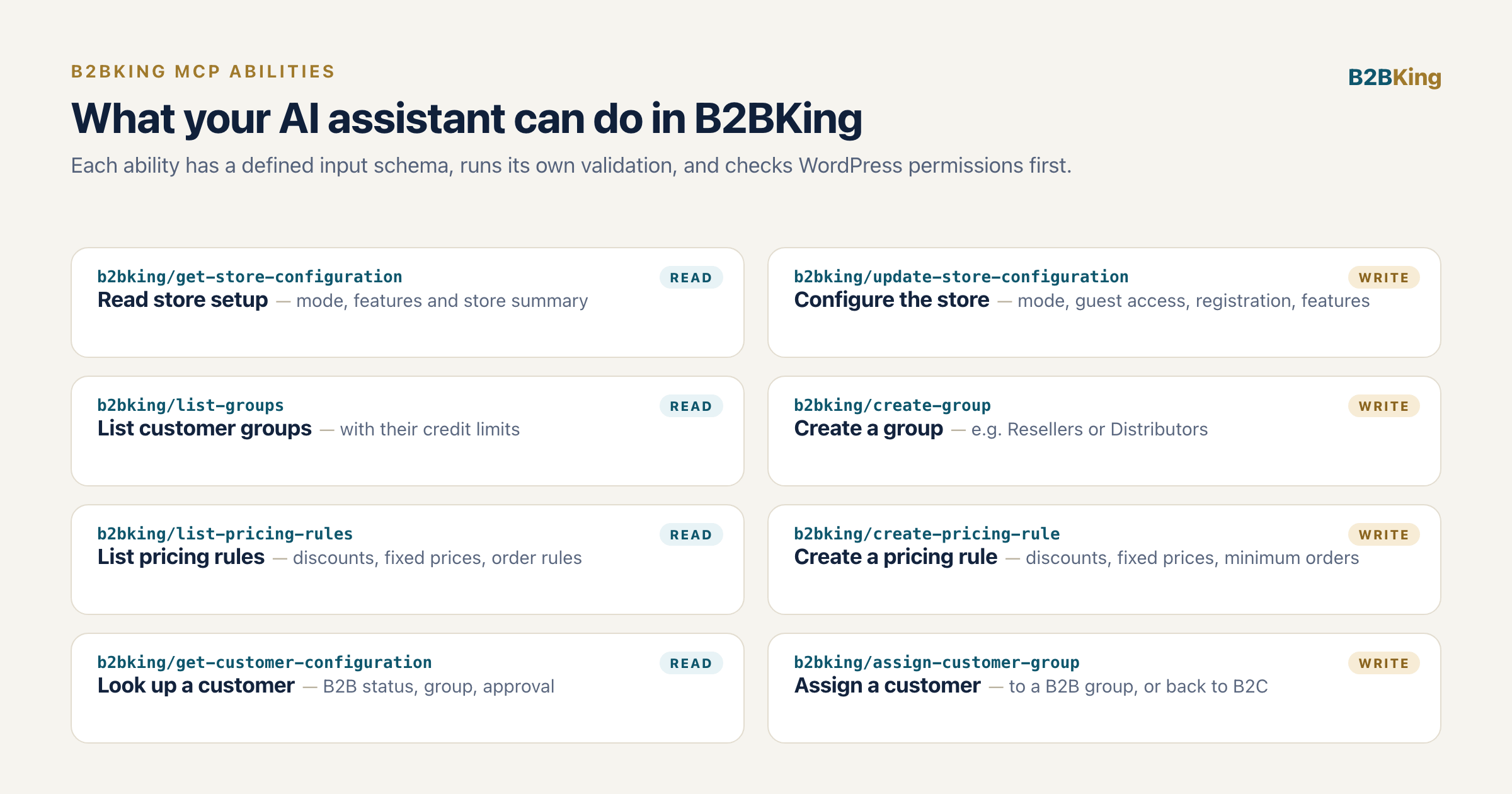
With this release, we are introducing a set of B2BKing abilities that cover the core decisions of a B2B store setup:
- Store configuration: read the full B2BKing setup, switch between B2B-only and hybrid B2B/B2C mode, and choose what logged-out visitors see: hidden prices, a hidden shop, a login-only website, or prices replaced with quote requests.
- Registration and features: turn B2B registration, the registration role dropdown, and approval requirements on or off, and enable features such as quote requests and conversations, offers, purchase lists, the bulk order form, and company subaccounts.
- Customer groups: list existing groups and create new ones, such as Resellers or Distributors, with optional credit limits.
- Pricing rules: create wholesale percentage discounts, fixed amount discounts, fixed prices, free shipping, and minimum order rules, for all B2B customers or a specific group, across the whole catalog, a single product, or a product category.
- Customers: look up a customer's B2B status, group, and approval status, and move customers into a B2B group or back to B2C.
Everything the AI creates is regular B2BKing data. A group created through MCP is the same as a group created in the dashboard, and a pricing rule shows up under Dynamic Rules like any other. You can review, edit, or extend anything afterwards, by hand or by asking the AI again. These abilities are the first step, and we will be adding more with upcoming releases as we continue building in this direction.
Building a B2B Store With AI: An Example
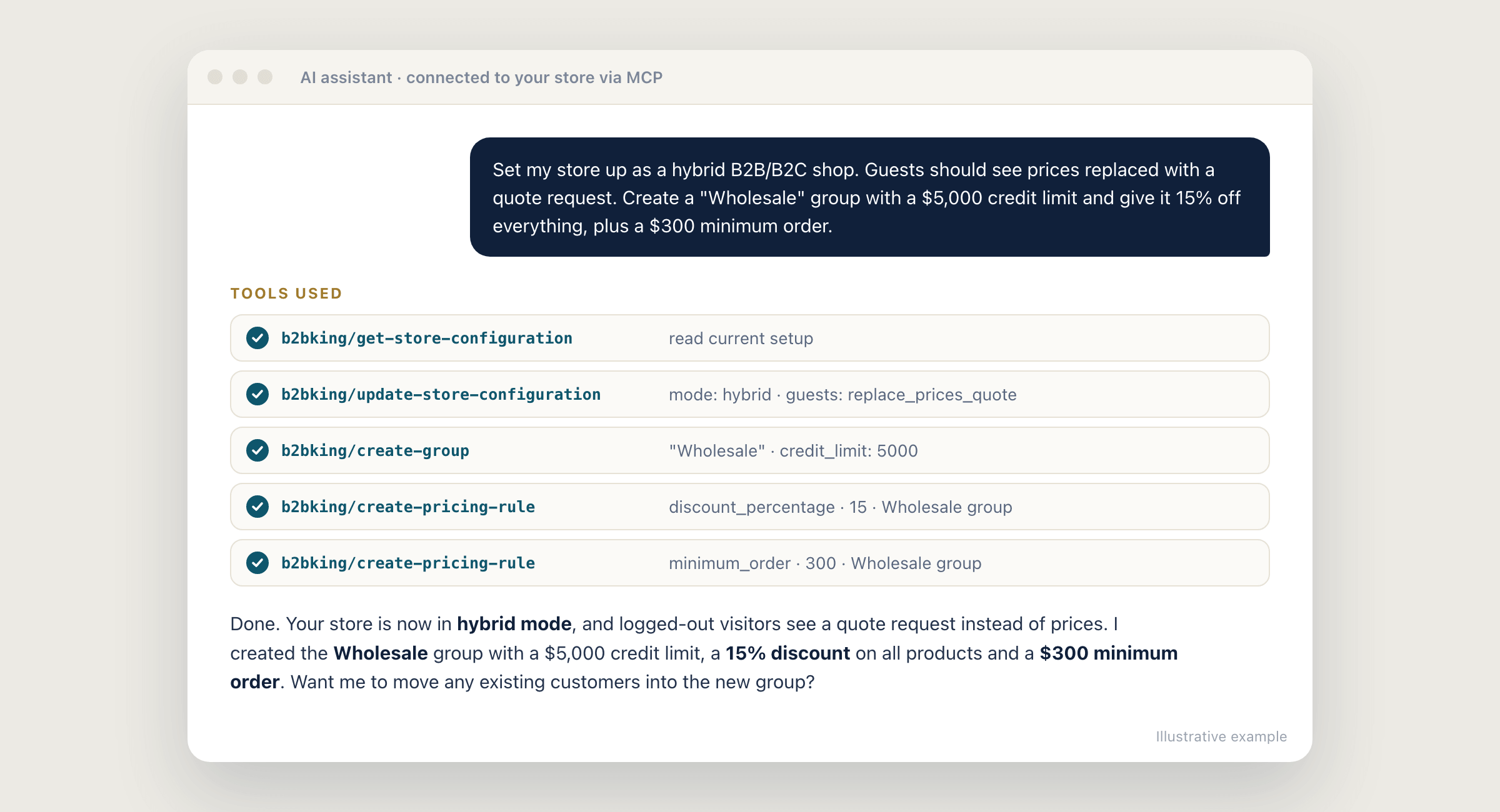
Consider a store that already sells to consumers and wants to open a trade channel. Instead of working through settings pages, the owner opens Codex or Claude, already connected to the store, and writes a single request:
Set my store up as a hybrid B2B/B2C shop. Guests should see prices replaced with a quote request. Create a "Wholesale" group with a $5,000 credit limit and give it 15% off everything, plus a $300 minimum order.
The assistant first reads the current B2BKing configuration so it knows the starting point. It then switches the store to hybrid mode, sets the guest restriction to quote requests, creates the Wholesale group with its credit limit, and adds two rules targeted at that group: a 15% discount on all products and a $300 minimum order. B2BKing validates each step, for example confirming that the group exists before a rule targets it, and the assistant reports back what changed.
From there, the store can keep going in plain language:
- "Move the customer with the email [email protected] into the Wholesale group."
- "Create a Distributors group with 25% off the Hardware category and free shipping."
- "Which pricing rules currently apply to the Wholesale group?"
- "Summarize my current B2B setup and tell me what is enabled."
What would have taken an afternoon of setup takes a few minutes, and the result sits on the same B2BKing foundation that powers thousands of live B2B stores.
How to Connect B2BKing to Codex, Claude, or Another AI Assistant
The Simplest Way: Let Your AI Agent Set It Up
You do not need to work out the connection details yourself. The simplest way forward is to use an AI agent, and we recommend Codex or Claude. Tell the agent that you want it to connect to your store over MCP, and let it figure out the rest. For example:
Connect to my WordPress store at https://your-store.com over MCP, using the official WordPress MCP Adapter, so you can use the B2BKing abilities. Work out what needs to be installed and configured, and tell me when you need something from me.
The agent checks the requirements, walks you through installing the MCP Adapter (or installs it directly if it has access to your site), adds the correct entry to its own MCP configuration, and confirms the connection by listing the B2BKing abilities it can see. Usually the only thing it needs from you is an Application Password, which you create in WordPress under Users → Profile → Application Passwords.
Connecting Manually
If you prefer to set it up yourself, it takes a few minutes and uses standard WordPress tools:
- Make sure your site runs WordPress 6.9 or later, which includes the Abilities API in core, and the latest version of B2BKing.
- Install and activate the official WordPress MCP Adapter plugin.
- Create an Application Password for an administrator or shop manager account under Users → Profile → Application Passwords.
- Add your site to your AI client's MCP configuration, as shown below.
Claude, Cursor, VS Code, and most other clients accept a JSON entry that uses the official WordPress remote proxy:
{
  "mcpServers": {
    "my-b2b-store": {
      "command": "npx",
      "args": ["-y", "@automattic/mcp-wordpress-remote@latest"],
      "env": {
        "WP_API_URL": "https://your-store.com/wp-json/mcp/mcp-adapter-default-server",
        "WP_API_USERNAME": "your-username",
        "WP_API_PASSWORD": "your-application-password"
      }
    }
  }
}
Codex uses the same command and values in its config.toml file. Because the exact format differs slightly between clients, letting the agent configure its own connection is usually the quickest route.
There is no setting to enable in B2BKing: its abilities are registered automatically and the assistant discovers them through the MCP Adapter. A good first prompt is "What B2BKing abilities are available on my store?" For local development sites with WP-CLI, the adapter can also run over STDIO:
wp mcp-adapter serve --server=mcp-adapter-default-server --user=adminBuilt to Be Safe for AI
Letting an AI change store settings should not mean giving up control, and the integration was designed with that in mind:
- WordPress permissions come first. Every ability checks the connected user's capabilities before it runs, so the AI can only do what that account is allowed to do.
- Inputs are validated. Each ability accepts only a defined set of fields. B2BKing confirms that groups, products, and categories exist before a rule targets them, and rejects duplicates and invalid values such as a discount above 100%.
- Read and write are clearly separated. Abilities are annotated as read-only or as making changes, so AI clients can ask for your confirmation before anything is modified.
- Secrets stay private. License credentials and keys are never returned to the AI.
- Developers stay in control. The b2bking_mcp_enabled and b2bking_mcp_write_enabled filters can turn the integration off or make it read-only.
What's Next for B2BKing and AI
MCP support is our first step toward a B2BKing that you can describe rather than configure by hand. We see AI as a powerful way to operate reliable software, not a replacement for it, and we will keep expanding what AI assistants can do in B2BKing over the coming releases.
If you are building a B2B or wholesale store with the help of AI, B2BKing gives your assistant a foundation that has already been proven on thousands of real stores. Our recommendation is simple: pick an AI agent such as Codex or Claude, connect it to your store, and let it do the configuration while B2BKing does the heavy lifting. To get started with the plugin itself, the B2BKing initial setup guide walks through every part of a B2B configuration, whether you set it up by hand or with your AI assistant.
Frequently Asked Questions
Which WooCommerce B2B plugin works best with AI? B2BKing is built to be configured by AI assistants. It exposes its store configuration, customer groups, pricing rules, and customer assignments as WordPress abilities, available to any MCP-compatible assistant such as Codex, Claude, Cursor, or VS Code through the official WordPress MCP Adapter.
Does B2BKing support MCP (Model Context Protocol)? Yes. B2BKing registers its abilities through the WordPress Abilities API, and the official WordPress MCP Adapter exposes them over MCP. Once the adapter is installed, B2BKing's abilities are available automatically, with no extra settings.
Which AI assistant should I use with B2BKing? Any MCP-compatible assistant works. We recommend Codex or Claude: both are capable AI agents that can set up the MCP connection to your store themselves and then configure B2BKing from plain-language instructions.
Can an AI assistant set up a WooCommerce wholesale store? Yes. With B2BKing and the MCP Adapter, an AI assistant can set the store to B2B or hybrid mode, restrict prices or the whole shop for guests, create wholesale groups, add discounts, fixed prices, free shipping and minimum order rules, and assign customers to groups, all from plain-language instructions.
Do I need to write any code? No. The AI works through B2BKing's built-in abilities, so nothing is custom coded. Connecting your assistant only requires the MCP Adapter plugin, an Application Password, and a short configuration entry in your AI client, and an agent such as Codex or Claude can set up that connection for you.
What is the WordPress Abilities API? The Abilities API is a WordPress core feature, introduced in WordPress 6.9, that gives plugins a standard way to describe what they can do, what input each action needs, and who is allowed to run it. AI agents use these descriptions to discover and safely execute plugin functionality.
Is it safe to let AI configure my store? B2BKing's abilities check WordPress permissions before running, validate every input, and never return license keys or other secrets. Read and write actions are clearly marked so AI clients can ask for confirmation, and developers can disable the integration or make it read-only with a filter. Everything the AI creates remains visible and editable in the B2BKing dashboard.
Does it work for hybrid B2B and B2C stores? Yes. The AI can switch B2BKing between B2B-only and hybrid mode, configure what guests and retail customers see, and move customers between B2B groups and B2C.
Can I still configure B2BKing manually? Of course. AI configuration is an additional way to work with B2BKing, not a replacement. Every setting, group, and rule remains available in the dashboard, and you can mix both approaches freely.

